Nintex Community Menu Bar

how can i limit the amount of text being saved to a multi line text field

  • November 25, 2019
  • 6 replies
  • 68 views

Forum|alt.badge.img+1
  1. Sharepoint nintex 2013
  2. An a lazy approval returns a long string of data
  3. This approver comments is then saved to a multiline list text field
  4. It there a way before saving the approver comments to a multi line field to cut off/limit the number of characters/words in the workflow before saving it to the multilne list text field?

Thank you

6 replies

Forum|alt.badge.img+9
  • November 25, 2019
1) disconnect the control on the form
2) create a hidden control that is connected to the SharePoint column from the previous step
3) create a rule that uses the runtime function called subString(step1_control, 1, YourMaxLength) to assign to the control from step 2

Forum|alt.badge.img+1
  • Author
  • November 25, 2019

thank you for this suggestion, unfortunately i am not using forms. Just workflow and sharepoint 2013.


Forum|alt.badge.img+9
  • November 25, 2019
In your Workflow, use "Extract Substring From Start of String" and reference the source string as the multi-line text string column in your List and Output into the same column.

Forum|alt.badge.img+1
  • Author
  • November 26, 2019

i have 2013 nintex workflow, apparently i dont have that nintex action....darn...


Forum|alt.badge.img+12
  • Scholar
  • November 26, 2019

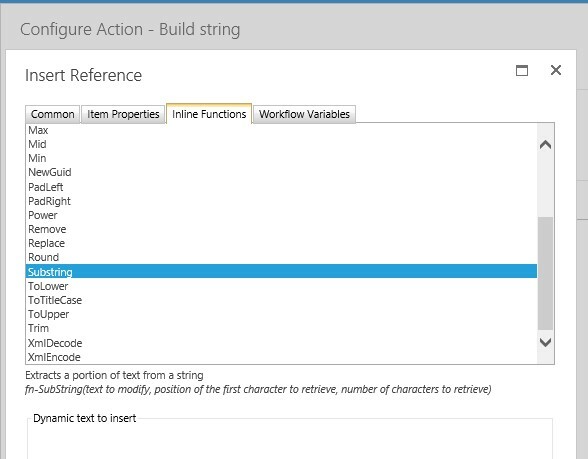
@dwinters ......Did you try using build string's inner function Substring? FYI...it will also count the space between two words too....see below:


5650i8954D74E597D50EB.jpg


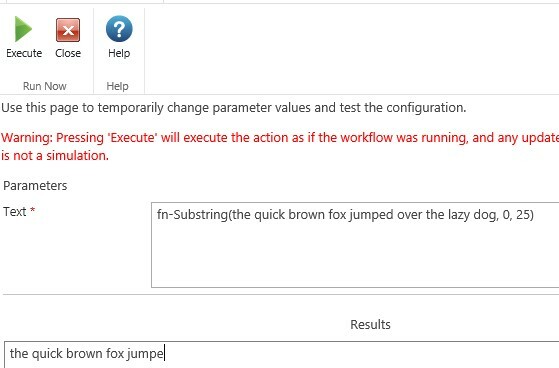
Testing using Run Now in build string:


5651i2B89BAFBA506F414.jpg


Simon Muntz
Nintex Partner
Forum|alt.badge.img+23
  • Nintex Partner
  • November 26, 2019

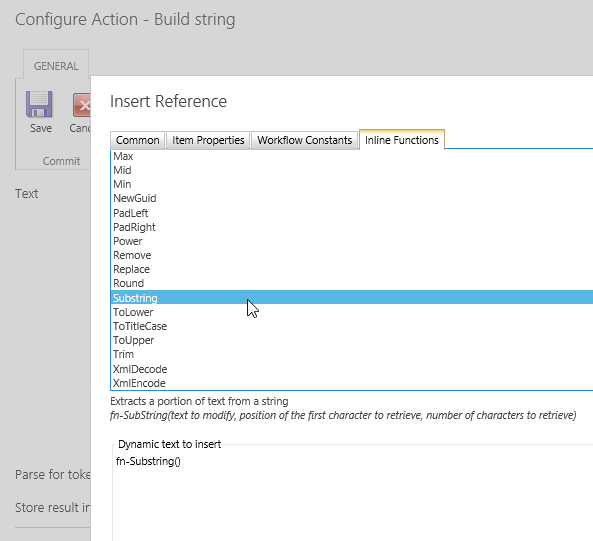
@dwinters sure you have that functionality.

5652i6BBB62F560598802.png