Nintex Community Menu Bar

Hiding and showing fields in a form

  • April 23, 2019
  • 6 replies
  • 17 views

Forum|alt.badge.img+2

Hello, I have a leave request form that has a tick box needs to be ticked when employee require flight tickets. I need to add a field that is only visible when the employee ticks the box. I have added the filed in a control panel and as I know I need to add formula to it. Any suggestions? 

6 replies

Forum|alt.badge.img+5
Hi @FatmaQ,
Select the panel, then click Add Rule. Name it something like, "HideNoFlight". It's a formatting rule. Enter the formula not(TickBoxControlName=="Yes"), then check the box below that says, "Hide".

Forum|alt.badge.img+2
  • Author
  • April 23, 2019

Hello @cherylshah, thanks for your help. I have entered the formula you provided and now it is hidded but when I click on the checkbox the field doesn't appear. 


Forum|alt.badge.img+5
Sorry about that @FatmaQ - I can never remember exactly how checkbox values work. Try:
not(TickBoxControlName=="1")
and see if that works?

Forum|alt.badge.img+5

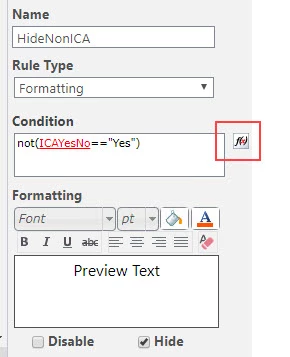
Also, please use the formula builder button (in red box in this screenshot):

1635iB32247C9992CDC3C.jpg


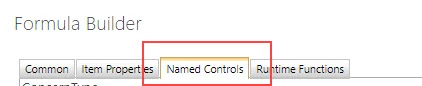
In the Formula Builder, use the Named Controls tab to pick the name of your checkbox control1633iC0E300663FEBD861.jpg


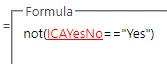
So the formula will look something like this

1634iA16379FCF8F60A8A.jpg


Forum|alt.badge.img+2
  • Author
  • April 24, 2019

This worked perfectly! Thank you! :)


Forum|alt.badge.img+5
Glad I could help!