
Nintex Community Menu Bar

Hide Disable Rule not working on Lookup Field

  • November 5, 2019
  • 6 replies
  • 29 views

naccarati
Forum|alt.badge.img+5

Hi,

Using Nintex Forms, when I try to create a rule for a lookup field (pulled in from a different SP list) the rule does not work.  I've tried hide and disable.  This is what the last iteration looks like.  The Bank Account field is  the lookup field in the form. 
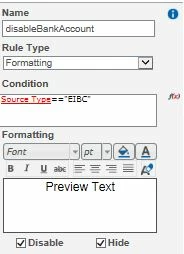
 

5389i936E0BFAD0C33DDA.jpg

6 replies

Forum|alt.badge.img+12
  • Scholar
  • November 5, 2019

@naccarati ....try contains instead


naccarati
Forum|alt.badge.img+5
  • Author
  • November 5, 2019
I just did. contains(Source Type, "EIBC")
It didn't work.

Forum|alt.badge.img+12
  • Scholar
  • November 5, 2019

@naccarati .....please provide more information about the lookup control you're using.


Simon Muntz
Nintex Partner
Forum|alt.badge.img+23
  • Nintex Partner
  • November 6, 2019

Try:

equals(parseLookup(Source Type),"EIBC")

Forum|alt.badge.img+3

Hello Simon,

how can I include several positions from the drop down there
For example, if you have selected Deutsche Bank or Commerzbank, it should be hidden.

I have tried the following, but unfortunately it did not work.

not(equals((parseLookup(Projekttyp),"Relativity")or(parseLookup(Projekttyp),"Relativity+Brainspace")))

Forum|alt.badge.img
  • May 20, 2020

Hi Simon,


you "double post" your question. See my answer here: https://community.nintex.com/t5/Nintex-for-SharePoint/Hide-Disable-Rule-for-more-for-more-than-one-answer-not-working/m-p/113579#M74857


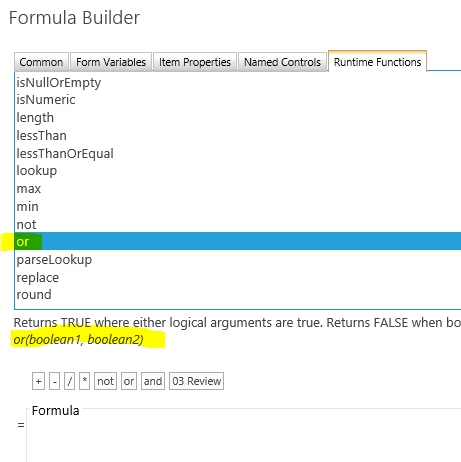
And if your unsure about the correct syntax of Nintex-Functions, just have a look to the hints, which the Formula Builder already gives. And googling helps sometimes also ;-)


Regards, Lübbe


7828i7405A8330FE1B982.png