

Hello all,
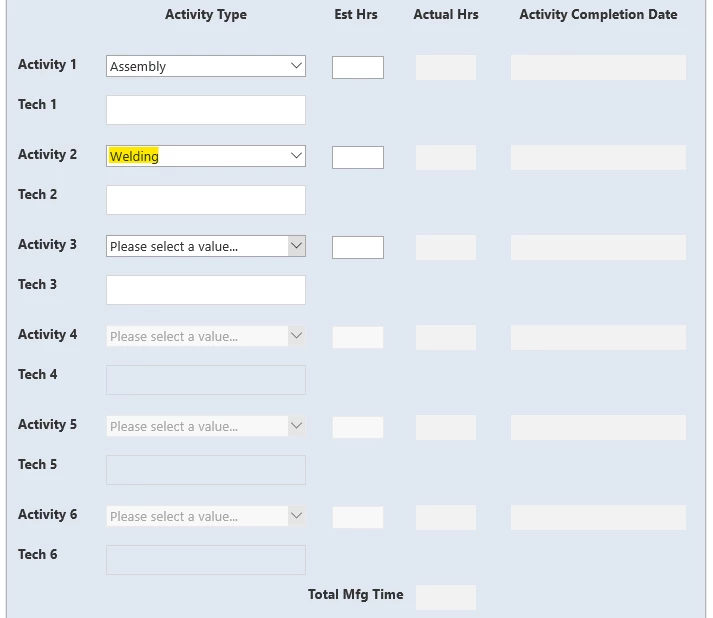
I am trying to create a dynamically changing form in Nintex that contains an abundance of panels that are hidden or shown based on several conditions. The first tab contains 6 "Activities" that can be fill in. There has to be one activity filled in, but the number of activies filled in after it can vary from 0 to 5 more. After each activity, there is an "Inspection", but after the last activity, there is a final inspection, so it's regular inspection is not needed, so that panel containing it is to be hidden. The rules work and the designated panels are hidden when they need to, but when they appear, they appear in a different order than intended. Here are some screenshots to show the issue:
This is the first tab, where you choose the activities:
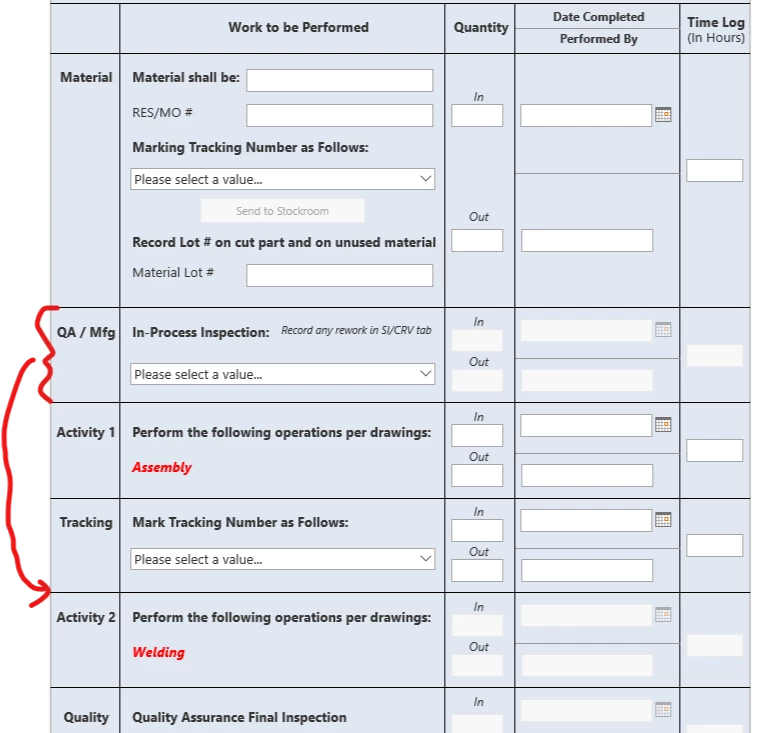
This is the second tab, where the activity and inspection info is to be filled in (each with their own panel). The panel with the red bracket is supposed to be after "Tracking", which is where it is in the form designer mode. The panel is hidden if there is only one activity selected, but since there are two it appears, but it switches here:
I've been using Nintex for almost a year now, and I cannot figure out this problem. Any help is very appreciated!
Thank you!
Owen



