
Nintex Community Menu Bar

Get values of "Created by" and "Send to" in text char format in other SharePoint columns

  • February 20, 2020
  • 5 replies
  • 19 views

VijayAntoine
Forum|alt.badge.img+3

Hello,


I meet a problem when I try to get values of "Created by" and "Send to" in text char format.


I want to display in text format theses elements.


For this I use 2 way, but it works for a moment and after 1 week It didnt works.


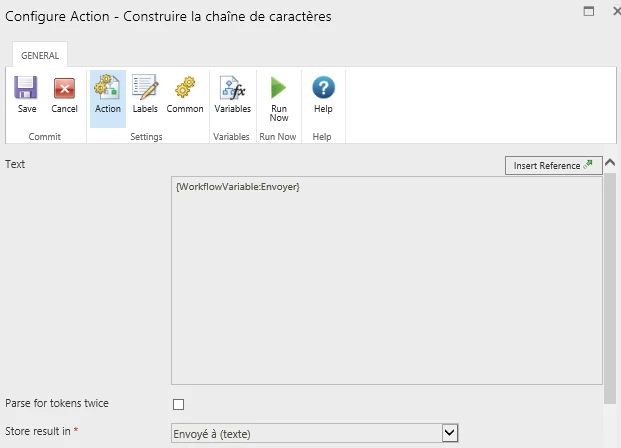
With text type variable

1 way : Manage variable
6528i77DE64363F3F0C6C.png


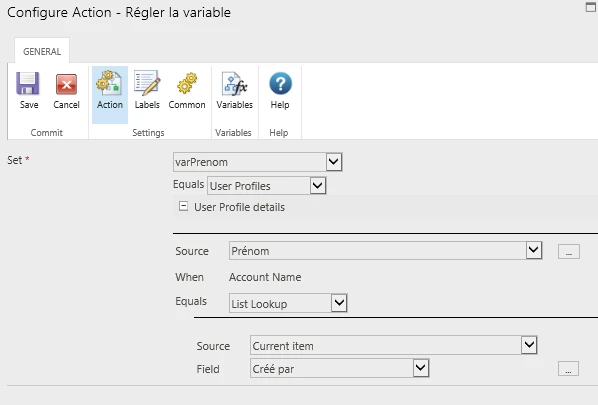
2 way :

6529i3F2A3692100DD647.png


Have you got a solid issu to purpose to me to fiw my bug please ?


Thanks,


Regards,


VijayAntoineMick

5 replies

VijayAntoine
Forum|alt.badge.img+3
  • Author
  • February 21, 2020

Hello @kunalpatel have you got an Idea ?


Thanks


Forum|alt.badge.img+12
  • Scholar
  • February 24, 2020

@VijayAntoine .....what kind of values you're trying to get from Created By field? Also, I can't understand the screenshot clearly due to language restrictions.


VijayAntoine
Forum|alt.badge.img+3
  • Author
  • February 25, 2020
Thanks for you reply @kunalpatel

I have a SharePoint List with a workflow.

It runs when a new element was created.

I have a SharePoint column wich called "Created By" and wich I didnt create it exists by default.

I want to get this value "Created by" in an other Column of this same SharePoint List in a text 'string' type.

Issue I have tried :

In the workflow :

1) Save this value in a "Construct a charactere string" -> It works 10 times and after it dont work

2) Manage variable :
I create a variable wich called "varName" and put the value of List LookUp -> "User Profiles" > "Name" of user, but it dont works...

If you have advice to get this value,

I am preneur ! ^^

Forum|alt.badge.img+12
  • Scholar
  • February 27, 2020

@VijayAntoine ..... try below approach:


  1. Create a single line of text list column in SharePoint called "str_CreatedBy"
  2. Now use either Set Field Value or Update Item action
  3. Select "str_CreatedBy" --> Equal List Lookup --> Source Current Item --> Field Created By (then click on 3 dots and select Display Name or eMail address from the drop down)

Also, may I know why you need Created By in a single line of text column in the same list?


Forum|alt.badge.img+7
  • February 28, 2020

You can use your 1st approach and select Display Name from the ellipsis.