

Nintex Community Menu Bar

Get latest date for a transaction date from another list

  • December 14, 2019
  • 5 replies
  • 23 views

Forum|alt.badge.img+2

Hi,

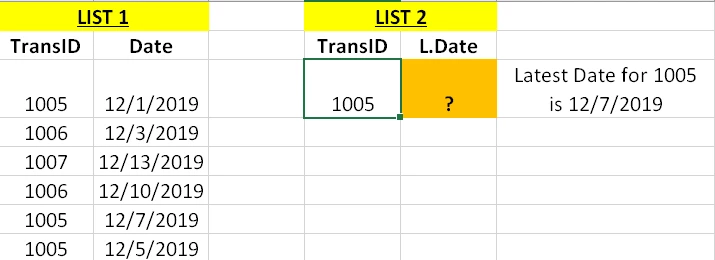
I have a requirement to populate Latest Date field in list 2 based on the transaction ID selected/inputed. I have a List 1 where we have both Transaction ID (multiple entries for same ID will be there) column and created date column.


I am not sure how to get this populated in the Nintex form for List 2. Please help!
 

5959iC9691886DDD46A1C.png

5 replies

Simon Muntz
Nintex Partner
Forum|alt.badge.img+23
  • Nintex Partner
  • December 16, 2019
Hi,

Use a query List action to query List 1
Filter by TransID
Sort by Date Ascending
Output into a Collection Variable.

Use a Collection Operation action.
Select your collection variable.
Select the POP option (pops the last item out of the collection which will be the latest date based on the sort in the previous action)
Store output in a Date variable.

Update List 2 with Date Variable.

Forum|alt.badge.img+2
  • Author
  • December 16, 2019

Hi SimonMuntz,

I am very new to Nintex workflows or forms.

Is it possible to give some screenshots? I don't understand what to give in Query list filter when it asks for 'TransID' is equal to field? 

Also, how do I update the list item with the date variabe created?


Sorry for multiple questions, but I can really use your help :)


Simon Muntz
Nintex Partner
Forum|alt.badge.img+23
  • Nintex Partner
  • December 16, 2019

For testing you could use TransID is equal to 1005.

Going forward you could read the TransID from the TransID column on List 2.


To update the item use an Update Item action.


Forum|alt.badge.img+2
  • Author
  • December 16, 2019

Thanks Simon. I have created the workflow in wrong list earlier. 

It is working now. However, when i create the item in master list first time, the date should be updated to created date.


Is there any formulae or workflow logic to achieve this?


Simon Muntz
Nintex Partner
Forum|alt.badge.img+23
  • Nintex Partner
  • December 17, 2019
How are you creating the item in the master list?
The easiest way would be to set the defaut value to "Todays Date" in the SharePoint Date column setting. When an item is created it will automatically be set with todays date.



