Nintex Community Menu Bar

Get Base64 Code From List Attachments

  • October 25, 2019
  • 9 replies
  • 86 views

Forum|alt.badge.img+9

There are multiple posts regarding copying list attachments to another list but how do we get the Base64 for each attachments of a item in a list? 

9 replies

Simon Muntz
Nintex Partner
Forum|alt.badge.img+23
  • Nintex Partner
  • October 27, 2019
Hi,
Did this post not help?
https://community.nintex.com/t5/Nintex-for-SharePoint/Copy-list-item-from-one-site-to-another-including-attachements/m-p/96153/highlight/true#M68141

I'll breifly step through it and explain.
The user has 2 lists and an interim document library.
The document library is the key to answering your question.
He coppies all the attachments to the document library and this creates individual items for each attachment.

The reasosn the document library is required is because he uses SharePoints Lists.asmx web service with the AddAttachments Method on the file in the document library.
In this method when you specify the file as <m:attachment>[FileData]</m:attachment> The [FileData] automatically converts the file into Base64. This can only be done from a document library and that is why its required as an interim step.


Forum|alt.badge.img+9
  • Author
  • October 28, 2019
Thank you Simon,
I am able to copy documents/attachments from one place to another but i just want the base64 code.
I am trying to send documents/attachments to a SQL server which only accepts base64.
Thank you!

allan
Nintex Partner
Forum|alt.badge.img+9
  • Nintex Partner
  • October 30, 2019
Vadim coded this a few years back, I often use his code. I suggest you have a look : http://www.vadimtabakman.com/nintex-workflow-get-list-item-attachment-in-base64-custom-action-happy-thanksgiving.aspx

Forum|alt.badge.img+9
  • Author
  • October 30, 2019

@allan 

I keep getting below error while using Vadims solution, and i am able to get the URL's properly. I must be missing something:

Error Getting List Item Attachment. Object reference not set to an instance of an object.


allan
Nintex Partner
Forum|alt.badge.img+9
  • Nintex Partner
  • October 31, 2019

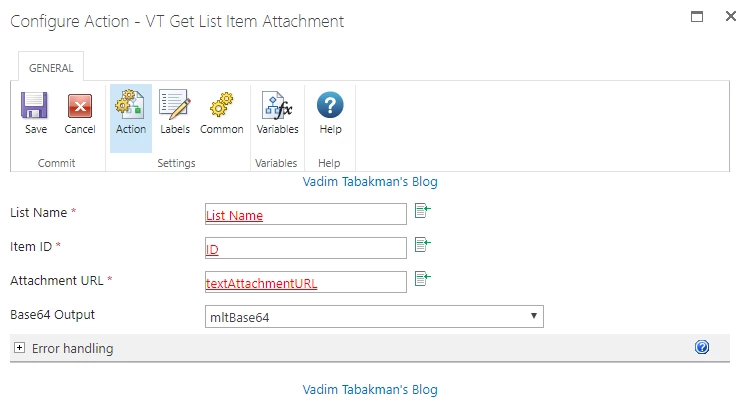
Could you screenshot your action settings ?

Did you install the WSP without error ?


Forum|alt.badge.img+9
  • Author
  • October 31, 2019

Yes,

There is no error on the solution.

FYI: I am not using a task list, just a regular custom list

5166i408CD59098E640B7.png


Forum|alt.badge.img+9
  • Author
  • October 31, 2019

@allan @SimonMuntz 

Finally got it after MULTIPLE tests...

The problem was with the internal list name MUST MATCH the list title. In my case the internal list name was ValidationTest and my list title was Validation Test. Finally after several failures i changed the list title to match the internal list name as ValidationTest and it worked!! Thank you for even trying to help me out, your guys are awesome!


allan
Nintex Partner
Forum|alt.badge.img+9
  • Nintex Partner
  • November 4, 2019

Glad to hear that.
I suppose that Vadim is using the list URL and the list title with the same variable for both cases.
(there's no internal name for list ;) )


nico
Nintex Partner
Forum|alt.badge.img+10
  • Nintex Partner
  • November 4, 2019

Yes, @allan is right. If you use the Vadim action to get file Base64, your list Title must match the list URL. 

In the code of this action (I have decompile the dll of the wsp), the URL of the list is re-build with the title, so if you have space or rename your list after his creation, this will not work.