

Nintex Community Menu Bar

Form Ribbon Greyed Out but Still Clickable

  • January 10, 2020
  • 5 replies
  • 21 views

Forum|alt.badge.img+1

I have a form where the ribbon is greyed out, but all the items are still editable.  The only other posting I've seen reference this didn't have a solution that applied to me.  This is on SharePoint 2013 and using Nintex Forms 2013 ( 2.11.5.20 ) Is there a fix for this?
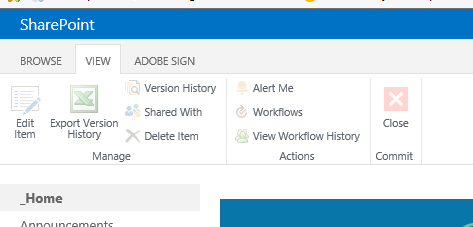
 

6113iE64130D946CB630E.png

5 replies

Simon Muntz
Nintex Partner
Forum|alt.badge.img+23
  • Nintex Partner
  • January 13, 2020
Hi,

In general when icons are greyed out it is a permissions issue.

Forum|alt.badge.img+12
  • Nintex Partner
  • January 13, 2020

I suggest you update Nintex to the latest version 2.11.7.22 to ensure that this problem hasn't already been fixed. 

Is this happening to all users and site collections?
Have you tried different browsers?


Forum|alt.badge.img+1
  • Author
  • January 13, 2020

It's not a permissions issue.  I'm able to click on and use all of the icons.  They are just greyed out. 


Forum|alt.badge.img+1
  • Author
  • January 13, 2020
I have tried different browser. It is only on this one form. I feel there is something inside the form that is causing this, but I can't find what it would be. The form is very large.

Simon Muntz
Nintex Partner
Forum|alt.badge.img+23
  • Nintex Partner
  • January 13, 2020

Is there any custom CSS in the form?

Do you see any errors in the browser console?




