

Nintex Community Menu Bar

Form layout doesn't match design

  • May 1, 2020
  • 1 reply
  • 5 views

Forum|alt.badge.img+6

I have a Nintex 2013 form with 3 panels.
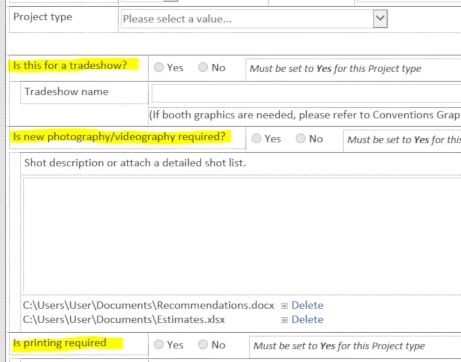
7699i041FDB3B71C6EFD2.png

Each panel has rules that control visibility based on the Project type selection.  Each panel is butted up against its neighbor without any overlaps.


Notice the order of the 3 panels.


When I view the form, and select a Project type that displays all 3 panels, this is what I get.
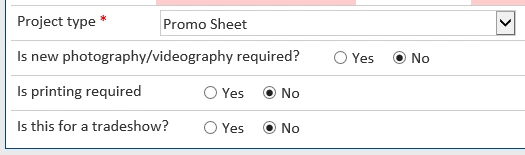
7700i38391B7134C355AE.png

Notice that "tradeshow" as last, not first.


If, when designing the form, I leave a gap between the panels (undesirable), then the order is correct.


Does anyone know what could cause this and how to correct?


Thank you.

1 reply

Simon Muntz
Nintex Partner
Forum|alt.badge.img+23
  • Nintex Partner
  • May 4, 2020
Hi,

Without having an export of the form this is a little hard to diagnose.
Make sure that the order of your rules matches the order of the panels from top to bottom.
If the rules are triggering in the wrong order to how the panels appear on the form it can cause these sorts of issues.


