
Nintex Community Menu Bar

Form filtering on many-to-many lookups (cannot cascade)

  • October 16, 2019
  • 4 replies
  • 40 views

MikeCrawford
Forum|alt.badge.img+3

Hello!

Newish to Nintex but have lots of InfoPath experience with SharePoint.

My problem is this:

How do I arrange my hierarchy to conjure a single number based on three lookup columns?

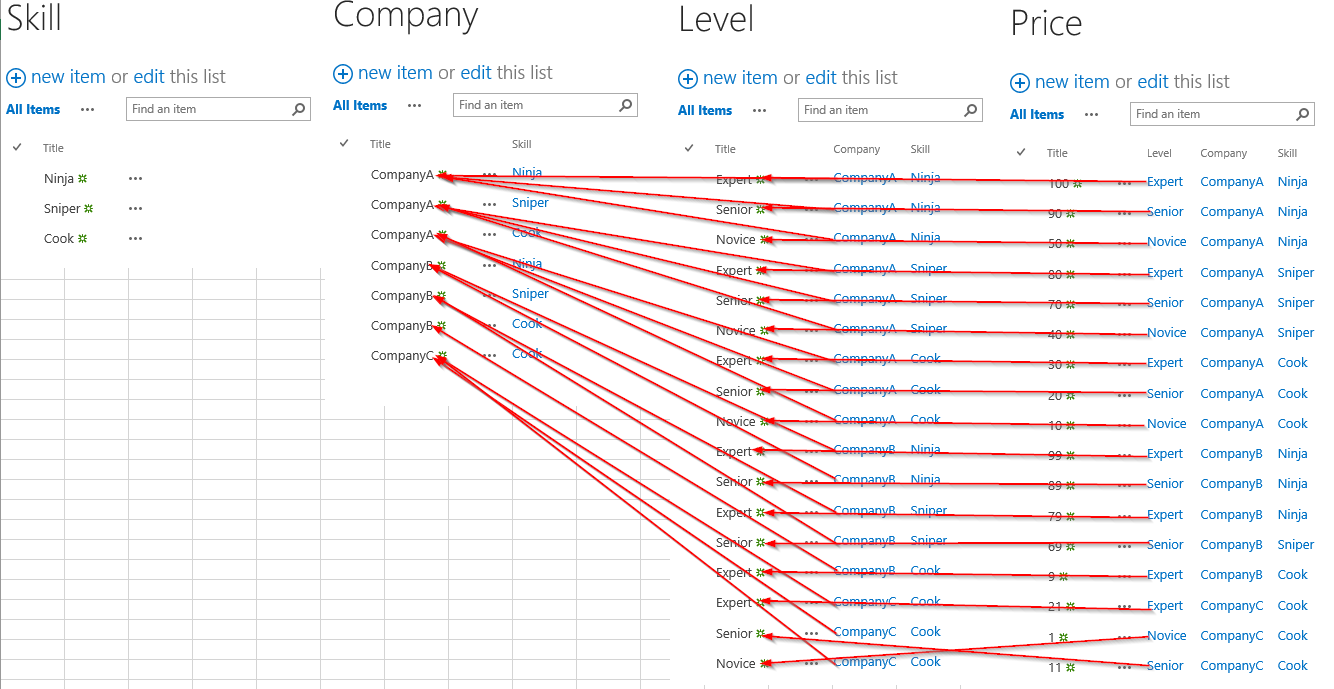
I have three lists that are lookups; Company, Skill, and Level:
4995i546E20087FF03877.png

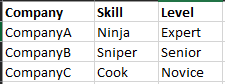
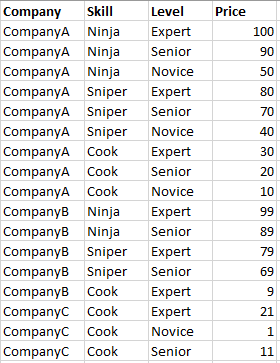
These lookups populate my Positions list, which has the various Companies, Skills and Levels and the most important aspect: Price.

Here's the flat table:
4996iC048A0C68AD1CAF6.png

What's the best way to setup a form in order to choose Skill, then Company, then Level and have the Price reflected on the form before submitting?

Because there is a many-to-many relationship between the three lookups, the cascade approach (https://community.nintex.com/news-18/three-tier-cascading-drop-downs-do-go-chasing-waterfalls-30846) doesn't work elegantly. I have also tried to do a multiple lookup, but that fails at the Price level (shows too many options).


Thanks for your feedback!

 

4 replies

Simon Muntz
Nintex Partner
Forum|alt.badge.img+23
  • Nintex Partner
  • October 17, 2019

Hi,

The most important thing here is the list setup.

Your title says you cannot cascade but that is not true as I just acheived this solution using cascades.

My list setup:

4998i360263533D57C57C.png

When you choose the Company on the Level list you will get multiples of the same company so you need to be careful to choose the correct one as I have illiustrated above.  Same as the Level on the PrIce list.

The attached video demonstrates this approach working.


MikeCrawford
Forum|alt.badge.img+3

Amazing! Thank you so much. Doesn't it get a bit confusing when you're trying to select the dropdown for the Skill, say, and you have to choose between Cook Cook Cook Cook Cook Cook Cook and Cook?

I am worried that this might cause trouble when I am trying to do this on prod and I have 50 companies with 20 roles each...

I will give this a go, though!


Simon Muntz
Nintex Partner
Forum|alt.badge.img+23
  • Nintex Partner
  • October 17, 2019
Yes it can get confusing unless you call them cook1 cook2 etc or some other distinguishing label
I think an easier way would be to put all the information into a database and then use cascading SQL request controls to filter through the data to get to a price.

MikeCrawford
Forum|alt.badge.img+3

My biggest concern with this solution is that we're not using lookup columns properly. For instance, say each company has a particular address. Then, it becomes a managerial nightmare when the address changes, and has to be updated in many different spots, as there are as many different companies as there are roles in the company. It's defeating the whole purpose of a lookup.


Do you know of any way to filter on three lookup columns? Crazy thing is that it's super easy to do on the list itself just using the filters on the list display. Is there a way to mimic this on a Nintex form?