Nintex Community Menu Bar

Extracting Repeating section data to a single column

  • July 20, 2020
  • 4 replies
  • 78 views

Forum|alt.badge.img+4

Hello 


basically i have a workflow that was developed with InfoPath and now its my job to migrate that onto Nintex. My issue is that i want to extract each repeating section row data into a SINGLE multiline column on a SINGLE SharePoint list item to perform collection calculations in the workflow


below is the repeating section
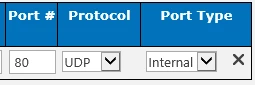
8416i64E3301187D299DC.png


and for every item that gets added into a new repeating section row, a new line in the same column like the below will be added)
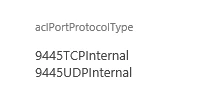
8417i2D57310C038C40EE.png

Can you please assist?


Thank you very much

4 replies

MegaJerk
Forum|alt.badge.img+14
  • Scholar
  • July 21, 2020

If you're just doing processing on the data via workflow, then you can likely save yourself a lot of trouble by just processing the bulk XML generated by the Repeating Section when the Form is Saved (assuming you have the Repeating Section associated to a multi-line text column on the list the Form is on). 

If you'd like to know more about that, there are several forum posts here on how to accomplish the task of parsing repeating section data / xml, as well as a few external blogs: 


However, if you really do wanna make different items on a different list that correspond to a Repeating Section on a different list, then this guide should get you started: 

Nintex Workflow - Order and Order Items Relationship


If you have more specific questions, please ask them. 


Forum|alt.badge.img+4

Thank you for the prompt response.


the problem am having is that i have to extract specific network port, protocol, and type data from each repeating section row, then check each one against a different list and based on a condition which will determine the next approval stage.


it currently works since in InfoPath there is a Concat() functions that gets the data from each repeating section row and puts it in a separate line on the same column.


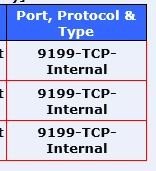
Below is how it looks in InfoPath form

8440i96B62B5E481BEA2E.png

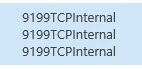
and below is how it looks in the sharepoint list item 

8441iEE2495B8DDC4ED63.png


am looking to do the same on Nintex forms without having to change the workflow since i have alot of forms that needs migrating and i already wasted quite some time on this alone


Again thank you very much for the help


Forum|alt.badge.img+4

so after three days of researching ive figured a better way to do this without having to parse the XML with a minor change in the workflow, below is what i have done since the repeating section had 8 fields and i only needed to query 3 fields against another list:

  • added a calculated field inside the repeating section that combines the fields and added "&"  as delimeter to be removed in the workflow

8458iBD614DAD0CE351E1.png

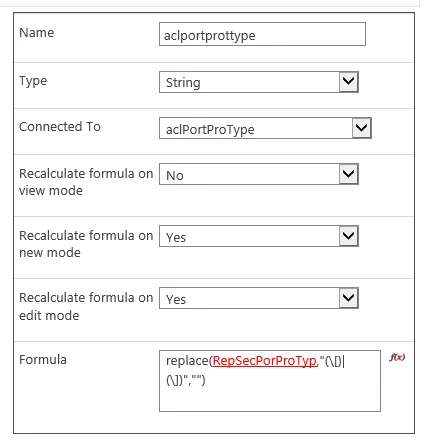
  • added a form variable with a replace action (to remove brackets from the above control) and added the calculated value control to it, then connected it to a column 

8459iB5D8728241BD3D02.png

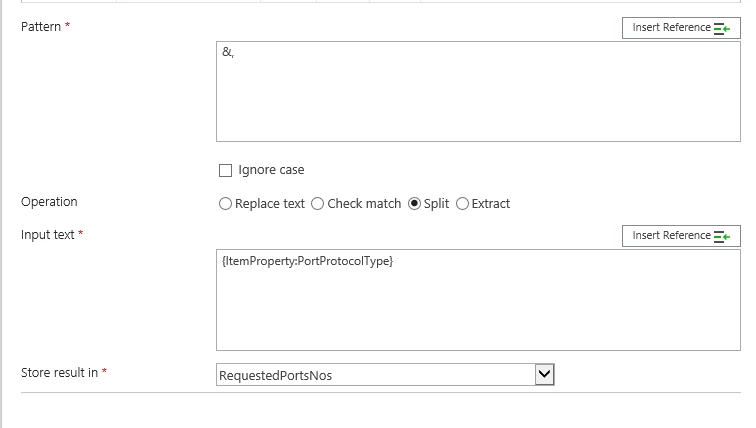
  • in the workflow ive used a regular expression action that will split the required fields and stores the results in a collection to compare with the external list (had to create an additional column in the external list that combies three columns for comparison in the workflow)

8461iC757A98BA749519E.png


hoping that this will help someone with the same issue


MegaJerk
Forum|alt.badge.img+14
  • Scholar
  • July 22, 2020

An excellent solution! Good to hear you got it worked out!