

Nintex Community Menu Bar

Error when using multiple conditions

  • June 6, 2019
  • 13 replies
  • 128 views

Forum|alt.badge.img+1

Hi together,


I have a problem in Nintex Workflows 2013 when I use "Set condition" action with more than one condition.


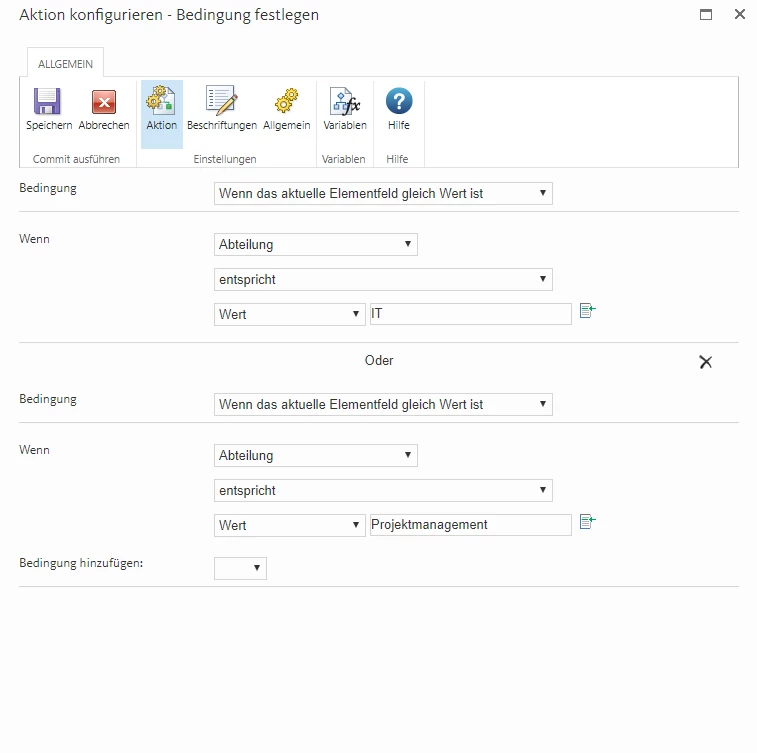
Config Action -> Set condition
2478iD7921F17820216B6.png

Condition 1: If the current item field "department" equals the value "IT"

OR

Condition 2: If the current item field "department" equals the value "Projectmanagement"


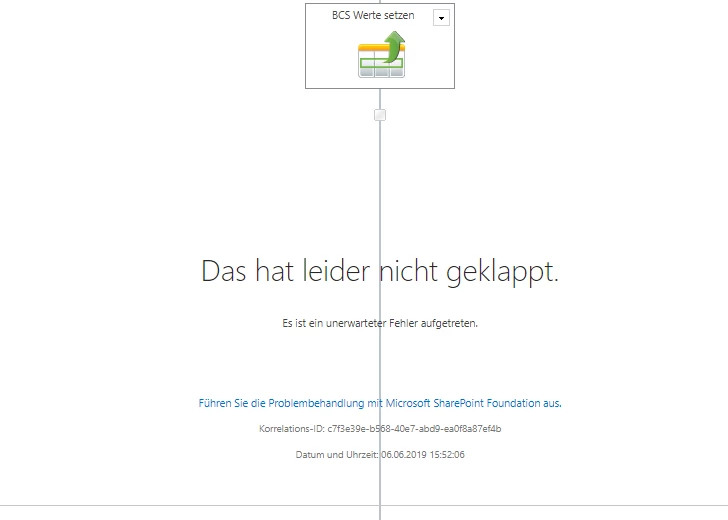
The error in the Workflow Designer (Something went wrong ...)

2479i87DBD1ECAB73D916.png


The following error appears in the SharePoint ULS Logfiles:


Application error when access /_layouts/15/nintexworkflow/ActivityServer.ashx, Error = The specified type is abstract: Name = 'ConditionConfig', Namespace = '', at <Left xmlns = ''>. at Microsoft.Xml.Serialization.GeneratedAssembly.XmlSerializationReaderNWActionConfig.Read39_ConditionConfig (Boolean isNullable, Boolean check type) at Microsoft.Xml.Serialization.GeneratedAssembly.XmlSerializationReaderNWActionConfig.Read36_ConditionPair (Boolean isNullable, Boolean check type) at Microsoft.Xml.Serialization.GeneratedAssembly.XmlSerializationReaderNWActionConfig.Read39_ConditionConfig At Microsoft.Xml.Serialization.GeneratedAssembly.XmlSerializationReaderNWActionConfig.Read62_NWActionConfig (Boolean isNullable, Boolean checkType) at Microsoft.Xml.Serialization.GeneratedAssembly.XmlSerializationReaderNWActionConfig.Read63_NWActionConfig ()


It doesn't matter what values I use, each action with multiple condition is broken.


Is there any solution for this problem?


Thanks for your help guys!

13 replies

Forum|alt.badge.img+4

I think it's a bug in the nintex environment, i too have the same issue. I tried to have mutliple conditions within a loop and it beaks out. I had a meeting with Nintex support and they said that the loop does'nt allow multiple conditions in it. Then i have tried with set condition and run if  with multiple conditions, one of the conditions is gone missing when i save the action it shows only one condition in it.


Forum|alt.badge.img+1
  • Author
  • June 7, 2019

Okay, but have you tried to test multiple condition outside of a loop?


I will also open a ticket with Nintex Support.


Forum|alt.badge.img+4

May i know which browser you are using.


Forum|alt.badge.img+1
  • Author
  • June 11, 2019

@rameshmusham tried in IE11, Chrome and Edge


Forum|alt.badge.img+4

Can you try Firefox, mine is working in firefox.


Forum|alt.badge.img+1
  • June 18, 2019

I also ran into this for the first time today. What version of WF are you on? We are on 4.4.0.0


Forum|alt.badge.img+1
  • June 18, 2019
Also we're on SP/Nintex 2016

MegaJerk
Forum|alt.badge.img+14
  • Scholar
  • June 24, 2019

I too am having this same problem in Version 4.3.3.0 for SharePoint 2016... 

Digging into the javascript it seems that there is some type of posting error that happens and the activityXmlString returned to the RenderActivity() funciton is just the erorr page... so the funciton basically just stops dead in its track. 


Anyone from Nintex looking into this?


Update: This is ALSO happening for multiple Conditions in the Run If action! The only way aorund this is to build out multiple and tedious amounts of single condition Run Ifs / Set Conditions to create Boolean (Yes/No) values that you can use afterwards!


MegaJerk
Forum|alt.badge.img+14
  • Scholar
  • July 17, 2019

I have opened a support ticket about this and the rep asked if it works just fine in FireFox and IE. For me, it does indeed work in both FireFox and IE, but will always fail in Chrome. 

I believe that i have discovered the problem coming down to the way that Chrome has started to handle the xml output on XML Document Node. It strips any attribute prefixes of attributes that were added using the createAttribute function (and then later appended to the node), while FF (and seemingly IE) do not. 

Because of this, whatever is pasrsing the blob of xml is probably failing to find certain attributes because they are malformed when passed in Chrome vs. FF/IE. Extracting identical XML output from FireFox, and using it inplace of the malformed XML in Chrome results in Chrome working correctly. 

I am bringing this to the attention of Support and hopefully they can figure out a workaround. 


Forum|alt.badge.img+1
  • July 30, 2019

Hhi!


any news on this? have the same issue on SP2019, Nintex 5.0.2.0


MegaJerk
Forum|alt.badge.img+14
  • Scholar
  • July 31, 2019

Not as far as I'm aware. With the way that everything is setup for how Workflow Actions are reconfigured and placed onto the Workflow Canvas (for lack of a better term), I'm not entirely sure that they will be able to fix the thing that Chrome is doing without some overhauls because it seems to be completely at odds with how their backend is setup. 

For the time being I would just use Firefox or IE to set any conditional statements that require more than two conditions, and move back to chrome for when you're working on everything else. 


MegaJerk
Forum|alt.badge.img+14
  • Scholar
  • July 31, 2019

For whatever reason I cannot edit a previously created post so I'm just adding another one to this thread. 

This is just a post giving a more detailed look into what is happening for those who are interested in the nitty gritty. Keep on moving if you're satisfied with previous answers ;)

I have modified a JsFiddle to show exactly what the problem is: https://jsfiddle.net/8cmn3xo1/

If you were to look at that Fiddle on Chrome, the output would be: 

3732i36CE9DBC65C24EFE.png

While on FireFox we get: 
3731i4385C08BE38887FF.png


Notice how the attribute prefix is dropped from the first textarea in Chrome. It would seem that an attribute prefix that has been added using the createAttribute function will no longer provide that prefix once the attribute is returned using XMLSerializer's serializeToString function. 

Being that a large portion of the code for Workflows is relying on building an XML payload that is hadnded to the server and is being built with attribute prefixes (and subsequently the create/setAttribute functions), it just won't work anymore for Chrome. 

All that aside, it would seem that adding the attribute directly using something like jquery (which is loaded in the Workflow Editor) as if it were a normal document nodeset seems to allow the XMLSerializer to return the correct value, so at least there is some way forward. It's just going to require them to rewrite several of the functions and then make sure that they still work across every browser combo (which is a big task). 


MegaJerk
Forum|alt.badge.img+14
  • Scholar
  • August 29, 2019

If you update to the latest version of Chrome (76.0.3809), the problem with Multiple Conditions for Conditional Actions / Run If Actions should be resolved. 

The Chrome Browser was in error and the latest updates addresses the problem to bring it in line with FireFox and Edge: https://chromium.googlesource.com/chromium/src/+/9e54bad462fb56b46cd36bef230c5c4f38828f8b



