Nintex Community Menu Bar

error when openning a process in the visual studio "one or more errors were encountered while attempting to open the designer. please review these errors"

  • February 28, 2010
  • 10 replies
  • 55 views

Forum|alt.badge.img+11

Hi


I encountered the following error when openning a process - .kprx file-  that i designed earlier in the visual studio; the following message appeared "An error has occurred one or more errors were encountered while attempting to open the designer. please review these errors"


the last major thing i remember was that i updated the license for k2

10 replies

Forum|alt.badge.img+11
  • Author
  • March 2, 2010

Hi


I dont use custom wizards


i also checked the visual studio part of the configurationmanager.config file


here is a copy of it


"


------


<environments>
    <environment name="VisualStudio">
      <services>
        <service type="SourceCode.VisualStudio.DocumentService" assembly="SourceCode.VisualStudio, Version=4.0.0.0, Culture=neutral, PublicKeyToken=16a2c5aaaa1b130d" interfaceType="SourceCode.Framework.IDocumentService" interfaceAssembly="SourceCode.Framework, Version=4.0.0.0, Culture=neutral, PublicKeyToken=16a2c5aaaa1b130d" name="DocumentService" />
        <service type="SourceCode.VisualStudio.HelpService" assembly="SourceCode.VisualStudio, Version=4.0.0.0, Culture=neutral, PublicKeyToken=16a2c5aaaa1b130d" interfaceType="SourceCode.Framework.IHelpService" interfaceAssembly="SourceCode.Framework, Version=4.0.0.0, Culture=neutral, PublicKeyToken=16a2c5aaaa1b130d" name="HelpService" />
        <service type="SourceCode.Workflow.Plugins.ObjectBrowserService" assembly="SourceCode.Workflow.Plugins, Version=4.0.0.0, Culture=neutral, PublicKeyToken=16a2c5aaaa1b130d" interfaceType="SourceCode.Workflow.Plugins.IObjectBrowserService" interfaceAssembly="SourceCode.Workflow.Plugins, Version=4.0.0.0, Culture=neutral, PublicKeyToken=16a2c5aaaa1b130d" name="ObjectBrowserService" />
        <service type="SourceCode.Workflow.Design.EnvironmentLibraryService" assembly="SourceCode.Workflow.Design, Version=4.0.0.0, Culture=neutral, PublicKeyToken=16a2c5aaaa1b130d" interfaceType="SourceCode.Workflow.Design.IEnvironmentLibraryService" interfaceAssembly="SourceCode.Workflow.Design, Version=4.0.0.0, Culture=neutral, PublicKeyToken=16a2c5aaaa1b130d" name="EnvironmentLibraryService" />
        <service type="SourceCode.VisualStudio.ProjectManager" assembly="SourceCode.VisualStudio, Version=4.0.0.0, Culture=neutral, PublicKeyToken=16a2c5aaaa1b130d" interfaceType="SourceCode.Framework.IProjectManager" interfaceAssembly="SourceCode.Framework, Version=4.0.0.0, Culture=neutral, PublicKeyToken=16a2c5aaaa1b130d" name="ProjectManager" />
      </services>
      <views>
        <view type="SourceCode.Workflow.Design.ProcessView" assembly="SourceCode.Workflow.Authoring, Version=4.0.0.0, Culture=neutral, PublicKeyToken=16a2c5aaaa1b130d" name="ProcessView" designerType="SourceCode.Workflow.VisualDesigners.ProcessDesigner" designerAssembly="SourceCode.Workflow.VisualDesigners, Version=4.0.0.0, Culture=neutral, PublicKeyToken=16a2c5aaaa1b130d" />
        <view type="SourceCode.Workflow.Design.DocumentView" assembly="SourceCode.Workflow.Design, Version=4.0.0.0, Culture=neutral, PublicKeyToken=16a2c5aaaa1b130d" name="DocumentView" designerType="SourceCode.Workflow.VisualDesigners.ProcessDesigner" designerAssembly="SourceCode.Workflow.VisualDesigners, Version=4.0.0.0, Culture=neutral, PublicKeyToken=16a2c5aaaa1b130d" />
      </views>
    </environment>


-------


"


Forum|alt.badge.img+11
  • Author
  • March 4, 2010

Is there any other reason for that?


Forum|alt.badge.img+11
  • Author
  • March 4, 2010

i found a solution for that


i want to share this info with


1. open the work space


2. go the the latest version of the workflow


3. download it


4. it will produce an exe file


5. run the exe file and extract it


6. look in the exracted folder


7. the kprx file is there

8. open it and it will open with you


Forum|alt.badge.img+3
  • March 16, 2010

Hi,


This solution will only work if you want to take a peek at the process. What if you NEED to open the workflow in a solution, so you can compile it and deploy it? How do we resolve this? I am stuck in this situation.


Forum|alt.badge.img+11
  • Author
  • March 16, 2010

you mean you tried to add it to a solution and that didnt wok with you???


try adding it to a  new k2 solution and make this process alone and try to compile and deploy; i hope this works with you.


i have no other solution other than that


Forum|alt.badge.img+3
  • March 16, 2010

Hi,


Opening the process (and only the process) in the Studio works fine. If I create a solution and add the process to the solution, then try to open the process I get the same error.


There is another thing. When I drag a server event (or some others too) to the canvas, I get some exception about templates not being found. It looks like the exception is coming from the Visual Studio itself, but wrapped in K2 UI.


Just a few minutes ago I came to the conclusion something might be wrong with my Visual Studio. I am reinstalling VS 2005 Pro SP1 (or 2, I forgot) and will see how it goes.


Thanks for your reply.


Forum|alt.badge.img+3
  • March 17, 2010

Just so everyone knows - the problem was in the Visual Studio 2005 itself. After re-installing it and the service pack, I don't get the error any more.


10x.


Forum|alt.badge.img+11
  • Author
  • March 17, 2010

Congrats man!!


Forum|alt.badge.img+1


Symptoms


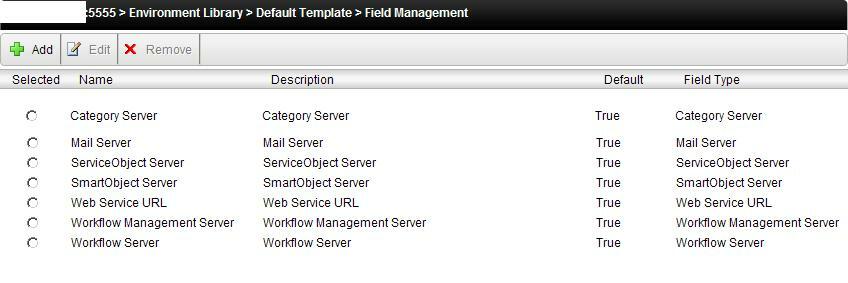
Try to create any new empty K2 Project and add new process run sharepoint workflow integration client during the wizard k2 ask you for SMTP Server, Workflow Server , Workflow Management all the below fields, if you find them empty you can also the mentioned issue


Resolution


Open Visual Studio à Open K2 Object Browser à goto field of the below picture à edit and check the values/ server names are correct (if yes) than à select Set as default à and save/ ok it.


Follow the same step for all fields.


Restart visual studio open your Process project, it will work. J


12735i9893762C1D521684.jpg

Forum|alt.badge.img

Make sure your connection string is correct via the K2 Object Browser. This happened to me with a service pack upgrade on VS.