

Nintex Community Menu Bar

error Nintex workflows while initiating:Failed to start workflow. Login failed for user 'devadmin'

  • July 29, 2019
  • 6 replies
  • 76 views

Forum|alt.badge.img+1

i recently setup a preprod farm with SP content databases from prod enviornment. connection with Nintex database is also made. i am able to publish the workflows. but i am getting the below error while initiating the nintex workflows. 


Failed to start workflow. Login failed for user 'devadmin'.

 

6 replies

Forum|alt.badge.img+11
  • Nintex Partner
  • July 31, 2019

Does this error occur for every workflow or just this one? What actions have you used in the workflow?


If this is a general problem, can you please have a look at the ULS log for the time the workflow errored out and check if you find some more useful error message?


Forum|alt.badge.img+1
  • Author
  • July 31, 2019

i am getting this for entore farm workflows. Below is the ULS entry that i see. Kindly help. this is the account: devadmin whihc i am using in connection string in Central admin . 


Nintex.Workflow.NWException: Could not retrieve workflow name for instance id. ---> System.Data.SqlClient.SqlException: Login failed for user 'devadmin'.

at System.Data.SqlClient.SqlInternalConnectionTds..ctor(DbConnectionPoolIdentity identity.

Error establishing database connection. SQL Error: 18456.: System.Data.SqlClient.SqlException (0x80131904): Login failed for user 'devadmin'.
at System.Data.SqlClient.SqlInternalConnectionTds..ctor(DbConnectionPoolIdentity identity,


Forum|alt.badge.img+4
  • Nintex Employee
  • July 31, 2019

@Manoj468 

I think this is related to the permissions on the Nintex databases. Try adding  WSS_Applications pool role for this account " devadmin " on all Nintex Databases. 


This post by Chad provides the answer. Please try the solution and let me know if you are having issues. 


https://community.nintex.com/t5/Nintex-for-SharePoint/Failed-to-start-workflow-The-EXECUTE-permission-was-denied-on/m-p/66095


Forum|alt.badge.img+1
  • Author
  • August 2, 2019

@sunkars i have verified in SP Content databases : access looks fine as per your recomendation. 


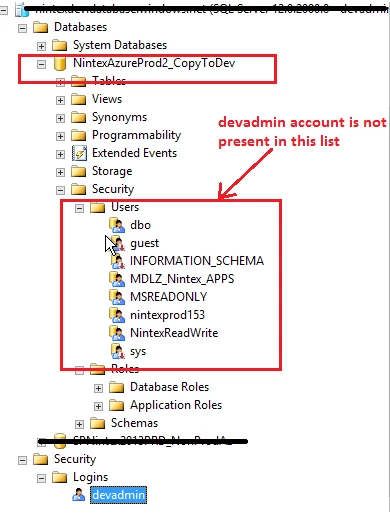
i am attaching the screenshot from my Nintex DB server. Please have look . 

we are using devadmin user to connect to nintex database. i am able to login to Nintex DB server with this user: devadmin. also, i am able to make UDL connection from SP to Nintex DB server Via devadmin account.

But after logging into Nintex DB server-->under Nintex database , i dont see this account under security-->logins-- see the screenshot. 

3794iEBE4F98E583242F9.png


Forum|alt.badge.img+1
  • Author
  • August 6, 2019

can someone help me here


Forum|alt.badge.img+4
  • Nintex Employee
  • August 13, 2019

@Manoj468 


Go to Security-> Expand the users and select the database to the list with the db_writer and add the wss_applications pool role for "NintexAzureProd2_CopytoDev". 


Let us know if  you are still having issues



