Nintex Community Menu Bar

Direct user back to source URL when clicking 'cancel'

  • April 24, 2019
  • 4 replies
  • 40 views

Forum|alt.badge.img+1

Hi,


I'm a new user to Nintex for SharePoint so please bear with me.


I've added a 'New Request' button to my page. When the user clicks the button, this takes them directly into the Nintex form - perfect.


When they then click 'Submit', 'Save' or 'Cancel' it re-directs the user to the list of requests.


Please can someone tell me how to re-direct the user back to the request page (the initial page with the request button) rather than to the list?


Thanks :smileyhappy:

4 replies

bamaeric
Nintex Partner
Forum|alt.badge.img+15
  • Nintex Partner
  • April 24, 2019

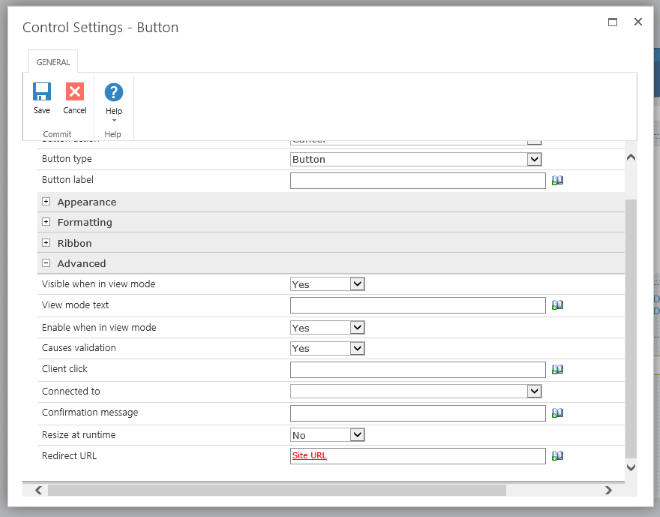
Welcome to the Nintex world!  On a Nintex Form, you configure the redirect when a button is clicked.  In the form designer, click on the button and go to the Configuration Settings.  Expand the Advanced section and find the "Redirect URL" field at the bottom.  Here you can enter the URL to redirect to when the form is closed from the button.  This can be hardcoded or dynamic by using the Inserting Reference option.


1670i70DFA11DBAA1A56A.png


Forum|alt.badge.img+1

I'm specifically referring to the following buttons:

1671iADA555E2B51A5562.jpg'Submit' 'Save' and 'Cancel'.


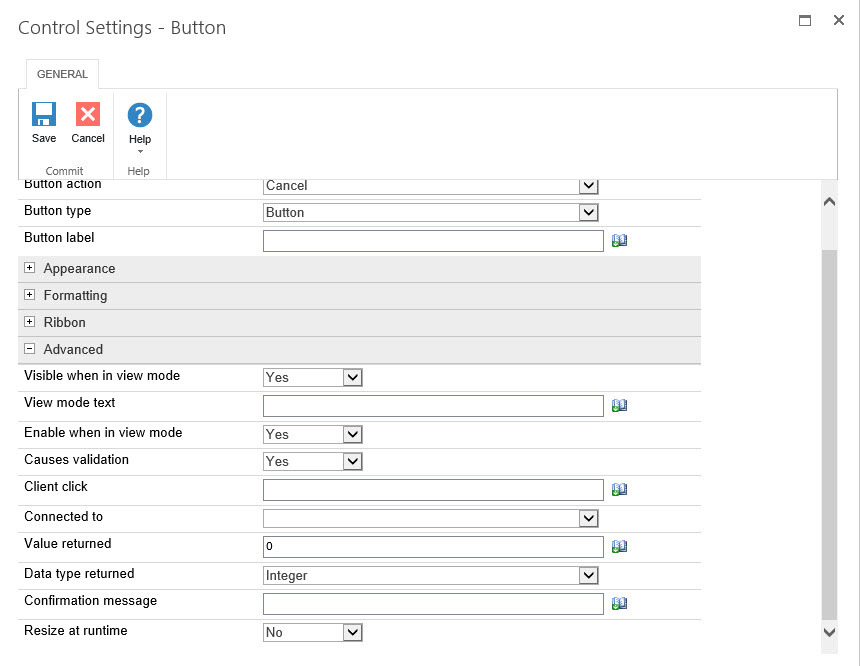
Also, I think we're still using an old version of Nintex as I don't have the option for 'Redirect URL' on the 'Save' & 'Cancel' buttons directly on the form:


1672iBB81223D7E55EDF6.jpg


bamaeric
Nintex Partner
Forum|alt.badge.img+15
  • Nintex Partner
  • April 24, 2019

Check which version of Nintex Forms you're using by clicking Help > About Nintex Forms.  Then compare it to the Release Notes document to see if this is a feature that was added since your installed version.


Nintex Forms 2013 - Release Notes


Forum|alt.badge.img+1

I'm currently using V2.9.2.20 (released 12/08/16). I can't see anything in the release notes to suggest that the feature has been added since that date.


Is there another way to do it? Javascript? Or perhaps it's been disabled somewhere?