Nintex Community Menu Bar

Custom includes not updating after edits

  • February 6, 2019
  • 3 replies
  • 16 views

Forum|alt.badge.img+2

I have a JS custom include in my form located in the SharePoint SiteAssets library.  After I made some edits to the code and saved it, form preview is still executing the old code.  When does Nintex reload the files?  I've verified my changes have been saved.  I also exited the form designer and then reloaded it and still it has the old code.  Any ideas?

3 replies

Forum|alt.badge.img+2
  • Author
  • February 7, 2019
Well, clearing the browser cache works but that's a pain to do if I'm testing / debugging code.

MegaJerk
Forum|alt.badge.img+14
  • Scholar
  • February 7, 2019

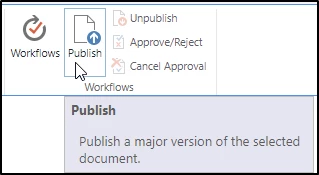
Depending on your setup, you might need to Publish the file once you have uploaded it to wherever it's living:

27i2ABA01DDD715E6F6.png


If you don't have that option then, yeah, clearning the cache might be the most reliable way to make sure that it's pulling the file fresh from your site. 


Forum|alt.badge.img+3

Have you tried appending versioning to your include URL?

ie. http://sharepoint.yourdomain.com/sites/finance/SiteAssets/MyJavaScriptIncludedFile.js?v=2


Just increment the versioning number in the include URL in Nintex Forms settings after each time you revision the JavaScript file. That would "force" the browser to reload the script.


It works for me.