
Nintex Community Menu Bar

Create a Toggle / Switch Choice button in a form opened in Internet Explorer

  • February 25, 2020
  • 3 replies
  • 40 views

VijayAntoine
Forum|alt.badge.img+3

Hello,


I have a SharePoint 2013 List with 2 columns :


Poste A Poste A
Yes No


I want to manage the information of "Poste A" and "Poste B" (Yes/No).

The goal of this process is to run the workflow when the item is modified, for instance in this case I want to run the workflow when ID = 1 of Poste A is change to No (Yes to No).


To manage this value I want to use a Nintex Form 2013 like this :
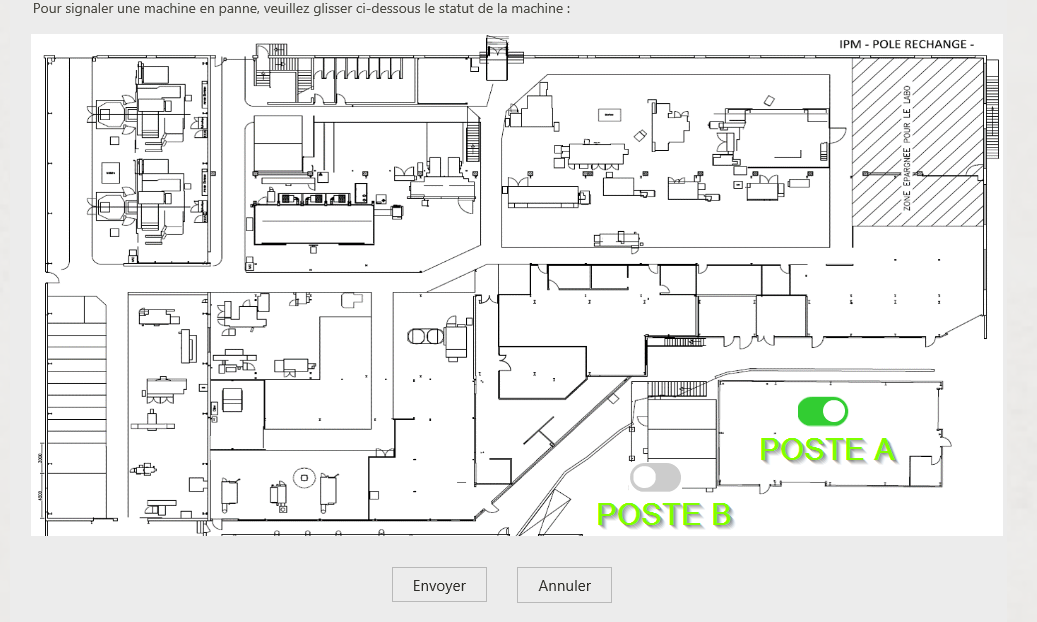
 

6559i883FEB49EA10B004.png


The goal is too, to use this form with Internet Explorer en Google Chrome and Mozilla.


Have you got an advice for me for the development to make in the Nintex Form 2013 to manage the value of Poste with a Switch / Toggle Button ?


Regards,


Vijay Antoine MICK

3 replies

Michel
Nintex Partner
Forum|alt.badge.img+7
  • Nintex Partner
  • February 27, 2020
Hi Vijay,

Do you need help with the design of the page or the actual workflow? When it comes to the design, you might want to use the image as a background image of your form and then use a table with hidden borders to position the toggles.

VijayAntoine
Forum|alt.badge.img+3
  • Author
  • February 28, 2020

Hi,


Michel, I want to create a toggle switch button like theses, thats a MockUp and not real Formn I want to show toggle / switch button on a Image to manage these (Choice-> Yes/No) Buttons.


6604i7A0DF72A73582FCF.png


Michel
Nintex Partner
Forum|alt.badge.img+7
  • Nintex Partner
  • March 9, 2020
Is this related to the thread you posted earlier? (https://community.nintex.com/t5/Nintex-for-SharePoint/Modify-Simple-CheckBox-to-a-Toggle-Switch-Button-gt-Yes-No/td-p/107725)

If so, have you looked at the solution mentioned by Simon?