Nintex Community Menu Bar

Copy list item from one site to another including attachements

  • May 27, 2019
  • 22 replies
  • 185 views

Forum|alt.badge.img+10

I build a workflow with two steps: first step is to copy the list item itself with "create element in another website" which works fine.


Now I want to copy the attachment(s) as well and used the "web service call AddAttachment":


SOAP:

<?xml version="1.0" encoding="utf-8"?>
<soap:Envelope xmlns:xsi="http://www.w3.org/2001/XMLSchema-instance" xmlns:soap="http://schemas.xmlsoap.org/soap/envelope/" xmlns:m="http://schemas.microsoft.com/sharepoint/soap/">
  <soap:Header>
  </soap:Header>
  <soap:Body>
    <m:AddAttachment>
      <m:listName>https://xxx.yyy.de/Feedbackmanagement/Lists/FeedbackmanagementNeu</m:listName>
      <m:listItemID>{WorkflowVariable:lidNeueElementID}</m:listItemID>
      <m:fileName>{ItemProperty:FileLeaveRef}</m:fileName>
      <m:attachment>base64Binary</m:attachment>
    </m:AddAttachment>
  </soap:Body>
</soap:Envelope>


Unfortunately I receive the following error message:
soap:ServerException of type 'Microsoft.SharePoint.SoapServer.SoapServerException' was thrown. List does not exist. The page you selected contains a list that does not exist. It may have been deleted by another user. 0x82000006


But the list exists. I can copy the string "https://xxx.yyy.de/Feedbackmanagement/Lists/FeedbackmanagementNeu" out of the web service call and the list opens.


What am I doing wrong?!?



22 replies

Forum|alt.badge.img+14
  • Scholar
  • May 29, 2019

list name should have been its name (title) or GUID, not URL


Forum|alt.badge.img+10
  • Author
  • Nintex Partner
  • June 3, 2019

Does that mean that I am only able to add attachements with this web service call within the site collection I am currently in?!


Forum|alt.badge.img+8
  • June 3, 2019

No, I don't think that's what @emha is saying. The first field you specify on the Call web service action is the URL. The listName field is just the name of the list on the site you specify in the URL field.


Forum|alt.badge.img+10
  • Author
  • Nintex Partner
  • June 3, 2019

OK, I think I am slowly  getting there...

I now have a problem, with this line:

<m:fileName>{ItemProperty:FileLeaveRef}</m:fileName>


It seems that {ItemProperty:FileLeaveRef} is not resolved by NINTEX.....


Any ideas why?!


Forum|alt.badge.img+14
  • Scholar
  • June 4, 2019

yes, @nj is right, site URL where do you call web service from denotes where target list is being looked for.


reg. FileLeaveRef - do you expect it contains attachment(s) name(s)? that's not the case. write it to history log to see its content.

you will have to get attachment(s) name(s) either from hidden nintex's column FormData or from sharepoint by a call to Lists.asmx webservice


Forum|alt.badge.img+10
  • Author
  • Nintex Partner
  • June 7, 2019

Okay. So with that (web service "GetAttachmentCollection") I was able to retrieve the file names and in a second step I was  able to copy the attachments into the list. I tested it with two attachments, both were attached to the list entry I wanted.


So far so good!


BUT it seems that the files have been corrupted. What could be the reason for that?

I attached a *.txt file and a *.docx file.


Opening the copied *.txt file:

2489i45FDA501FB95ED80.png


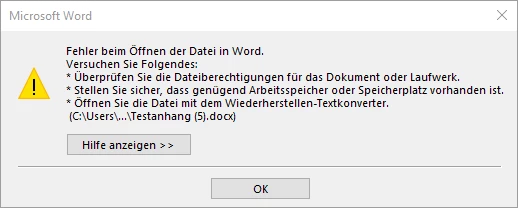
Opening the copied *.docx file:

2490iDC652EBF4D957036.png

(it says: Error opening the file in Word)


I would guess from Nintex point of view everything is configured correctly...


Cheers

mai-kel


Forum|alt.badge.img+14
  • Scholar
  • June 7, 2019

how did you copied the content over?

have you base64 encoded it?


Forum|alt.badge.img+10
  • Author
  • Nintex Partner
  • June 7, 2019

I used the WS "AddAttachment" with the following service message:


<?xml version="1.0" encoding="utf-8"?>
<soap:Envelope xmlns:xsi="http://www.w3.org/2001/XMLSchema-instance" xmlns:soap="http://schemas.xmlsoap.org/soap/envelope/" xmlns:m="http://schemas.microsoft.com/sharepoint/soap/">
<soap:Header>
</soap:Header>
<soap:Body>
<m:AddAttachment>
<m:listName>Feedbackmanagement</m:listName>
<m:listItemID>{WorkflowVariable:lidNeueElementID}</m:listItemID>
<m:fileName>{WorkflowVariable:slotAttachmentShort}</m:fileName>
<m:attachment>base64Binary</m:attachment>
</m:AddAttachment>
</soap:Body>
</soap:Envelope>


Forum|alt.badge.img+10
  • Author
  • Nintex Partner
  • June 11, 2019

I am pretty sure this is not working because of this line:

<m:attachment>base64Binary</m:attachment>

But I honestly have no clue what to write instead...

I have seen something like this, but that is also not working:

<m:attachment>FileData</m:attachment>


Maybe @vadim_tabakman has an idea, as he has already written some blog posts about this?!?


Forum|alt.badge.img+14
  • Scholar
  • June 11, 2019

once again, you cannot supplie 'base64Binary' or 'FileData' literally as these string.

they are just a placeholders for real file content. and the file content has to be base64 encoded.


as you mentioned, a possible way how to get list item's attachment base64 encoded is described on Vadim's blog

http://www.vadimtabakman.com/nintex-workflow-get-list-item-attachment-in-base64-custom-action-happy-thanksgiving.aspx


Forum|alt.badge.img+10
  • Author
  • Nintex Partner
  • June 12, 2019
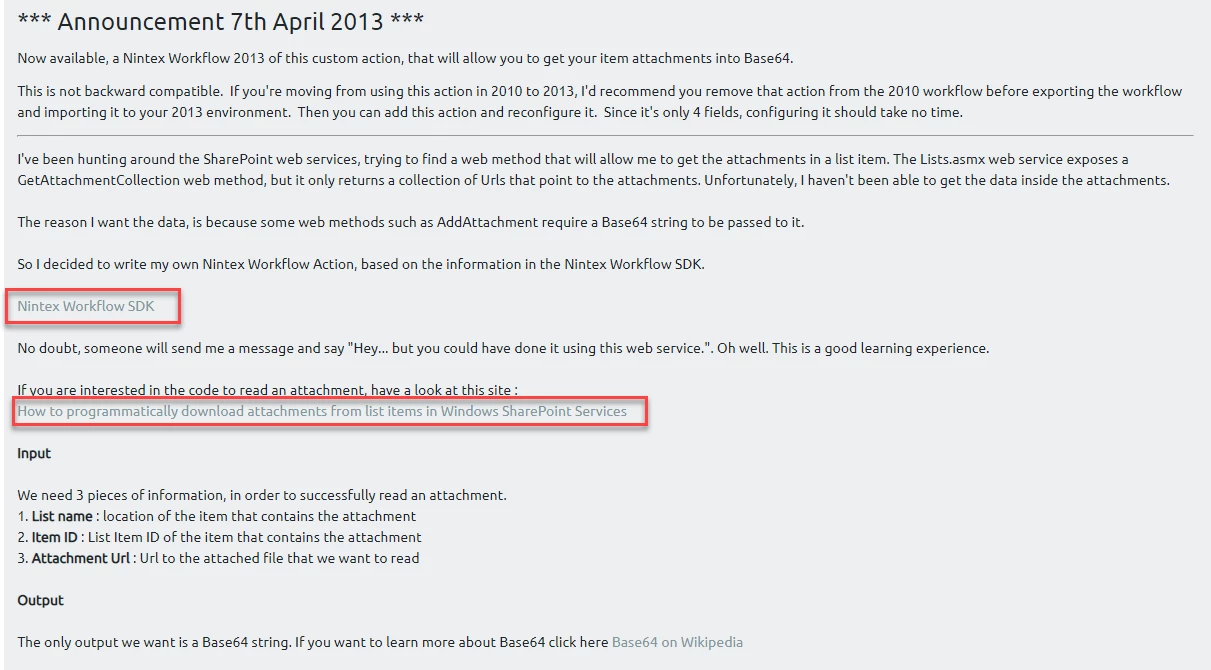
Yeah, but the links are not working... :(

Forum|alt.badge.img+14
  • Scholar
  • June 12, 2019

which one?


Forum|alt.badge.img+10
  • Author
  • Nintex Partner
  • June 12, 2019

2535i0AF2F0E6B8BB27A6.png


Forum|alt.badge.img+14
  • Scholar
  • June 12, 2019

none of these two links are important in your context.


anyway, nintex workflow SDK has been moved to the help portal https://help.nintex.com/Content/helpportal.htm


MS KB article showed just a sample C code how to get listitem attachemnts

https://web.archive.org/web/20150304172150/http://support.microsoft.com/kb/929259


Forum|alt.badge.img+10
  • Author
  • Nintex Partner
  • June 12, 2019
So, can you tell me how do I get the base64 encoded file content?! I am not familiar with C....

Forum|alt.badge.img+14
  • Scholar
  • June 12, 2019

have you read through Vadim's blog???


you do not need any coding.

simply download his GetListItemAttachemnt action suitable for your environment, ask your admins to install it, and then you can use it just like any other workflow action.


Forum|alt.badge.img+10
  • Author
  • Nintex Partner
  • June 13, 2019

OK all,


I finally managed to copy a list entry from one site collection to another site collection including attachements. As it took me quite a while and I am happy with the solution I want to share this with you.


As a prerequisite you need to build two identical lists. One in the site collection A, second in site collection B.

Another prerequisite is to setup a document library on both site collections, I named them both "FeedbackAttachments".


Now we can build the first workflow (running on the list) of two workflows (the other one is running on the attachment folder):

2552i79EE155BA6017409.png

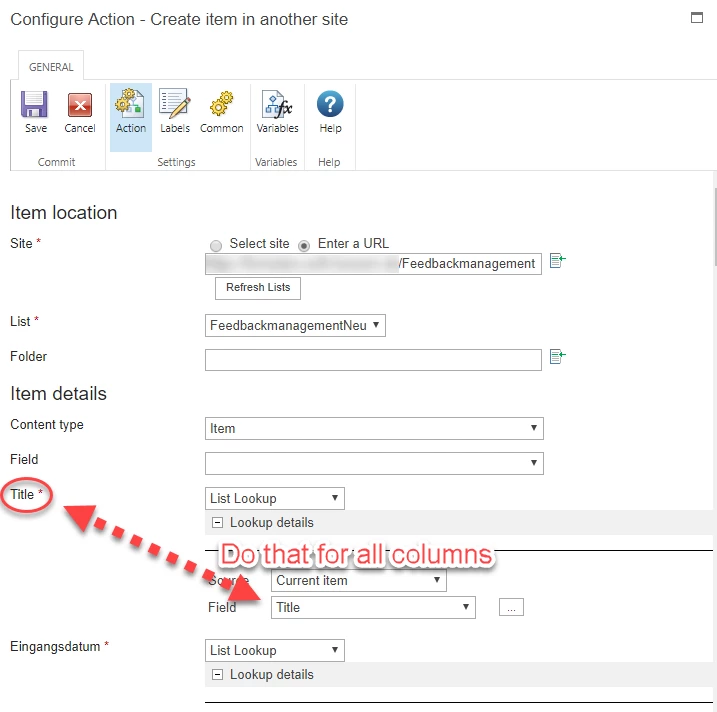
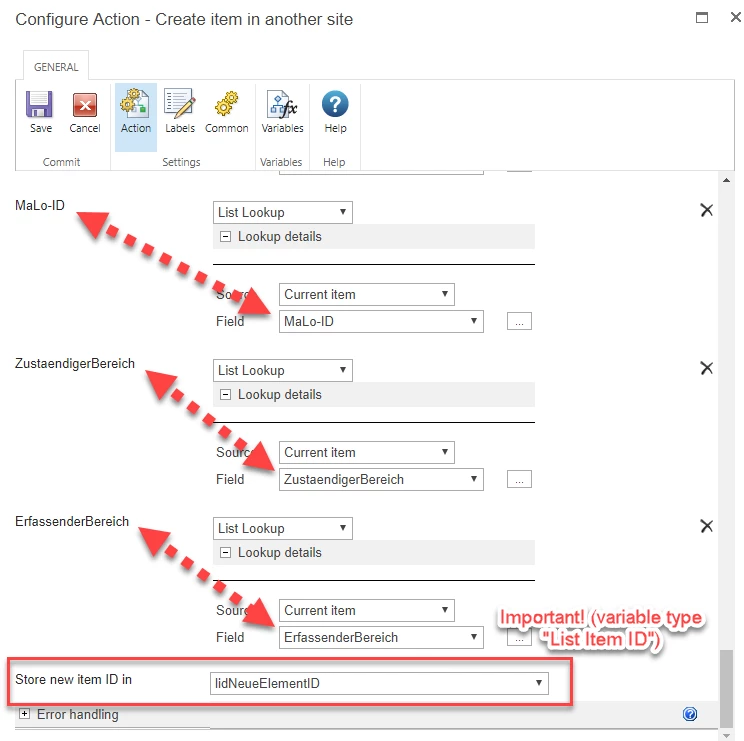
1. Create element in another website (here we copy all the columns from one list to another):

2543iD8D6FF0ADF066371.png

2544i8A535180679F1727.png

2. Commit pendig changes (always a good idea after updating a list!)

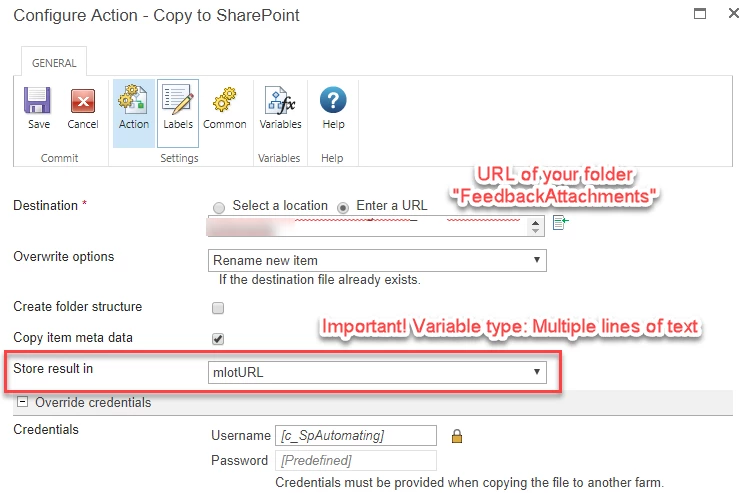
3. Copy to SharePoint (here we copy the attachment to the prepared folder)

2548i3D80C93921BA291C.png

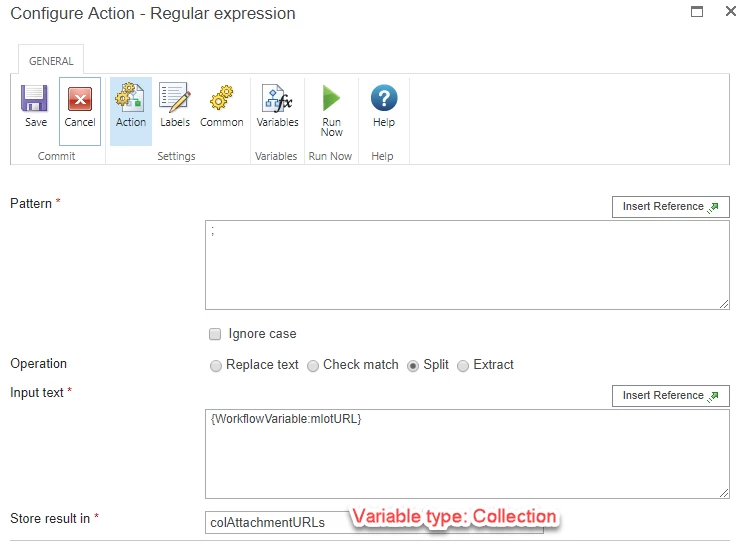
4. Regular Expression

2546i645AFA25AE23983F.png


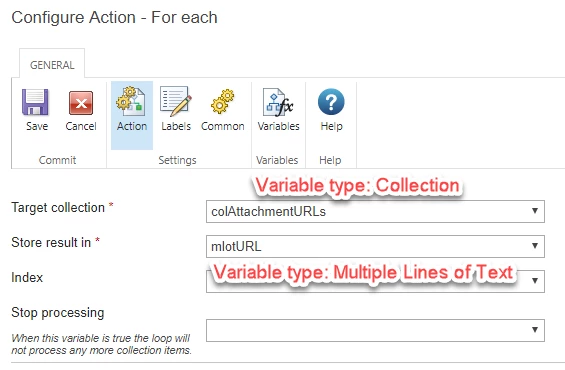
5. For each

2547i72C913F23E2E41E5.png

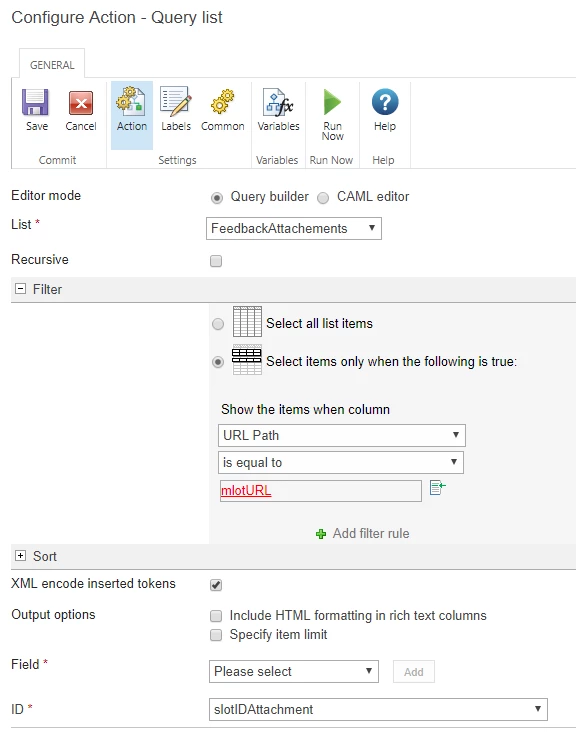
6. Query list

2549iB4AFC281E64F401C.png

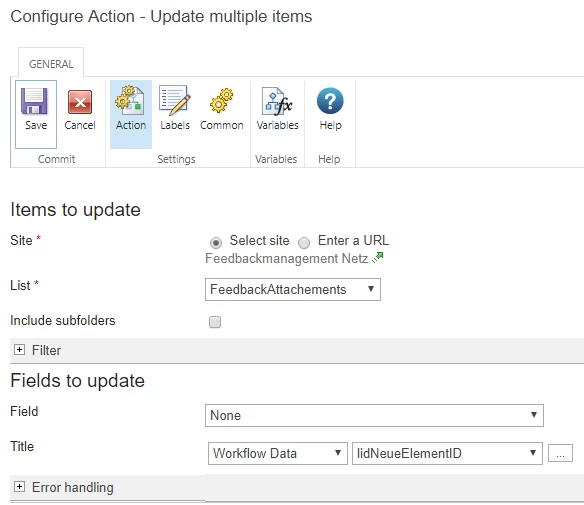
 7. Update multiple items

2550iE4AA234CBDA61530.png

8. Commit pendig changes (always a good idea after updating a list!)

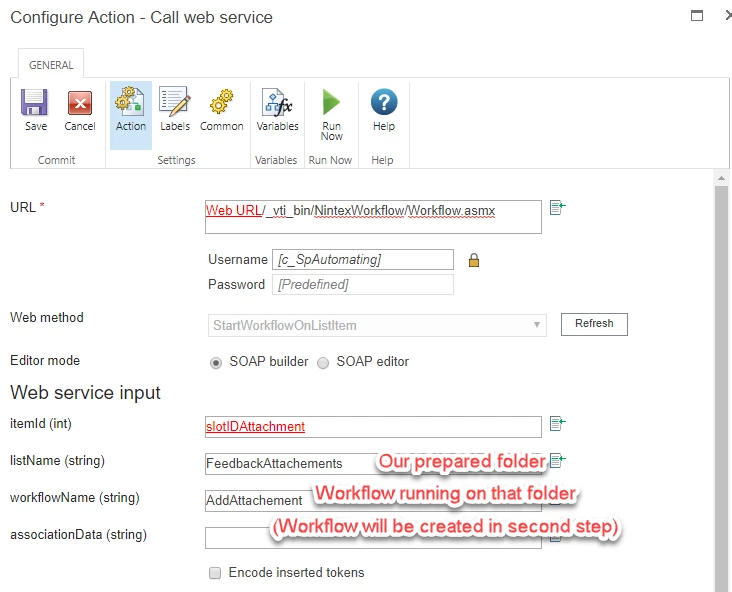
9. Call web service

2553i3BB7F00A5580EDF7.png

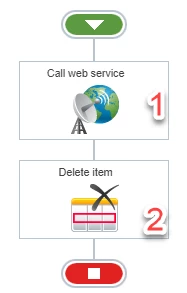
That's all for this workflow. Now go to the folder you've created and create a new workflow:

2555i2C1F584EC75B0529.png

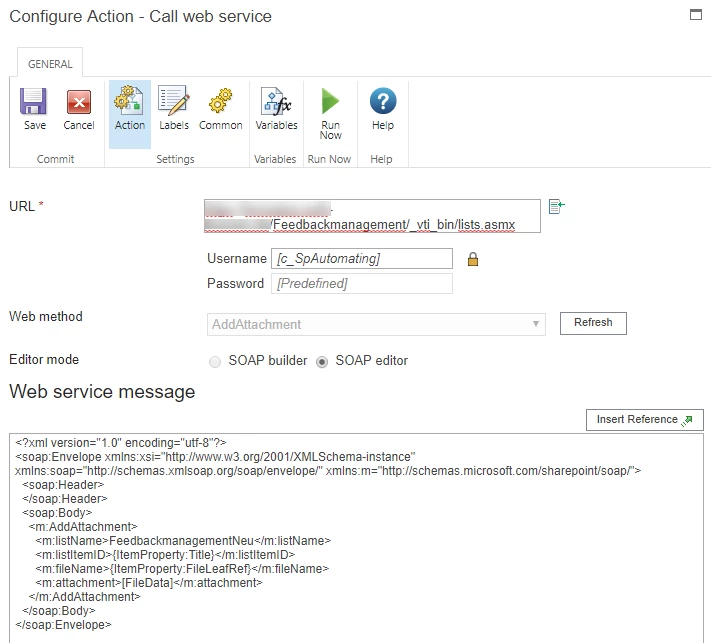
1. Call web service

2556iDD561662584B5801.png

Web service message:

<?xml version="1.0" encoding="utf-8"?>
<soap:Envelope xmlns:xsi="http://www.w3.org/2001/XMLSchema-instance" xmlns:soap="http://schemas.xmlsoap.org/soap/envelope/" xmlns:m="http://schemas.microsoft.com/sharepoint/soap/">
<soap:Header>
</soap:Header>
<soap:Body>
<m:AddAttachment>
<m:listName>FeedbackmanagementNeu</m:listName>
<m:listItemID>{ItemProperty:Title}</m:listItemID>
<m:fileName>{ItemProperty:FileLeafRef}</m:fileName>
<m:attachment>[FileData]</m:attachment>
</m:AddAttachment>
</soap:Body>
</soap:Envelope>


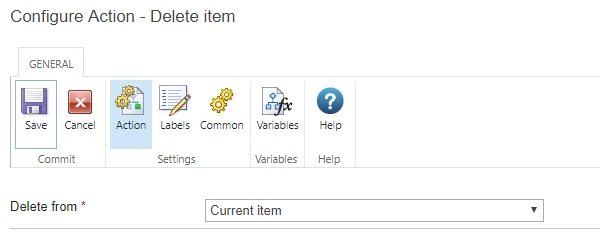
2. Delete item

2557iF9B5F37562F27EAA.png

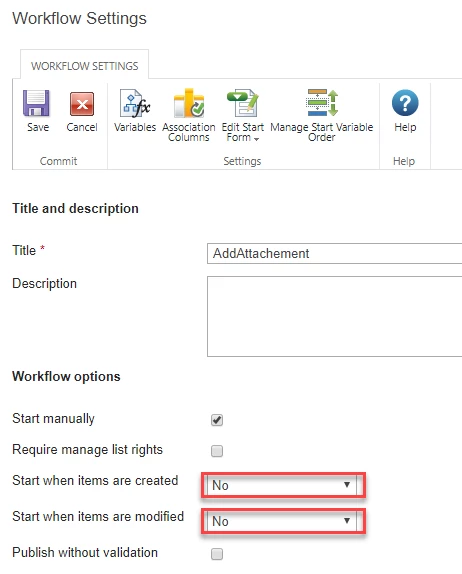
BTW: as this workflow is only started be the web service call from our first workflow you can keep the settings here as follows:


2559i0246AF74468C6690.png


That's it. Enjoy!


Cheers

mai-kel


Forum|alt.badge.img+10
  • Author
  • Nintex Partner
  • June 13, 2019

@emha :

1. I was not able to use a WSP on customer system, but with this, it also worked

2. Luckily this "wording" does the job: <m:attachment>[FileData]</m:attachment>


vadim_tabakman
Forum|alt.badge.img+11
Mai-Kel, this is the perfect solution for this, without having to do any coding or any custom actions, like the one I built. Great job getting to the bottom of this and getting this work. Very nice solution!!

Forum|alt.badge.img+10
  • Author
  • Nintex Partner
  • June 24, 2019
Yeah, thanks for that (I could not give kudos to you, max number of kudos for this thread has already been reached...)!

Cheers
mai-kel

Forum|alt.badge.img+9

@mai-kel 

I am having trouble with getting the base64 from the documents if you could help. I am able to copy the attachments from the list to the document library. Now i am calling the web service to get the base64, which i am interested in, but unable to get it. In your screenshot you have m:ListItemID as ItemProperty:Title, is this correct? or should it be the ItemID of the document in the document library for which i am trying to get the base64 for?


Forum|alt.badge.img+9

@mai-kel ,

Finally got this to work.