Nintex Community Menu Bar

Copy Folder and Files Inside Folder

  • July 3, 2018
  • 8 replies
  • 74 views

Forum|alt.badge.img+9

Hello,

I want to copy folder and files inside folders from one document library to another document library in same site.I used both of the Vadim Tabakman‌ solutions: Nintex Workflow - Copying a Document Library Folder and Contents - Vadim Tabakman, and Nintex Workflow - Move Documents and Preserve Version History - Vadim Tabakman but i have failed to copy the items inside the folder. Below is the screen shot of the workflow:

workflow_diag

i am using web request inside for each loop with below settings:

URL: web URL/_vti_bin/_vti_aut/author.dll

POST

content type: application/x-www-form-urlencoded

Headers:

Name: X-Vermeer-Content-Type

Value: application/x-www-form-urlencoded

Text

method=move+document:14.0.2.5420&service_name={Common:WebUrl}&oldUrl={WorkflowVariable:SourceURL}&newUrl={WorkflowVariable:DestinationURL}&url_list=[]&rename_option=findbacklinks&put_option=overwrite,migrationsemantics

8 replies

Forum|alt.badge.img
  • November 22, 2019

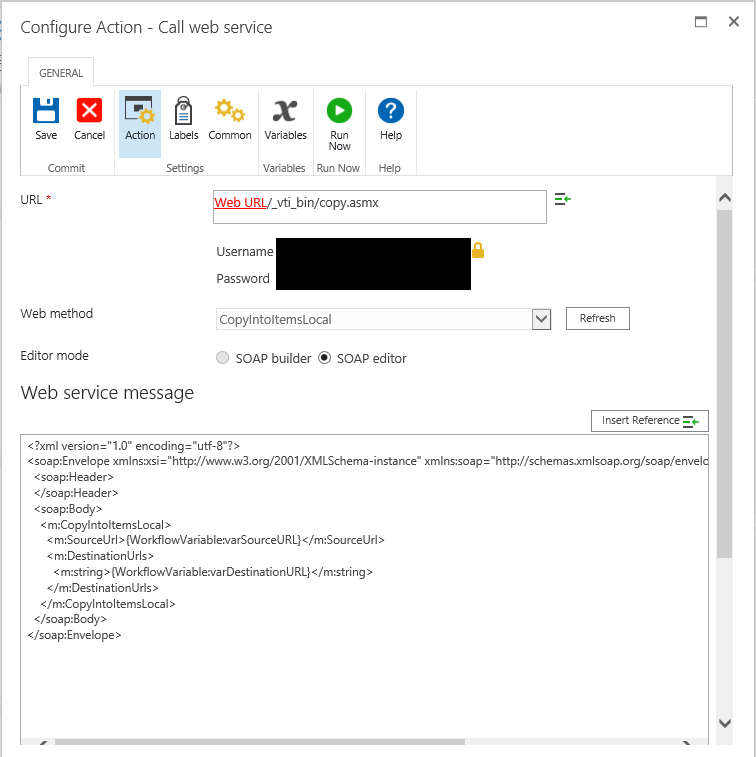
I have also reviewed those solutions from Vadim Tabakman‌ and am having issues copying a folder and contents into another folder on the same site in a different library. In my situation, the destination folder already exists, the name of which matches a piece of metadata in for multiple folders in another library. I've noticed a couple of strange things. When I use the query action to query IDs for the matching folders, I set content type = to Folder and the collection is empty, despite the folders being present. I have attempted with and without recursive selected as well as with and without content type = folder. Secondly, I'm using a web service call for CopyIntoItemsLocal. I have validated both the source and destiniation URLs and both redirect to the expected pages, however the web service call does not move the folders nor does it move any files. I have replaced the default 'string' values with the correct variables for source and destination paths and have validated that the URLs being generated do in fact work. Any assistance is much appreciated.

KrxnpAdsEIQoIeX4jJcJAFALFkBJs5FtbmkRGJwsy2QAAAABJRU5ErkJggg==

5624iE43B98832D54CB6E.png


Forum|alt.badge.img+12
  • Scholar
  • November 22, 2019

@brightlight  @premanuel ....I had the similar issue and we end up creating a different library and using Copy to SharePoint action we copied the item and then workflow will delete the original item. In short instead of Move, we are doing copy and delete.


Forum|alt.badge.img+9
  • Author
  • November 26, 2019

Forum|alt.badge.img+5
  • January 22, 2020

@brightlight The link to the solution you recommend seems to be for attachments and not folders and folder content.  Maybe I'm missing something.


Forum|alt.badge.img+9
  • Author
  • January 22, 2020

Yes @kwilliams, that was for the list item attachments, i somehow got swayed from the initial purpose as that title says what you are asking.

I am pretty sure you can use Copy to SharePoint action.

You may also find THIS link helpful.


Forum|alt.badge.img+5
  • January 22, 2020

@brightlight Thank you, I will take a look at these links.


kmccool
Forum|alt.badge.img+9
  • Scholar
  • April 6, 2020

@premanuel I'm having this exact same issue. In face, the workflow with the web call says it completed and still nothing has been copied over to the second library. I have files in folders. Ideally I would just like to move the whole folder and it's contents over the other library, but I haven't found any solutions that work that way.

Did you ever find a solution?


Thanks

Kassie


Tea_helps
Forum|alt.badge.img
  • Novice
  • June 19, 2020

You need to use RecursiveAll, otherwise it won't copy nested files and folders