We wanted to convert some InfoPath form data into HTML -
The form data is just simple XML, containing the information that is entered in the form.
I considered creating an XSLT stylesheet to manage the transformation, but it looked awfully complex. Then I remembered in the past, I had cracked open the form template file – the .XSN (it’s just a CAB file) and it contained XSL files. There is actually one XSL file for each view in the form.
I extracted the relevant file that matched the InfoPath view we called ‘Summary’ and posted it in the Pages library – I did this as I wanted to be insulated from subsequent changes to the form – if I put it as literal text into the workflow, I would need to edit and republish it each time the form changed. This way I only need to re-upload it to the library.
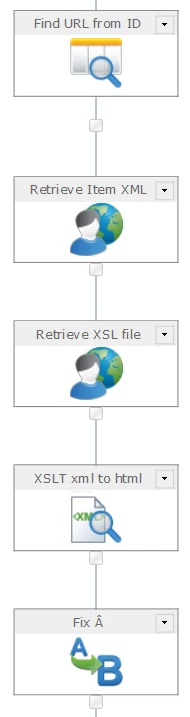
I’ll show the relevant steps here – this fragment starts with the ID of the item in ItemID (we have a lot more processing going on before this)
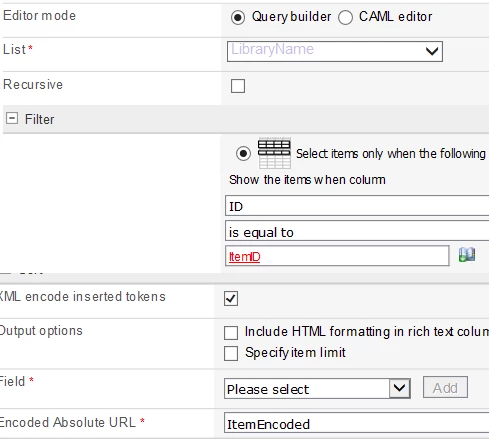
Query List {LibraryName} Where ID = ItemID
Encoded Absolute URL into ItemEncoded
We need to retrieve the encoded url to use in the web request to retrieve the contents later – {LibraryName} is a placeholder for the library holding the xml documents
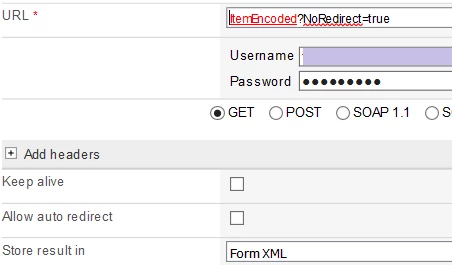
Web Request GET {ItemEncoded}?NoRedirect=true into FormXML
note the querystring parameter to prevent the redirect to the ‘page has been moved’ page
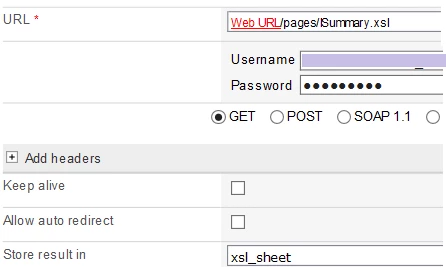
Web Request GET {Common:WebUrl}/pages/Summary.xsl into xsl_sheet
Retrieves the content of the XSL file from the library
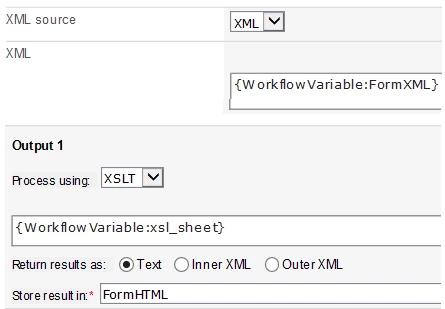
Query XML Source XML FormXML Process XSLT xsl_sheet as Text into FormHTML
Transforms the form into html
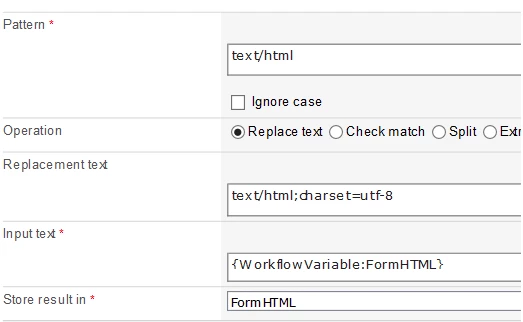
Regular Expression REPLACE FormHTML
Find “text/html”
Replace “text/html;charset=utf-8”
into FormHTML
this sets the charset to remove the random "Â" characters in the html
The contents of FormHTML may now be emailed to the requestor, or archived in a library. You may even be able to use the document convertor to save it as a pdf file.
Workflow Overview
Query List
Web Request
Web Request
Query XML
Regular Expression