Nintex Community Menu Bar

Context Item Display Name

  • November 4, 2019
  • 6 replies
  • 40 views

Forum|alt.badge.img+4

Hi all, 

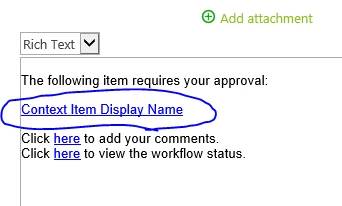
I need some help to show me how I can re-word the "Context Item Display Name" in Request Approval filed .

I need to change it to make more sense for the users.
 

5372i3BD2575FD9897912.png


Regards 

6 replies

Michel
Nintex Partner
Forum|alt.badge.img+7
  • Nintex Partner
  • November 4, 2019
Hi Harris,

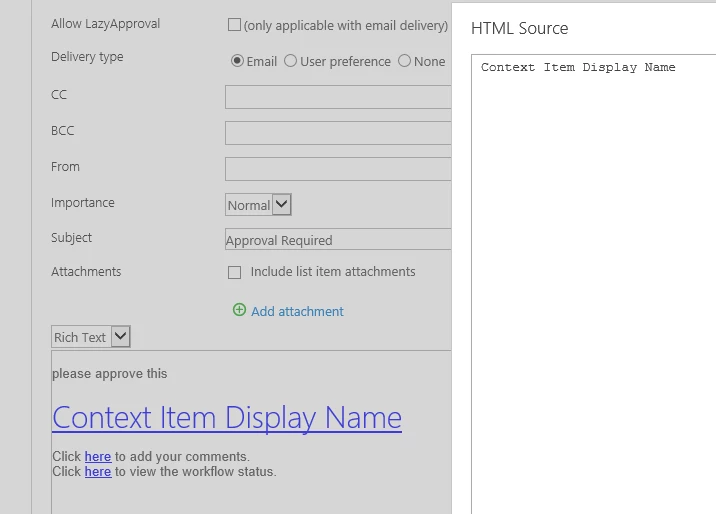
You can accomplish this by editing the HTML source of the e-mail notification.

If you open the HTML source of this default message, you will notice a HTML tag that contains {Common:ContextItemUrl} with the text 'Content Item Display Name'. You can change that to suit your needs.

Forum|alt.badge.img+4
  • Author
  • November 4, 2019

Hi Michel

Thanks for your messgae, where can I find the HTML source of the email, could you please send me some screenshot.

Regards


Forum|alt.badge.img+4
  • Author
  • November 5, 2019
Hi Michel,
Please ignore my previous message, I have found the HTML source, however every time I change it and save it it revert back to the original wording.

Forum|alt.badge.img+4
  • Author
  • November 5, 2019

5380iA1F064257773DF15.png


Forum|alt.badge.img+4
  • Author
  • November 5, 2019
Hi Michel
Please ignore all my messages, its all good now.
Much appreciate your time and help.
Regards

Michel
Nintex Partner
Forum|alt.badge.img+7
  • Nintex Partner
  • November 5, 2019
No problem at all!