Nintex Community Menu Bar

Conditional Startup for when checkbox gets checked

  • April 24, 2019
  • 13 replies
  • 56 views

Forum|alt.badge.img+4

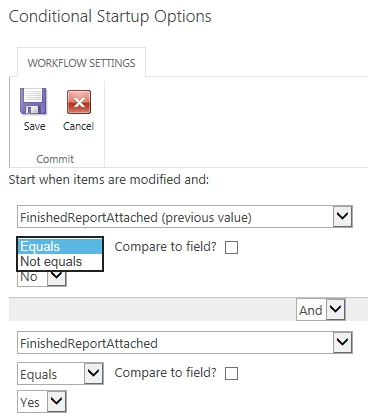
I want to trigger a workflow when a user updates a list item with a checkbox being changed from unchecked to checked.  The approach I was taking was to set a conditional startup option where the previous value of the checkbox equals No and the current value of the chekbox equals Yes. 


This works on all newly created items in the list, but I'm having trouble with existing items.  For those, although the checkbox looks unchecked, its actual value is null.  So the previous value of the checkbox doesn't "Equal" No, but it also doesn't "Not equal" No.  It looks like Nintex Workflow doesn't allow me to look for a null value.  I can only choose Equals or Not equals as the operator, and only Yes or No as the value.
 

1674i299794975244C218.png

13 replies

Forum|alt.badge.img+5
  • April 24, 2019

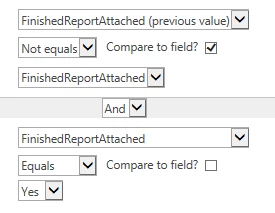
Can you do FinishedReportAttached Equals Yes and FinishedReportAttached (previous value) Not equals FinishedReportAttached?


Forum|alt.badge.img+4
  • Author
  • Rookie
  • April 25, 2019
That was the first thing I tried and the workflow doesn't get triggered. Null != anything always equates to False... or to Null.

Forum|alt.badge.img+4
  • Author
  • Rookie
  • April 25, 2019

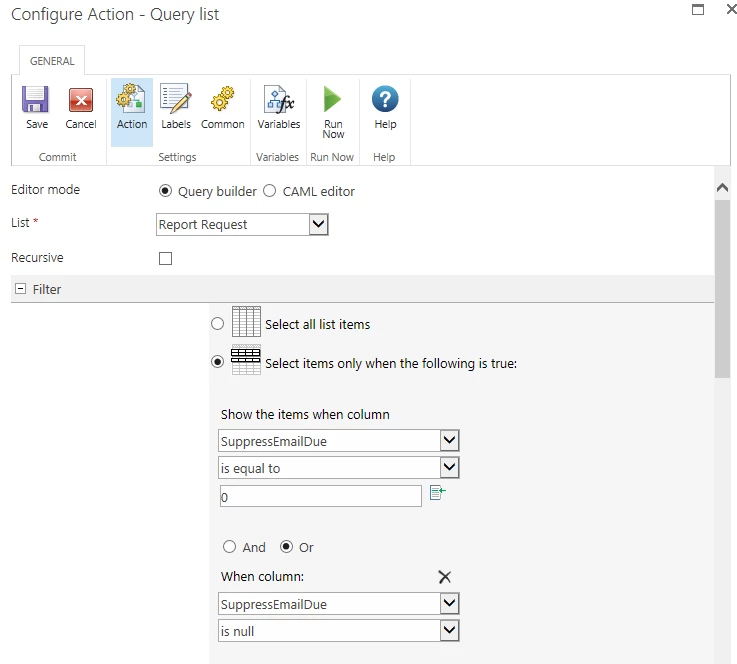
For comparison, in a different workflow, I needed to run a query on a list based on a checkbox being unchecked.  I was able to work with the null values by looking for them separately:


1685i379040FE9E637A6C.png


Forum|alt.badge.img+3

Hi @ab50439 ,

Assuming you are talking about Yes/No field and you need the workflow to be started on item update when the field value is changed to Yes:

1686i915AA656CC1102DF.png

I tried to reproduce the behavior you've described, but in my case everything worked just fine :)


Forum|alt.badge.img+4
  • Author
  • Rookie
  • April 25, 2019

In order to reproduce this, you need to add the Yes/No checkbox to a list that already has existing records.  When you do this, the existing records will have the new Yes/No field set to Null instead of No/False/0.  Any new records created in the list after the new Yes/No checkbox was added will have the checkbox's value set to No/False/0 and should work fine.


Forum|alt.badge.img+4
  • Author
  • Rookie
  • April 25, 2019

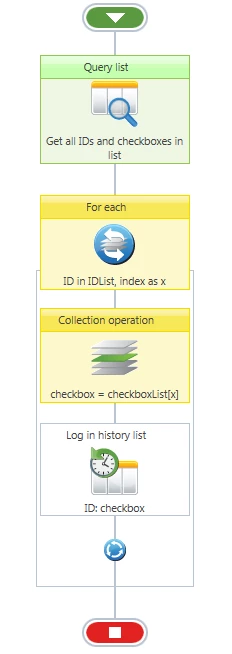
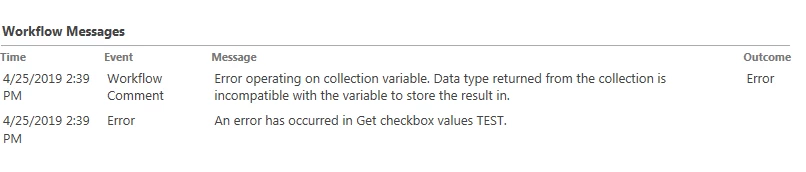
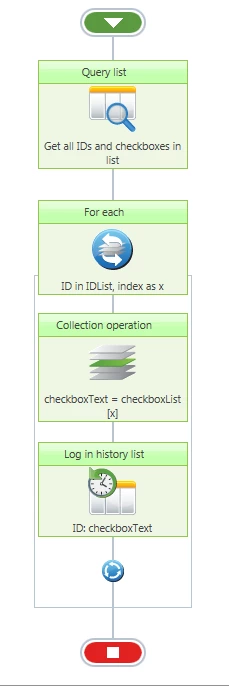
Here's the test to show the values of the checkbox.  I query all the values in the SharePoint list and print to the history list.  However, when I try to copy the checkbox value from the collection variable into a checkbox variable, I get an error.  The workflow won't allow a null value in a checkbox variable:


1688iD60F998A84B6A33F.png1689i2F68AE3033E936D8.png


Forum|alt.badge.img+4
  • Author
  • Rookie
  • April 25, 2019

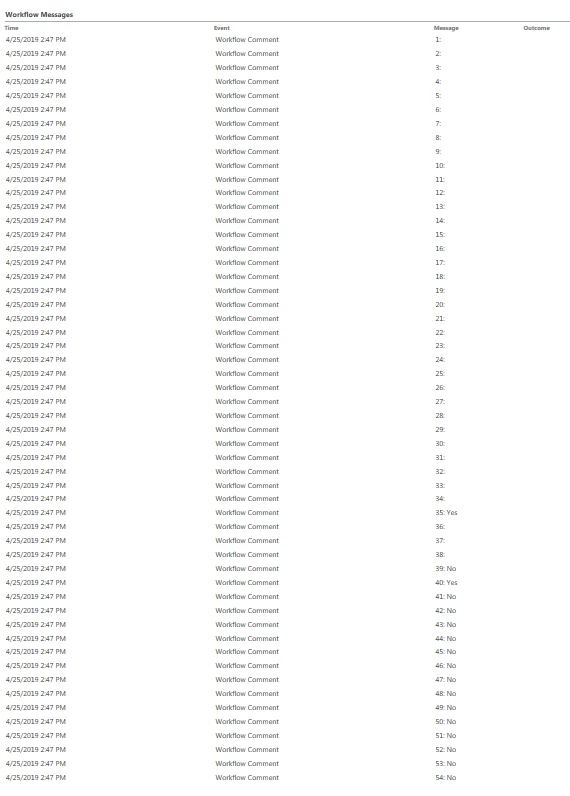
So instead of putting the values from the checkbox field into a checkbox variable, I put it in a text variable.  Now it works.  You can see in the history log that the checkbox value is blank up until a certain point, which is when the field was added.  After that, it's No:


1690i6ADD743FDD6F279D.png1691i341AF80B066B8AE1.png


Forum|alt.badge.img+17
  • April 26, 2019

@ab50439 glad you got it working. Could you mark one of these responses as the correct solution or type out what the solution was that worked for you?


Forum|alt.badge.img+4
  • Author
  • Rookie
  • April 26, 2019
No, I did not get it working. I did tests to show what the problem is.

Forum|alt.badge.img+4
  • Author
  • Rookie
  • April 26, 2019
I see the confusion. I got my TEST to work. The test demonstrates that the value of checkboxes (Yes/No fields) are set to NULL for any items in the list created before the checkbox was added. There doesn't seem to be any way to check for null values of a checkbox in the conditional startup criteria. And the conditional startup criteria seems to be the only place you can check "previous values".

Forum|alt.badge.img+3

@ab50439,

I was able to reproduce the behavior now - indeed, after creating the Yes/No column, the value is NULL for all existing items in the list and the workflow is not triggering.

Perhaps then you should consider less complicated approach...


If you decided to add a new column into the existing list and build the workflow based on it, I think it is normal to ensure that the data in the list is consistent. To achieve that you could update all items in the list where Yes/No field value is NULL and set the values to 'No'. This can be done throught the workflow as well (one action to update multiple items).

Another approach would be to create a calculated column in the list (=IF([FinishedReportAttached],"Yes","No")) and configure the start up options of the workflow to use this field instead.


I would prefer the first approach because I don't like the lists with unnecessary columns....


Forum|alt.badge.img+4
  • Author
  • Rookie
  • April 29, 2019

Thanks.  Updating the vaules of the new checkbox on all existing records is a possibility.  I want to avoid it, though, because it would change the the last modified date and last modified user on all records.


Forum|alt.badge.img+4
  • Author
  • Rookie
  • April 29, 2019

I confirmed that adding a calculated field and using that for the workflow conditional startup works.  That's what I'll probably use since it doesn't change the modified dates of every list item.  Having to add an extra field for this is unfortunate, but this is a usable workaround.