Nintex Community Menu Bar

Column Validation - Error in Form

  • February 25, 2020
  • 8 replies
  • 41 views

Forum|alt.badge.img+2

I have added a column validation in a single line text to have  minimum characters. I created a nintex form and everything seems to work, I put less than the minimum and I am supposed to get an error saying "Must have 8 characters or more" but i am getting "Sorry something went wrong, please try again" and it is not highlighting the column section as it would when you have a required field.


Validation i placed is: 

1: =IF(LEN([Column Name])>7,TRUE,FALSE)

or

2: =LEN([column name])>=7

 

8 replies

Simon Muntz
Nintex Partner
Forum|alt.badge.img+23
  • Nintex Partner
  • February 25, 2020
The issue is that the Nintex form does not look at the validation of the column. When the form tries to submit an invalid entry the column doesnt like it and errors.

Use a validation rule on the form instead
lessThan(length(Single Lines of Text Control),8)

Forum|alt.badge.img+2
  • Author
  • February 25, 2020
@SimonMuntz
Does it matter that the characters would be something like this
-236.24869
(longitude)

i have added the validation rule on the form and i am still receiving the same error.

Simon Muntz
Nintex Partner
Forum|alt.badge.img+23
  • Nintex Partner
  • February 25, 2020
Do you get the same error with no validation?
If you use the Geolocation control does that resolve the issue?

Forum|alt.badge.img+2
  • Author
  • February 25, 2020

Unfortunately we do not have the Geolocation turned on at the Farm level. If i remove the validation from both the form and the column in the list i do not receive this error no. But if no validation it will not stop them from having to put a minimum of 8 characters - it will allow them to use 6 or 4 characters


Simon Muntz
Nintex Partner
Forum|alt.badge.img+23
  • Nintex Partner
  • February 26, 2020
Use the folowing regular expression in the controls validation and that should resolve your issue
-?d+.d{7}

Forum|alt.badge.img+2
  • Author
  • February 26, 2020

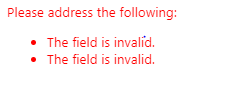
I am now getting this error.


6584i189FAFE1E1A40689.png


Simon Muntz
Nintex Partner
Forum|alt.badge.img+23
  • Nintex Partner
  • February 26, 2020

If you put a valid Longitude in does it validate then? 123.1234567
I tested this regular expression before replying to your post and it worked flawlessly.

I have attached my Responsive form that demonstrates this concept.


Forum|alt.badge.img+2
  • Author
  • February 27, 2020
i was trying it in chrome. Once i put IE tabs on it worked. thank you