


Using Nintex for SharePoint 2016, I created a new list workflow and in Workflow Designer > Workflow Settings > Edit Start Form > Edit with Nintex Forms, I'm working on a "Initiate Workflow" form.
Everything is working fine in the Designer and Preview mode, except that when I pull a multi-select control onto the Designer canvas, it does not display checkboxes.
In Preview mode, the control allows me to select multiple values using Ctrl-Left Click, but this will not be intuitive to my users, who will need a more obvious selection method:
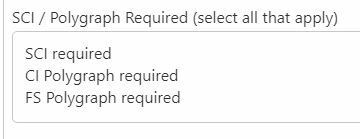
How can I display checkboxes with the text values?
I tried something similar to what I used to have to do in InfoPath ((shudder)): I added a plain unconnected Choice control and it immediately showed the checkboxes with Option 1, 2 3:
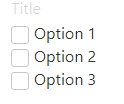
Unfortunately, after I connected it to my workflow variable, the checkboxes disappeared and only the value text showed as before.
If it matters, the workflow variable is set to Display Format: List (Multi-Select). I did not see any option for checkboxes.
I know I could break this into three yes/no checkbox questions instead, but I'd rather not have even more controls to fool with...
Thank you,
anneliese
