Nintex Community Menu Bar

check if number/text already exist in the list when submitting

  • April 18, 2019
  • 2 replies
  • 25 views

Forum|alt.badge.img+11

I know this can be probably achieved via the workflow but wonder if it can be also done on the form when submitting??


How do we validate if the number/text within [PONumber] already exist in the List [Item Lists], colum [PONumber] and if it does then show error message. The form is loaded from the same list where it should validate against it, to check if the number/text exist in the column!


I was thinking something with lookup()


lookup("Item List", "ID", PONumber, "PONumber")

Please advise?

2 replies

nico
Nintex Partner
Forum|alt.badge.img+10
  • Nintex Partner
  • April 19, 2019

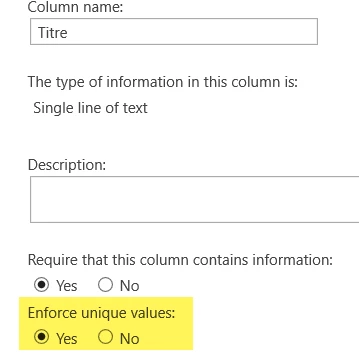
You can can achive this with just a SharePoint field configuration.

In the settings of your field you just have to check "Enforce unique values" to Yes


1586i1D5708F7E5DAF0FF.png


With this settings, when you will save your form, if you have already save your value, you will have an error message "The list item could not be added or updated because duplicate values were found in the following field(s) in the list: [Titre]."


Forum|alt.badge.img+11
  • Author
  • May 8, 2019
shame there is no option to change / modify the default message to something else...