Nintex Community Menu Bar

Cascading Fields from Lookup Field

  • April 29, 2019
  • 6 replies
  • 12 views

Forum|alt.badge.img+8

I have a lookup field on a form. With that lookup field there are several secondary fields that I want to have autopopulate some read only textboxes when an item is selected. I KNOW that I have done this in the past, but I am at a loss with how to recreate it now! TIA for your help!

6 replies

bamaeric
Nintex Partner
Forum|alt.badge.img+15
  • Nintex Partner
  • April 29, 2019

You can add a Calculated Value control to the form and configure the Formula to use the Lookup runtime function.  This allows you to use the value of the lookup field in the Lookup runtime function pull and display data from a list.

Here's the format for the Lookup runtime function:


lookup(list title, column to filter on, value to filter on, output column)


Forum|alt.badge.img+8
  • Author
  • April 30, 2019

Thanks Eric! I will give that a go!


Forum|alt.badge.img+8
  • Author
  • April 30, 2019

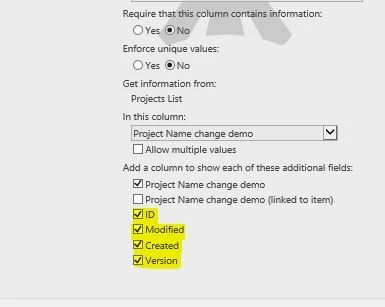
Just to be clear, I want to reference additional columns from the lookup I've already established in SharePoint (example below).

1752iA26E7EA8A7A3049A.jpg

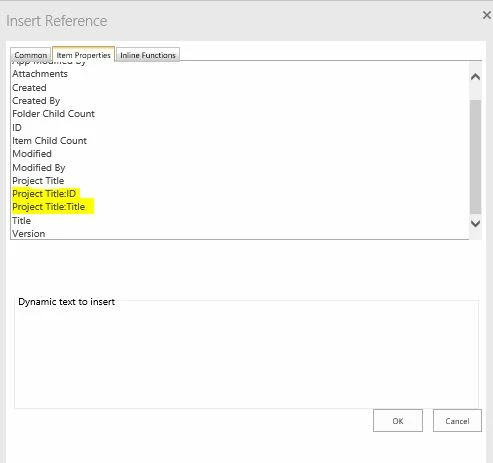
Then I would have thought I could populate another field by setting the default value to one of the other fields already in the lookup (example below), but the values are not populating to the fields.

1753iFD4E082FA52E0622.jpg


Forum|alt.badge.img+14
  • Scholar
  • May 2, 2019

This combination is not going to work...


these 'additional fields' are not available in NEW form since nothing is yet stored in sharepoint so they do not have a source where they could be populated from.

on the other hand, default value is only evaluated and populated in NEW mode, not in EDIT mode.


Forum|alt.badge.img+8
  • Author
  • May 3, 2019

So I could instead populate those fields in a workflow upon submission. That may be what I'll have to do.


Forum|alt.badge.img+14
  • Scholar
  • May 6, 2019

or may use lookup() function on form