Nintex Community Menu Bar

CAML Query on list view with Control Value as parameter

  • March 19, 2020
  • 6 replies
  • 42 views

Forum|alt.badge.img+2

Hi,


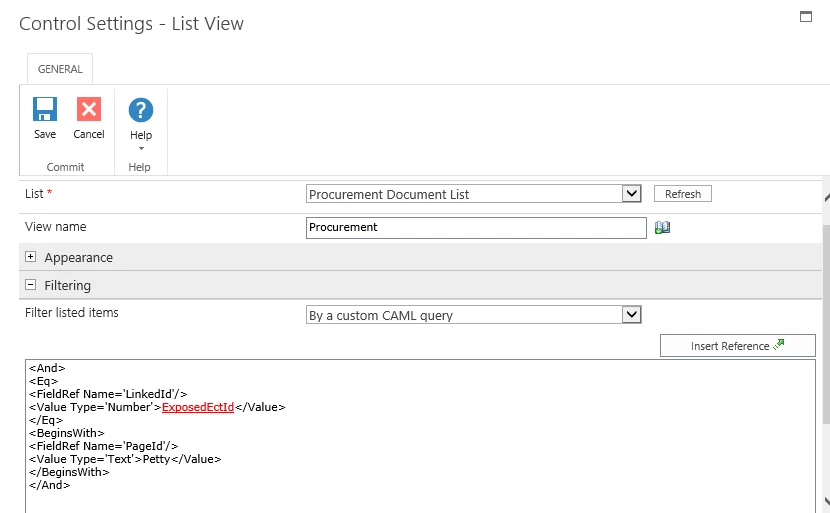
I am trying to filter my list view with multiple conditions. At the moment, using Item Property field name yields no results. Hardcoding the field value works fine though. 

No result -> <Eq><FieldRef Name='LinkedId'/><Value Type='Number'>ExposedEctId</Value></Eq>

Expected result -><Eq><FieldRefName='LinkedId'/><ValueType='Number'>78</Value></Eq>

How do I use field name to get the expected results.

Thanks!

6 replies

Simon Muntz
Nintex Partner
Forum|alt.badge.img+23
  • Nintex Partner
  • March 19, 2020
Hi,

If 'LinkedId' is an item propety remove the quotes as they are not required when using references.

Forum|alt.badge.img+2
  • Author
  • March 20, 2020
Thanks for the reply! LinkedId is a column in my list I am trying to filter. ExposedEctId is the named control on my current list which I am trying to pass as a filter parameter.

Priya

Simon Muntz
Nintex Partner
Forum|alt.badge.img+23
  • Nintex Partner
  • March 22, 2020
Did removing the quotes from 'LinkedId' resolve the issue?

Forum|alt.badge.img+2
  • Author
  • March 23, 2020
No. I get below error -
'LinkedId' is an unexpected token. The expected token is '"' or '''. Line 3, position 16.

LinkedId is a column in my list I am trying to filter. ExposedEctId is the named control on my current list which I am trying to pass as a filter parameter.

Thanks,
PR

Simon Muntz
Nintex Partner
Forum|alt.badge.img+23
  • Nintex Partner
  • March 23, 2020
Please provide a screen shot of the action configuration.

Forum|alt.badge.img+2
  • Author
  • March 24, 2020

6924iA7651689C555063C.png