Nintex Community Menu Bar

Calendar not showing Nintex Form even after publishing

  • October 9, 2019
  • 2 replies
  • 27 views

Forum|alt.badge.img+3

Hi All,


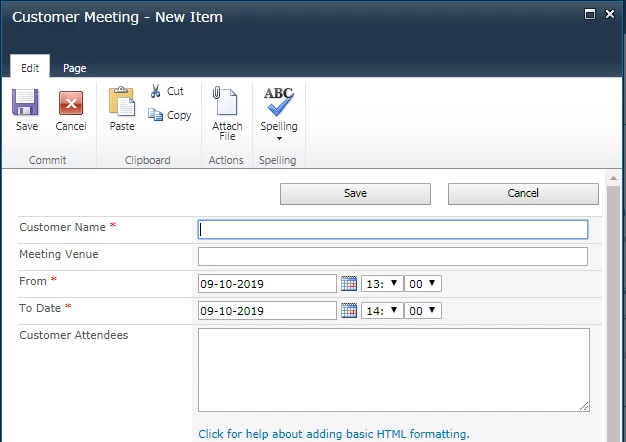
I have a Calendar which had a Designer form for Both Edit And new Item, Now I want to Create a new Nintex form for the same, However the List shows Designer form instead of Nintex form even after the Nintex Form is published.

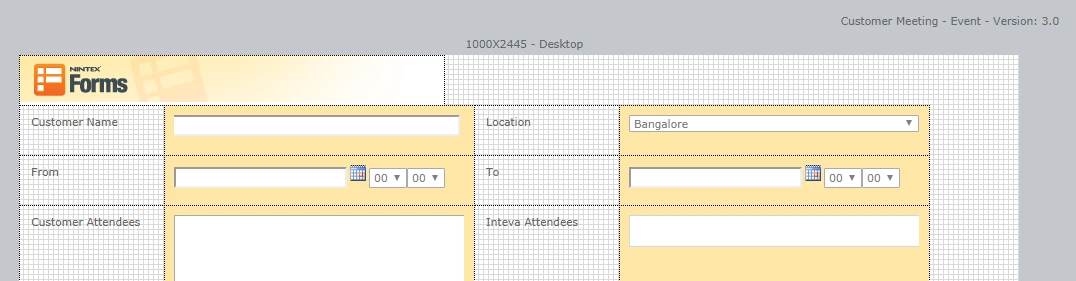
As you can see in this image the workflow is published and is current version 3.
4917iC1593854F7FF6AEB.png


4918i1E855B4EFB45D128.png

Should I do any change in content type or any other region befor publishing the Form for Calendar? 


Thanks for your help. 

2 replies

Forum|alt.badge.img+12
  • Scholar
  • October 9, 2019

@akshaynayak ......usually the calendar list has only 1 content type i.e. Event unless you've added more content type for your list. 


When there is 1 content type then Nintex form usually gets tied to the default content type and list should render the Nintex form once it's published.


If you have only 1 content type then can you check you don't have multiple layouts? If you don't then try to export the form, delete the form from form design and re-create the new one. Once it's open in designer, import the save form and see if that works.


Forum|alt.badge.img+3
  • Author
  • October 17, 2019
Hi ,

Thanks for your reply. I was not able to figure out what was the issue. What I did was create a new Calendar and Copied the data Using Workflow and Created a new form and that Worked for me.