

Nintex Community Menu Bar

Back to Back regular expressions not working even though commit pending changes is added

  • April 6, 2020
  • 3 replies
  • 13 views

Forum|alt.badge.img+3

Hi,


What i am trying to do here is. If a user responds with a Lazy approval. I am trying to capture his comments on to a Notes column based on his response.(I am using default Approver Comments)

But on my way down this scenario. i observed that when i try to do resular expression actions back to back in the same block. for some reason it is not working. even though i have added commit pending changes to my previous action.

What i am doing here is storing each outcome in one temporary variable and using that variable on another regex action. that way my final variable contains my final output which i use to update the item.

My regex formula seems to be working fine upon run now. 

any help is appreciated.

Thanks
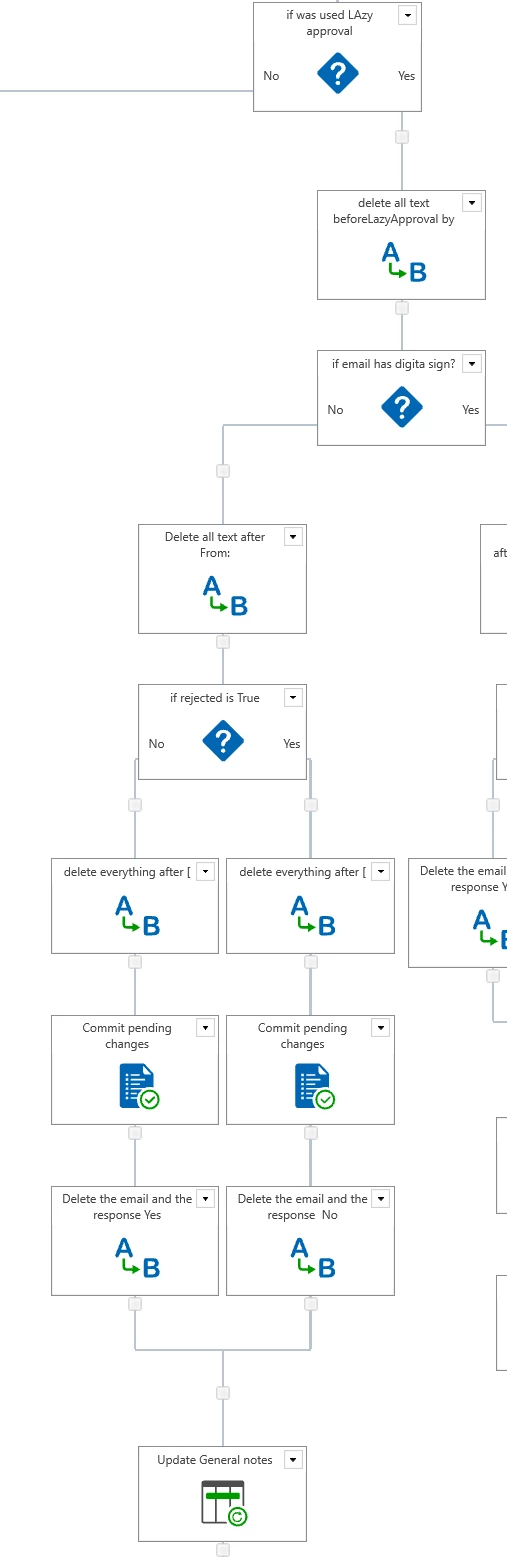
7196i40FBB2EDBC76B6E2.png

3 replies

Simon Muntz
Nintex Partner
Forum|alt.badge.img+23
  • Nintex Partner
  • April 7, 2020
Commit pending changes action is not required in this situation.
This article gives you insight into the correct use of the action.
https://community.nintex.com/t5/Nintex-for-SharePoint/Designing-your-Workflow-Commit-Pending-Changes-Action-NW2010/td-p/85180

Forum|alt.badge.img+3
  • Author
  • Rookie
  • April 8, 2020

I have disabled commit pending changes as well. but still no change in the regex behavior.


Simon Muntz
Nintex Partner
Forum|alt.badge.img+23
  • Nintex Partner
  • April 9, 2020
If you create a workflow with just 2 regular expression actions in a row does that work? This will tell us if its the workflow or the fact that there are two regular expression actions in a row that cause an issue.



