Nintex Community Menu Bar

Automatic creation of a continuous number based on the ID

  • August 20, 2020
  • 3 replies
  • 16 views

Forum|alt.badge.img+3

Dear Nintex Community,


I have a question regarding the use of the continuous ID.
I would like to have a field in my Nintex form where a continuous request number is automatically generated, which should always look like this "DEAL CR-1" 
The beginning "DEAL CR-x" should always be there and the ID at the end should be added instead of the x.


How can I best achieve this?


Kind Regards,


Florian

3 replies

Simon Muntz
Nintex Partner
Forum|alt.badge.img+23
  • Nintex Partner
  • August 20, 2020

Hi,


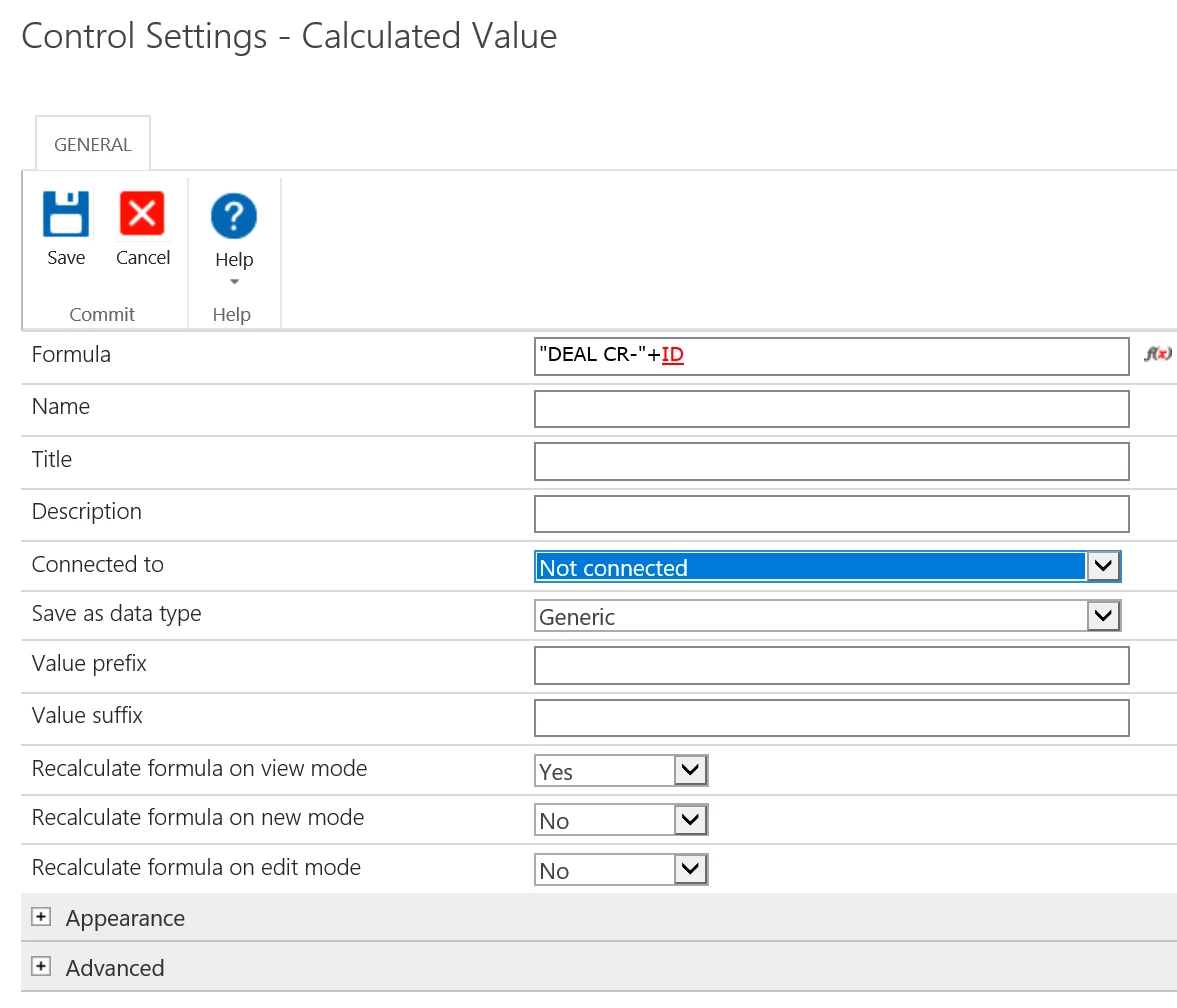
Add a calculated value control to the form and configure it as per the screen shot.  Take note of the recalculate settings for the different modes.

8751i1C41B2D1F3D7BE42.png


Forum|alt.badge.img+3
  • Author
  • August 21, 2020

Many thanks for the quick help.
It works partly because the ID is only shown to me after I have created a new item and then go back to edit and save the item.
Is there a way at Nintex how I can get the ID/a sequential number displayed when I create a new item?
Currently it looks like this when I click on New Item:


8760i9F57B22AB98C9B12.png


Simon Muntz
Nintex Partner
Forum|alt.badge.img+23
  • Nintex Partner
  • August 24, 2020
Hi,

What you are seeing is expected behavior. If the item has not been created then there will be no item ID for the current item.
You could look up the previous ID and then add 1 to it and display that on your form in only calculate on new mode. The only issue there is if multiple people submit at the same time they will all get the same previous Item ID.

Here is a KB on how to retrieve a value from the previous item. https://community.nintex.com/t5/How-To-s/How-to-get-the-value-from-the-previous-list-item-to-pull-into-my/ta-p/89680