

Nintex Community Menu Bar

Auto populate Repeating Section based on the Single line text input

  • May 22, 2019
  • 4 replies
  • 94 views

Forum|alt.badge.img

Hi All,


I have 2 SharePoint list,

1) One SharePoint list will save the data based on the user input from Nintex Form

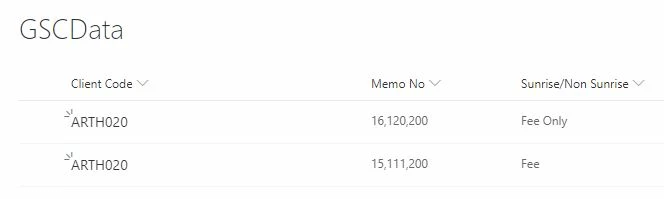
2) Second SharePoint list (GSCData) is used as database.
2267i78D9FF8D374780C2.jpg


When the user inputs client code from Nintex form it has to lookup from GSCData list and fetch the 

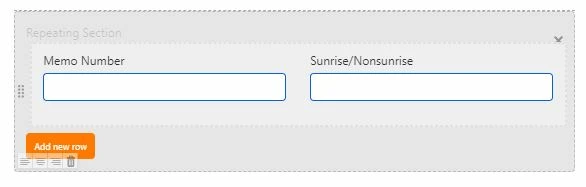
memo no and sunrise/non sunrise to Repeating Section. In the below scenario i have updated Client Code and in the above GSCData list we have 2 line items which is related to "ARTH020" client. It has to automatically add 2 line items in Nintex Form Repeating Section.

2268iEAB45E34D9E4CC7B.jpg

2269iF1426F46F1A359DB.jpg


4 replies

Forum|alt.badge.img+17
  • May 22, 2019

This can be done with JavaScipt which is possible in the product but not supported. Meaning you're on your own, but hey thats why you're in the community :-)


Forum|alt.badge.img+14
  • Scholar
  • May 23, 2019

I see you decided for responsive design...


if you'd like to show dynamic number of rows for a given client code you can forget to achieve anything like that in responsive forms.

if number of rows is constant, you'd need to add to the design as many controls as number of rows and columns you'd like to show.


with classic design, you could write a javascript that queries the other list and populates the repeating section.

if you're not stick to a repeating section, resp. you just want to show but not edit clients data you could use list view control - which would be much easier and straight forward solution.

but neither of those are available in responsive forms.


Forum|alt.badge.img+17
  • May 23, 2019

@emha  both of those and the original post is referencing classic forms designer because javascript isn't supported in responsive forms. 


I appreciate your responding and offering advice, but not quite sure why the negative tone regarding responsive forms. It doesn't even merit this use case and Nintex provides options for different use cases as needed. 


Forum|alt.badge.img+14
  • Scholar
  • May 24, 2019

@eharris04


both of those and the original post is referencing classic forms designer because javascript isn't supported in responsive foms. 

have a closer look at pictures attached to the question....

there are handles around the controls that are only present in responsive designer


I appreciate your responding and offering advice, but not quite sure why the negative tone regarding responsive forms.

that's not negative tone, that's simply fact.

my personal rough estimation would be it miss half the functionality of classic forms.

and do not allow javascript so that one could work around it.

of course, there are as well advantages of responsive design, but IMHO limitiations outweight positives (so far)


sure, everybody can decide which of the two is more suitable for a specific use case. if one decides for or is obliged to use responsive forms s/he has to aware of limitations as well.

and so I provided hints for both possible designs

