
Nintex Community Menu Bar

Allow 'Fill-in' choices For Dropdown List Creating Extra Blank Space on Form

  • July 31, 2019
  • 5 replies
  • 24 views

AasimNaseem
Forum|alt.badge.img+2

Hello friends,


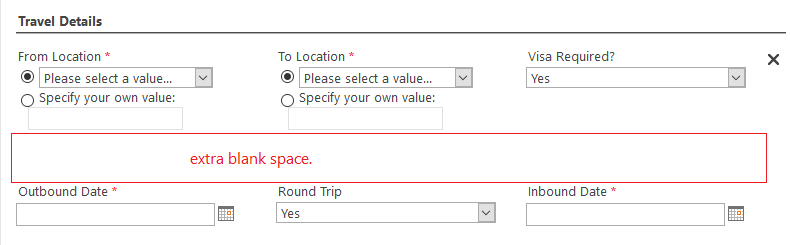
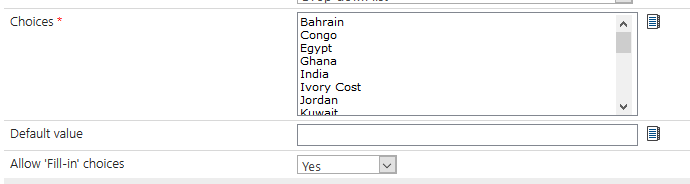
I selected the "Allow Fill-in choices" for my drop down. Everything looks fine in design mood but in preview, it is showing extra blank space. How to get rid of this extra space?



3720iB197A650BD22A8E1.png


3722iE6EC7DE9BE4686F6.png


3721iCD55B61BDC3C4C69.png

@DimaHijazi   @PhilipWarrak any suggestion from your side?

Thanks

- ANS

5 replies

Simon Muntz
Nintex Partner
Forum|alt.badge.img+23
  • Nintex Partner
  • July 31, 2019
Hi,
Just by looking at the screenshots it appears there may be some control overlap that is causing the issue.
Please provide an export of the form and I can look what may be causing the issue.

Forum|alt.badge.img+10
  • August 1, 2019
Place the controls in panel

AasimNaseem
Forum|alt.badge.img+2
  • Author
  • August 14, 2019

Hello.

Please find the attached form.


AasimNaseem
Forum|alt.badge.img+2
  • Author
  • August 14, 2019
@sojanm - I placed them in a panel as well but no success.

Forum|alt.badge.img+10
  • August 14, 2019

HI Aasim,


It seems there was some issue with the panel, just delete and add another panel. Or try the one attached.

It is always better to use panels, there shouldn't be any floating controls on the form, let all the contorls be in a panel