Nintex Community Menu Bar

Add schedule button Scheduled Workflow

  • February 24, 2020
  • 1 reply
  • 14 views

Forum|alt.badge.img

Hi, 

I'm trying to add a global scheduled workflow that will parse the data of a list. However, I'm failed to see the "Add Scheduled" button. 

I went to a site collection -> site settings -> Scheduled Workflows under Nintex workflow and can see the empty list correctly indicating that I've no scheduled workflows but I cannot see the "Add Scheduled" button. Can you please guide why? 

 

6550iC04A7C3067DA5615.png

1 reply

Simon Muntz
Nintex Partner
Forum|alt.badge.img+23
  • Nintex Partner
  • February 24, 2020

Hi,


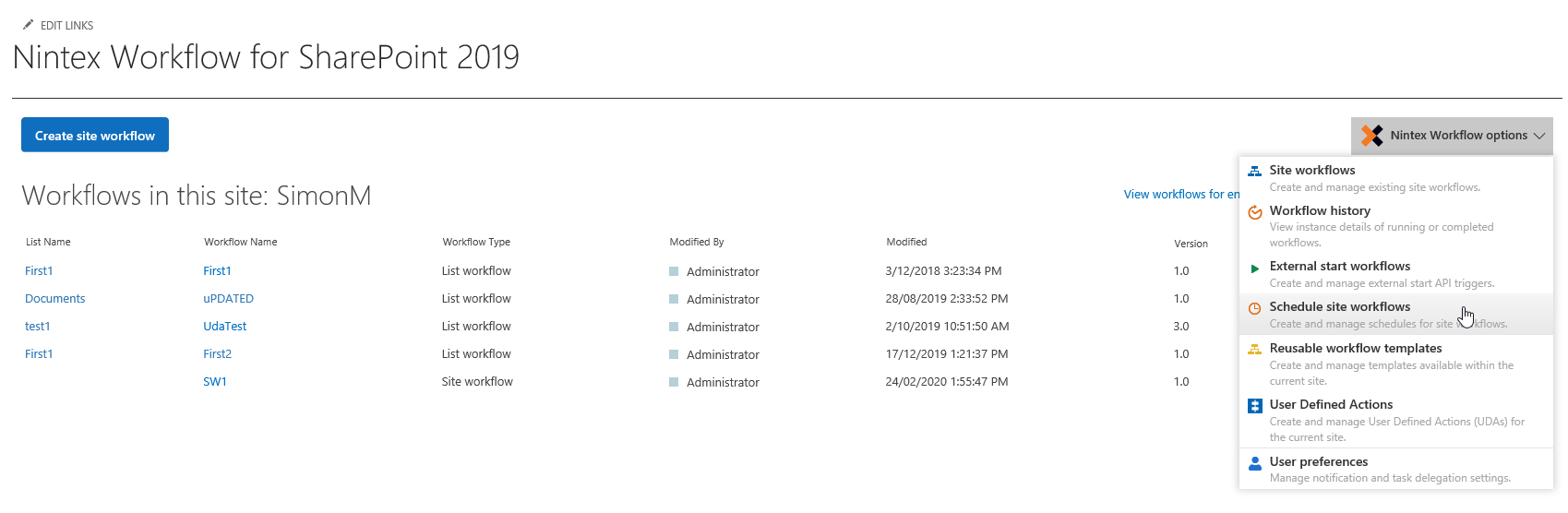
Navigate to site settings.  In the Nintex workflow menu instead of clicking on "scheduled workflows" click on "Workflows for this site" Then from the right hand menu click select to schedule site workflows.

6551i316ABF4DBD0FB72E.png