Nintex Community Menu Bar

2 level document approval based with condition

  • March 29, 2020
  • 6 replies
  • 13 views

Forum|alt.badge.img+1

Hi All,


I'm looking for a solution where once the document is uploaded and sent for approval (Reject/Approved/Reviewer2) to Reviewer1. Based on the action of Reviewer1 the next steps should execute.


For example: if Reviewer1 selects approve the document is approved without Reviewer2's approval.

and vice versa.


Please let me know your comments. 

6 replies

Forum|alt.badge.img+14
  • Nintex Employee
  • March 29, 2020

Hi @Syedbahauddin ,


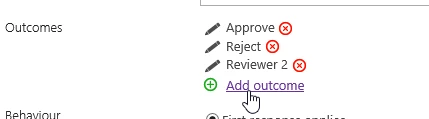
You should be able to do this using a flexi task(https://help.nintex.com/en-US/nintex2016/current/#sp2016/Workflow/ActionsCore/FlexiTask.htm), as it allows you to add an extra outcome like below. Then all you would need to do is add another task on the reviewer2 branch.

7022i0302DFBB03730D8B.png


Forum|alt.badge.img+1

Hi @leighburke ,


Thank you for replying.


So do you mean once the document is uploaded a task should be assigned to Reviewer1 and depending on the the action we can assign it to Reviewer2.

However, I would like to know where does the value approved/reject get stored for the activity - Set documents Initial approval status is stored?


or I don't need that activity if I'm assigning task.

Please advise.

It would be great if you could just design and send me a screenshot of the workflow.


Thank you in advance.


Forum|alt.badge.img+14
  • Nintex Employee
  • March 30, 2020

@Syedbahauddin Can you confirm the use case, are you looking to get a response(Approve/Reject) from reviewer 1 and also allow them to decide if needs to go to reviewer 2? 


Forum|alt.badge.img+1

@leighburke 


So here is the case - The Reviewer1 will have 3 option:

1. Approve : here if Reviewer1 is satisfied with the document and Reviewer2 approval is not required.

2. Reject : Document is rejected

3. Approval from Reviewer2: Here if the Reviewer1 is satisfied(approves) with document and require Reviewer2 to approve too.


and finally Reviewer2 will have either Approve or Reject.


Forum|alt.badge.img+14
  • Nintex Employee
  • March 30, 2020

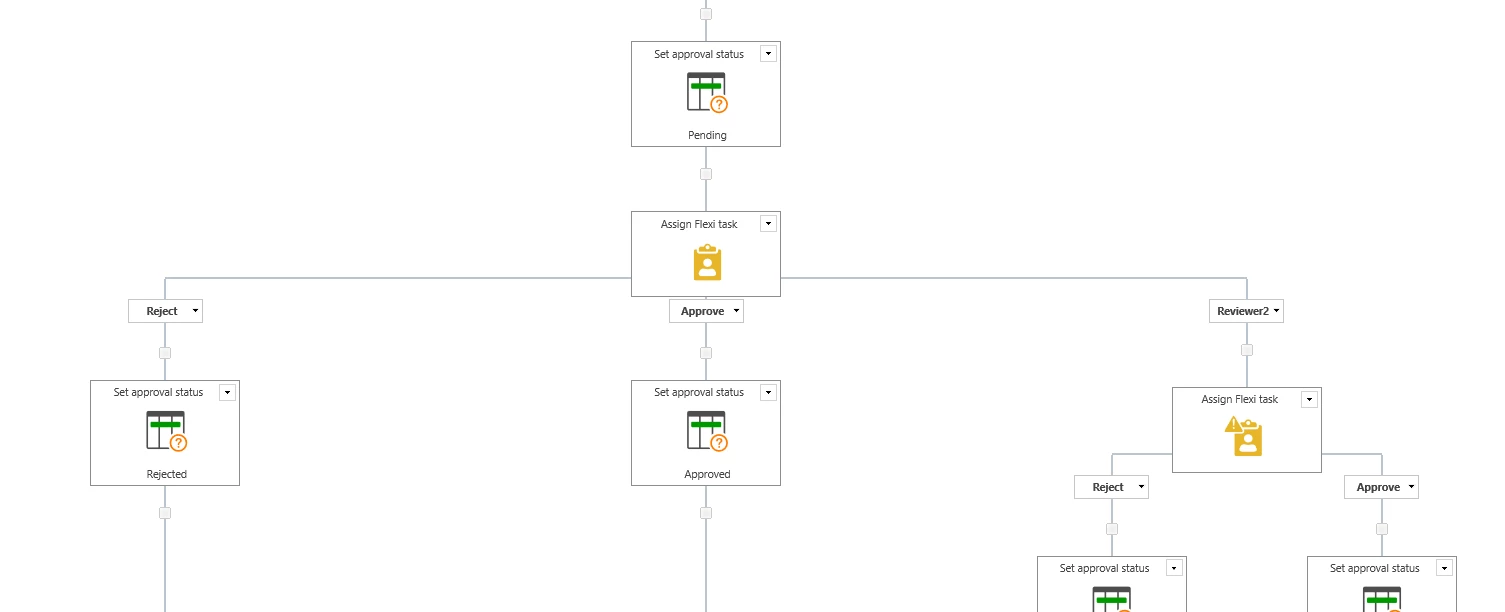
@Syedbahauddin There is a few ways you could do this and the way I mentioned would work. I have included a screenshot below of the basic design, you could improve on this by adding some send email actions to notify the initiator.

7024i18D7776BB0DF1748.png


Forum|alt.badge.img+1

Hi @leighburke,


Thank you so much.


Works perfectly fine :)