




Issue
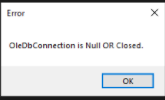
While importing data (either manually or using the Open Data action), an error is displayed regarding an open and available connection or stating OleDBConnection is Null or Closed. This could be the result of one of two scenarios:
- An older version of Microsoft Access Database Engine, 2010 is installed.
- The 64-bit version of Microsoft Access Database Engine 2016 is installed.
Error Code
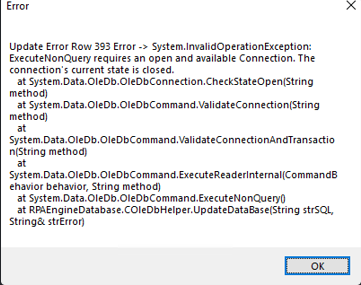
Try this for any error that mentions a connection such as the two displayed below.
Update Error Row XXX Error
Update Error Row XXX Error - System.InvalidOperationException:ExecuteNonQuery requires an open and available Connection. The connection's current state is closed.
OleDbConnection is Null or Closed
Nintex Foxtrot RPA and Nintex RPA LE are 32-bit applications that use a helper app called Foxtrot64 to interact with 64-bit systems. The 32-bit version of the Microsoft Access database engine 2016 is needed to work with Foxtrot64.
Please note: If you are running version 15.1.2 or below, you can use Access Database Engine 2010, but versions 15.1.4 or above require Microsoft Access DB Engine 2016 (32 bit).
Resolution
If using Foxtrot version 15.1.4 or above or and RPA LE version:
- Navigate to Programs and Features and check to see what version of Microsoft Access Database Engine is installed.
- RPA LE version 15.1.4 and above require the Microsoft Access Database Engine version 2016, (32 bit).
- If version 2016 (32 bit) is already installed, it may have become corrupt, try running a repair.
- If MS Access Database Engine 2010 or MS Access Database Engine 2016, (64 bit) is installed, uninstall it and install MS Access database engine 2016, 32 bit.
-
Microsoft Access Database Engine 2016 Redistributable (32-bit)
- **MS Access Database engine will not install over an existing older version, so it must be uninstalled first.
-
- If you are running a 64 bit version of Microsoft Office, the /Quiet command noted in the Community Post link below, under Related Links, will need to be used to install the 32 bit version of MS Access Database Engine, 2016.
- An alternative to using the /Quiet command is to uninstall Foxtrot or RPA LE, delete the MS Access database engine and reinstall Foxtrot or RPA LE.
If using Foxtrot version 15.1.2 or below, you will need the Microsoft Access Database Engine 2010 (32 bit).
Additional Information
The RPA Development Team also recommends that you upgrade your version of RPA LE to the newest versions listed in the Release Notes Page at https://help.nintex.com/en-US/platform/ReleaseNotes/NintexRPA.htm.
If you are using Nintex Foxtrot RPA version 15.1.12 or below and cannot upgrade to RPA LE due to your license, please upgrade to version 15.1.13 which is the latest version of Foxtrot.
These versions contain fixes for maintaining a persistent connection to the .accdb file that fixes connection issues to the database. Especially when the database is located over the network and can cause errors such as the ones mentioned in this article.
Related Links
In the Community Post link below, you may read the entire post, but please focus on the last post from EHerrera, RPA Development Team Manager. (7th reply)
Community Post - Import Data from Excel Issue
RPA-has-detected-an-issue-that-is-preventing-Excel-Support