



Issue
When using conditional word formulas, statements are not populating as expected, even when conditions are believed to be met.
Resolution
First, Created a Delivery option which is Output - Originals
In Salesforce Lightning (LEDD):
1. Navigate to the Delivery Tab
2. Uncheck Convert Word Fields to Text
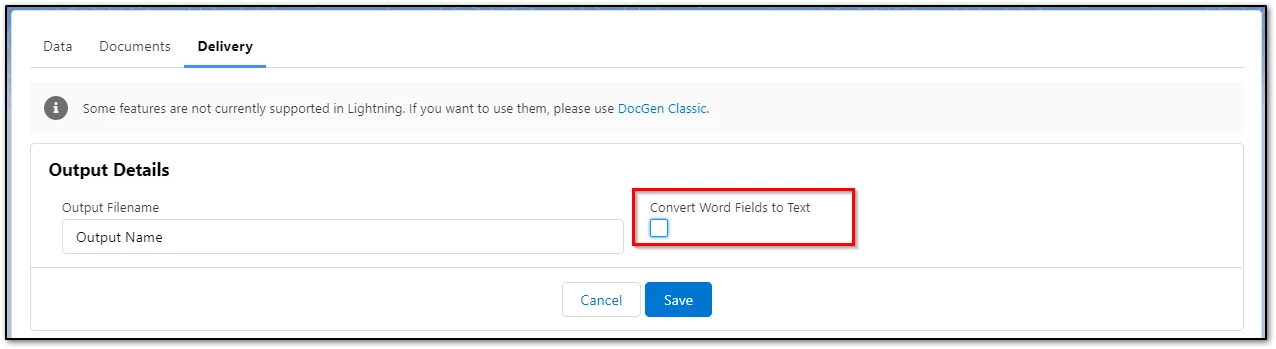
In Salesforce Classic:
Add "Keep Word Formulas" to the Document Package layout
- Go to Salesforce Setup.
- Search for Create > Objects.
- Scroll down and click on Document Packages.
- Scroll down to Page Layouts.
- Choose the appropriate layout (DDP/Document Package/Custom DDP/etc).
- Under Quick Find, search for "Keep Word Formulas", and then drag onto the Document Package layout.
Run the DocGen Package and Toggle the Word Conditional Fields to verify the Data being placed into the Package.
Another indication that an IF Statement is populating incorrectly could be that either the True or False statements may contain quotation marks within the middle of a True/False Statement. For example: IF "<<This_Tag>>" = "True Statement" "False Statement with "quotation marks inside" of this Statement"
- As a workaround, remove the quotation marks and add two single quotation marks before and after the word/phrase/sentence containing quotation marks within said statement: https://community.nintex.com/t5/Technical-Issues/Drawloop-Quotes-Break-If-Statement/ta-p/208153
Error Code