



Scenario
You need to update a hidden column in a SharePoint document library or list using a Nintex Automation Cloud workflow. The standard SharePoint Update items actions will not be able to display the column as a selectable value as it is hidden and/or restricted.
Using a SharePoint Call a web service action with standard update actions and REST API calls (e.g., MERGE or PATCH) return 204 No Content (positive outcome), but do not apply the actual update due to the column being hidden or schema-restricted.
Solution: Use ValidateUpdateListItem REST API
This method bypasses UI and schema restrictions and allows updates to hidden or locked fields.
Call a SharePoint web service - Action Configuration
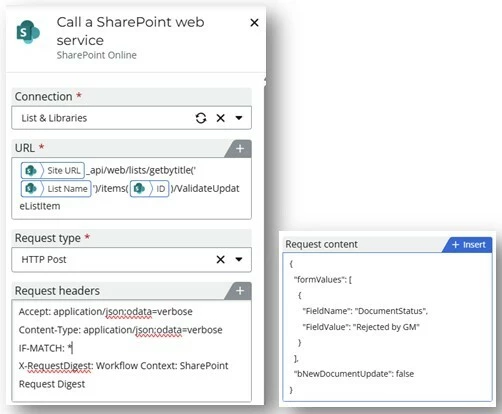
Plain Text:
Method: POST
URL:
https://<yourtenant>.sharepoint.com/sites/<yoursite>/_api/web/lists/getbytitle('YourLibraryName')/items(<ItemID>)/ValidateUpdateListItem
Headers:
Accept: application/json;odata=verbose
Content-Type: application/json;odata=verbose
IF-MATCH: *
X-RequestDigest: Workflow Context: SharePoint Request Digest
Request Content (Body):
{
"formValues": [
{
"FieldName": "DocumentStatus",
"FieldValue": "Rejected by GM"
}
],
"bNewDocumentUpdate": false
}
Notes & Tips
- This method works even if the column:
- Is hidden via schema (Hidden = TRUE)
- Is not editable via SharePoint UI or in SharePoint update items action in a NW workflow
- Is part of a document library item (not only a list item)
- Ensure the field name is the internal name, not the display name.
- The display name is what the user will see in SharePoint at direct face-value on the list or library (“Document Status”):
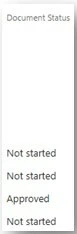
- The display name is what the user will see in SharePoint at direct face-value on the list or library (“Document Status”):
The internal name can be found by using a SharePoint Call a web service action with <siteURL>/_api/web/lists/getbytitle('YourListName')/fields?$select=InternalName
And then a Query JSON action with d.InternalName:
{
"d": {
"results": [
{
"Title": "Document Status",
"InternalName": "DocumentStatus"
}
]
}
You can update multiple fields by adding more objects to the formValues array.