



Sometimes repeating section data is not as simple as coming directly from a Nintex form. There are times when XML is captured within a SharePoint list. This XML contains the data that can be extracted and used in Generate document actions.
The different data is often represented by various GUIDs, for example, Title, Cost, Age etc. that may look something like this: _a555555555aaa5aaa55aaaaa555aa555
In this case, we can use Query XML actions to obtain the data and put it into separate collections for each (Age, Cost etc).
The below shows how to achieve this within a NAC workflow:
-
Create collection variables for each data set.
-
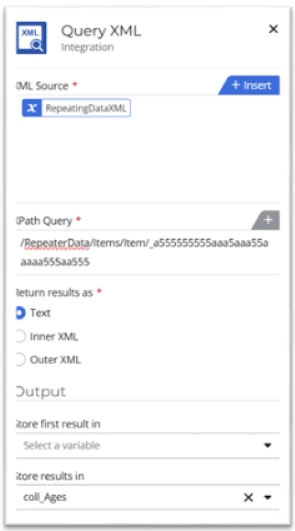
Drag on a Query XML action for each set of data you want to add to a collection for use in the document. The configuration may look like this depending on how the XML is stored/built up in SharePoint. In this case, ReapeatingDataXML is the column storing the XML in SharePoint:
-
Once you have done this for all the relevant values, we can now combine these collections with a Merge Collections action:
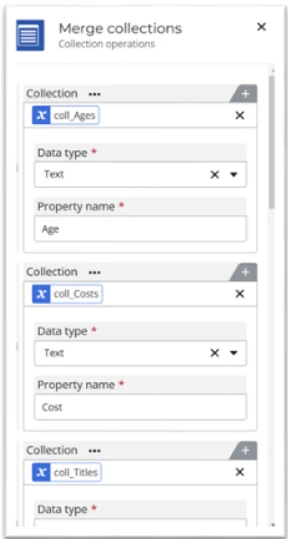
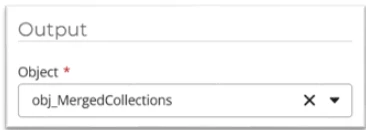
We will create an object as the output at the end of the Merge collections action to store the merged collections that we will then use in the Generate document action’s document tagger:
-
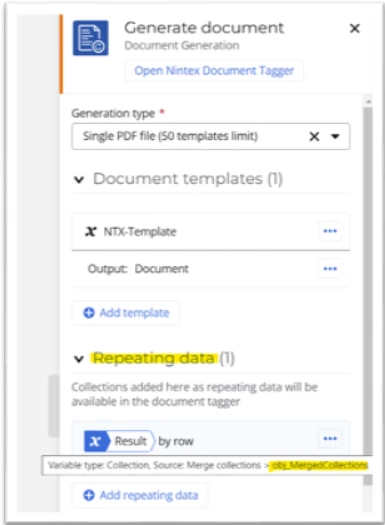
In the Generate Document action, make sure to add this output in the repeating data section of the action:
-
We can now open the Document Tagger in the Generate document action and use the merged collections to display the repeating data in a document:

**NB – do not forget to add the start tag seen above in the example below (to the first column only) to mark where the repeating section data will begin**
| Title | Age | Cost |
| <<Mergecollections_objmerge | <<Mergecollections_ob | <<Mergecollections_ |