This checklist outlines critical pre-production considerations for workflows that have been migrated from Nintex for SharePoint On-Premises or Office 365 into Nintex Workflow. It helps ensure the production environment is correctly configured and that workflows function as expected without conflicts or test artifacts. Review and complete each item prior to go-live to help prevent issues and ensure a successful deployment.
Key Pre-Production Checks:
Update SharePoint Connections
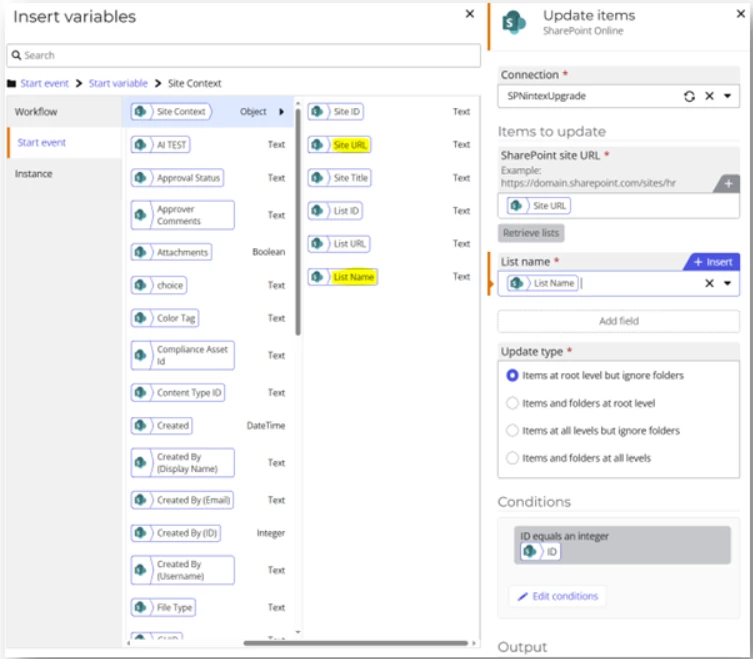
Replace all SharePoint site URLs and list/library names with production versions in the Start Event.
We recommend using variables in your SharePoint Online actions to make it easier when changing between development and production sites:
Note: If you do not have a SharePoint Start event, you can use a workflow variable and harcode the site URL into the variable.
If hardcoded values were used instead of variables, each action must be updated manually.
Verify Links in Emails and Tasks
Ensure all hyperlinks (e.g., SharePoint list links or documentation links) point to the production environment, not the test/staging site.
Confirm Assignees in Tasks and Notifications
Replace any test or placeholder users used during testing with the correct production users or distribution groups.
Re-enable Any Disabled Actions
If any workflow actions were disabled during testing (e.g., “Send an Email,” “Create Item”, “Call a Workflow”), re-enable them for production.
Prevent Duplicate Workflow Execution
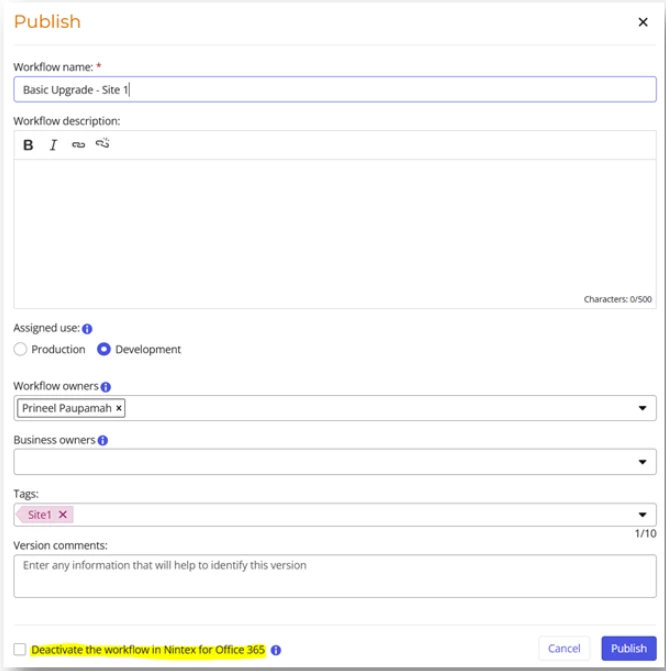
For Office 365 (O365) workflows: When publishing to Nintex Workflow, disable the original workflow to avoid duplicate instances running in parallel:
Note: You can also deactivate your O365 workflow directly from the O365 workflow.
For On-Prem workflows: Ensure users are informed and begin using the new solution in Nintex Workflow.
Rollback Plan
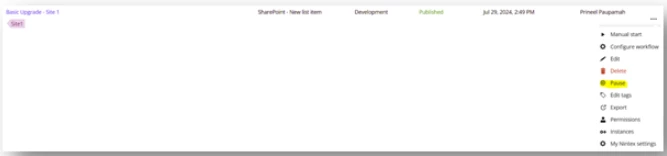
If you encounter issues after deploying the workflow in Nintex Workflow, you can pause the workflow in Nintex Workflow and temporarily re-activate the original O365 or On-Prem workflow (if still available and functional).
⚠️ Be cautious to avoid running both workflows simultaneously, as this can cause data duplication or conflicting actions.