

Nintex Community Menu Bar
Question

Ui-only formula field on aggregate model.

  • July 9, 2024
  • 12 replies
  • 76 views
  • Translate All

Forum|alt.badge.img+18

We’re currently using a bunch of javascript to make percentage calculations on an aggregate model.

I’d love to replace that with a ui-only formula field.

Here’s my attempt at a formula:

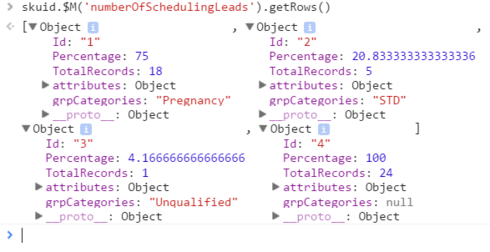
{{TotalRecords}} / MODEL_LOOKUP(‘numberOfSchedulingLeads’, ‘TotalRecords’, ‘Id’, ‘4’)

The formula isn’t returning anything. Is my syntax ok?

The fourth row of my model (Id=4) is the roll-up summary row. TotalRecords and Percentage are both COUNT(Id), and we’re using javascript to change the values of Percentage to a percent of the column sum.

The ui-only field is called PercentUI, but isn’t showing up in the model at all.
This topic has been closed for replies.

12 replies

Forum|alt.badge.img+17
  • Nintex Employee
  • July 9, 2024

This is a place where our documentation needs to be improved.  ( I don’t think we have a tutorial on UI Only fields published yet…)

The syntax for lookup fields is as follows: 

MODEL_LOOKUP(“ModelName”,“FieldNametoBeReturned”,“FieldNameToMATCHinCurrentModel”,{{MatchingValueFromCurrentModel}})

The first three properties need to be in quotes. 
The last property is a data merge, so it needs to be in Braces. 

Hopefully this helps. 

Translate

Forum|alt.badge.img+18

So, if I want to return the value of the TotalRecords field from the numberOfSchedulingLeads model where Id = 4 (or actually, just get the value of {{TotalRecords}} from the last row of the model… how would I do that? can I do that with a model lookup function? Seems like I actually need a query of some kind?

The current model is the numberOfSchedulingLeads model… not sure if that makes a difference.

Translate

annajosephine
Nintex Employee
Forum|alt.badge.img+18

Guys! I just (finally) published the ui-only fields tutorial. Pretty basic, but at least there’s something! http://help.skuidify.com/m/models-conditions-filters/l/378313-ui-only-fields

Translate

Forum|alt.badge.img+18

The Staff of Gandalf for only $2,500! What a steal!!

Translate

annajosephine
Nintex Employee
Forum|alt.badge.img+18

You’d be surprised what you can find on the internet 😉

Translate

Forum|alt.badge.img+5

Hey Matt. Were you able to get this working with a UI only field? I have created an aggregate model and would like to add a formula column to it if possible. All it would do is multiply total man hours by 200,000 & then divide by the total recordable incidents.

Translate

Forum|alt.badge.img+5

I can do this now using a custom summary formula on a standard report. And I can see where I can add a formula to an aggregate model. But when I do I cannot add the field to my table for some reason. 

Translate

annajosephine
Nintex Employee
Forum|alt.badge.img+18

Hey Ryan, this should be doable in Skuid. You create the formula field in the “aggregations” section of your aggregate model, and then just drag it in to your table.

What version of Skuid are you running? in some of the earlier Banzai versions you could only add aggregate model fields from the Add > Model Field(s) button on your table.

Also, make sure your table is set to the right model. Do either of these fixes work for you?

Translate

Forum|alt.badge.img+5

Thanks Anna. Dragging and dropping did get the formula on to the table. I wasn’t able to add it using the add model fields button. However my formula isn’t working. It’s showing up as 0.00 so I guess my formula is wrong. How do I reference the other aggregations in the formula? 

Translate

Forum|alt.badge.img+18

Ryan, you can use merge syntax with the unique id that you give the other fields, i.e. {{sumMyOtherAggFieldc}} 

Translate

Forum|alt.badge.img+5

Yea that was it. Dumb mistake. But this is huge so thanks for the help guys,.

Translate

annajosephine
Nintex Employee
Forum|alt.badge.img+18

Not dumb!  Aggregate model field aliases can be tricky. Happy Skuidifying!

Translate





