Nintex Community Menu Bar
Question

Set column width on Row Actions Icon column?

  • Jul 9, 2024 9:54 PM UTC
  • 2 replies
  • 23 views
  • Translate All

Forum|alt.badge.img+5

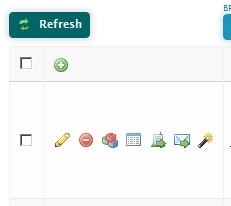
Is there a way to set the width of the column with the Row Action icons?
3eaa3e59e5a3061c08f97495ca9597e2397cd250.jpg

I would like to set the width so they wrap onto multiple lines since my data already makes the rows taller than one line of text.

This column does not seem to have an id or class so I’m not sure how to set it’s width.

Thanks!

2 replies

Forum|alt.badge.img+5
  • Author
  • Jul 10, 2024 12:05 AM UTC

Any ideas on this one? Anyone?

Translate

Forum|alt.badge.img+3
  • Nintex Partner
  • Jul 10, 2024 12:05 AM UTC

Give your table a class. After that add the following css:

&#46;your-table-class tr td:nth-child(2){<br /> width:60px;<br />}<br /><br />&#46;your-table-class tr td:nth-child(2) &gt; div{<br /> white-space:normal !important;<br />}

If you remove all your mass actions it would be td:first-child instead of td:nth-child(2)

Hope that helps

Translate