

Nintex Community Menu Bar
Solved

Nested JSON array in REST request body

  • July 11, 2024
  • 11 replies
  • 96 views
  • Translate All

Forum|alt.badge.img+18

I am attempting to connect a REST model to ClickSend.

The API is expecting a body that looks like this:

{
  "messages": [
    {
      "to": "+61411111111",
      "from": "+6142222222",
      "body": "This is a message"
    }
  ]
}

I am using the batch insert option and the nested JSON array option, which the tooltips indicate should create an what I’m looking for. Here’s the setup:
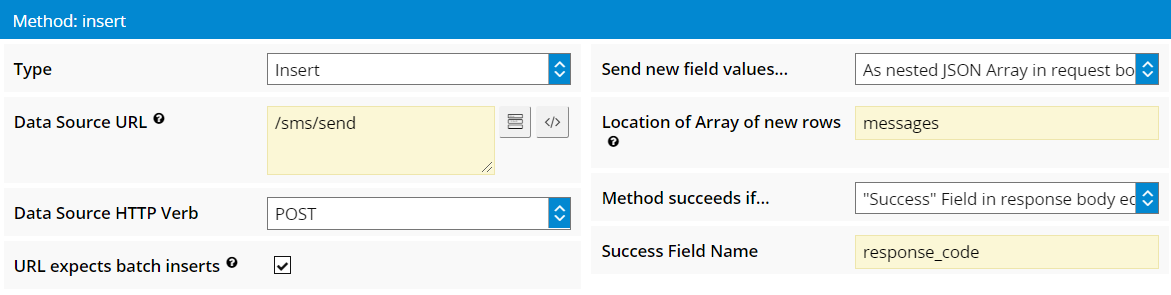
However, the body of the actual request being sent looks like this:

{

ā€œmessagesā€: {

ā€œsk-3PMGf3-5ā€: {

ā€œtoā€: ā€œ+61411111111ā€,

ā€œfromā€: ā€œ+6142222222ā€,

ā€œbodyā€: ā€œThis is a test.ā€,

ā€œcustom_stringā€: ā€œ123456ā€

}

}

}

It looks like an object with the temp skuid row Id as the key rather than an array.

Help?

Best answer by Matt_Sones

I’m still way back on 10.0.27, so ā€œuse template for request bodyā€ is not an option. I used this snippet instead successfully:

var changes = arguments[0].changes,

payload = {

messages: [

{

 to: changes.to,

 from: changes.from,

 body: changes.body,

 custom_string: changes.custom_string

}

]

};

return payload;

View original

11 replies

Forum|alt.badge.img+18

The response I’m getting is ā€œBAD REQUEST: The messages array is empty.ā€

Translate

Forum|alt.badge.img+18

bump

Translate

annajosephine
Nintex Employee
Forum|alt.badge.img+18

Hey @Matt_Sones what version of Skuid are you on?

Do you mind sending a simplified version of your page XML?

Translate

Forum|alt.badge.img+18

10.0.27 😦

Here’s the test page I’m working with:

<model id="Send" query="false" createrowifnonefound="false" datasource="ClickSend" processonclient="true" type="readwrite" label="Message" labelplural="Messages">

  <fields>

    <field id="to" displaytype="TEXT" label="To" required="true" uionly="false"/>

    <field id="from" displaytype="TEXT" label="From" required="true" uionly="false"/>

    <field id="body" displaytype="TEXTAREA" label="Message" ogdisplaytype="TEXT" required="true" uionly="false"/>

    <field id="custom_string" displaytype="TEXT" label="Patient Case ID" uionly="false"/>

  </fields>

  <conditions/>

  <actions/>

  <methods>

    <method type="insert" verb="POST" successif="responsefieldequals" sendchanges="asnestedjsoninbody" endpoint="/sms/send" batch="true" pathtocontent="messages" successfield="response_code"/>

  </methods>

</model>
<buttonset model="Send" uniqueid="sk-3PATUJ-218">

  <buttons>

    <button type="multi" label="New Message" uniqueid="sk-3PATl0-221" icon="sk-icon-add">

      <actions>

        <action type="createRow" model="Send" appendorprepend="prepend" defaultmodefornewitems="edit" affectedrows="context"/>

      </actions>

    </button>

  </buttons>

</buttonset>

<basicfieldeditor showheader="true" showsavecancel="true" showerrorsinline="true" model="Send" buttonposition="" uniqueid="sk-3PALtc-174" mode="edit">

  <columns>

    <column width="100%">

      <sections>

        <section title="Section A" collapsible="no">

          <fields>

            <field uniqueid="sk-3PAOCB-189" id="to"/>

            <field uniqueid="sk-3PARw5-200" id="from" valuehalign="" type=""/>

            <field uniqueid="sk-3PASIg-209" id="body" valuehalign="" type=""/>

            <field uniqueid="sk-3PIMR1-537" id="custom_string" valuehalign="" type="">

              <label>Case ID</label>

            </field>

          </fields>

        </section>

      </sections>

    </column>

  </columns>

</basicfieldeditor>
<labels/>

<javascript/>

<css/>
<styleitem type="background" bgtype="none"/>
Translate

Forum|alt.badge.img+18

bump

Translate

Forum|alt.badge.img+11

Hey, @Matt_Sones . can we hop on a call either today or this week to check out your project?

Translate

Forum|alt.badge.img+18

@Germany Sure. Does Friday 2/12 at 1pm eastern time work for you?

Translate

Forum|alt.badge.img+11

Glad to know you figured out the issue @Matt_Sones . so others can know,

Matt had dummy models on the page to help Skuid grab the right metadata on the initial scrape. he had a set of dummy models for internal salesforce and external salesforce… except he actually had both set for external instead of internal.

Translate

Forum|alt.badge.img+11

Hey @Matt . found the issue!

Solution:

we had to unselect:

  1. URL expects batch inserts

For Send new field values… we selected

  1. as templated request body

then went under custom request

  1. and added:
{
  "messages": [
    {
      "to": "{{to}}",
      "from": "{{from}}",
      "body": "{{body}}"
    }
  ]
}
saved and viola. it worked! 

The entire XML is: 
<skuidpage unsavedchangeswarning="yes" personalizationmode="server" showsidebar="false" useviewportmeta="true" showheader="false">
    <models>
        <model id="Send" query="false" createrowifnonefound="false" datasource="ClickSend" processonclient="true" type="readwrite" label="Message" labelplural="Messages">
            <fields>
                <field id="to" displaytype="TEXT" label="To" required="true" uionly="false"/>
                <field id="from" displaytype="TEXT" label="From" required="true" uionly="false"/>
                <field id="body" displaytype="TEXTAREA" label="Message" ogdisplaytype="TEXT" required="true" uionly="false"/>
                <field id="custom_string" displaytype="TEXT" label="Patient Case ID" uionly="false"/>
            </fields>
            <conditions/>
            <actions/>
            <methods>
                <method type="insert" verb="POST" successif="responsefieldequals" sendchanges="usetemplaterequest" endpoint="/sms/send" batch="false" successfield="response_code" contenttype="application/json" payloadsnippet="cs_snip" insertresponse="recordinbody" customrequesttemplate="{&#10;  &quot;messages&quot;: [&#10;    {&#10;      &quot;to&quot;: &quot;{{to}}&quot;,&#10;      &quot;from&quot;: &quot;{{from}}&quot;,&#10;      &quot;body&quot;: &quot;{{body}}&quot;&#10;    }&#10;  ]&#10;}"/>
            </methods>
        </model>
    </models>
    <components>
        <buttonset model="Send" uniqueid="sk-3PATUJ-218">
            <buttons>
                <button type="multi" label="New Message" uniqueid="sk-3PATl0-221" icon="sk-icon-add">
                    <actions>
                        <action type="createRow" model="Send" appendorprepend="prepend" defaultmodefornewitems="edit" affectedrows="context"/>
                    </actions>
                </button>
            </buttons>
        </buttonset>
        <basicfieldeditor showheader="true" showsavecancel="true" showerrorsinline="true" model="Send" uniqueid="sk-3PALtc-174" mode="edit">
            <columns>
                <column width="100%">
                    <sections>
                        <section title="Section A" collapsible="no">
                            <fields>
                                <field uniqueid="sk-3PAOCB-189" id="to"/>
                                <field uniqueid="sk-3PARw5-200" id="from" valuehalign="" type=""/>
                                <field uniqueid="sk-3PASIg-209" id="body" valuehalign="" type=""/>
                                <field uniqueid="sk-3PIMR1-537" id="custom_string" valuehalign="" type="">
                                    <label>Case ID</label>
                                </field>
                            </fields>
                        </section>
                    </sections>
                </column>
            </columns>
        </basicfieldeditor>
    </components>
    <resources>
        <labels/>
        <javascript>
        </javascript>
        <css/>
        <actionsequences/>
    </resources>
    <styles>
        <styleitem type="background" bgtype="none"/>
    </styles>
</skuidpage>

let me know if this helps.

Translate

Forum|alt.badge.img+11

(not sure where my post went with the solution, so I will re post here)

We figured out the solution. in essence, we had to uncheck the URL expects batch inserts box and choose use templated request body for the Send new field valuesfield.

once we did that, we then create the custom request with the following:

{
  "messages": [
    {
      "to": "{{to}}",
      "from": "{{from}}",
      "body": "{{body}}"
    }
  ]
}
You can see the entire XML here:
<skuidpage unsavedchangeswarning="yes" personalizationmode="server" showsidebar="false" useviewportmeta="true" showheader="false">
	<models>
		<model id="Send" query="false" createrowifnonefound="false" datasource="ClickSend" processonclient="true" type="readwrite" label="Message" labelplural="Messages">
			<fields>
				<field id="to" displaytype="TEXT" label="To" required="true" uionly="false"/>
				<field id="from" displaytype="TEXT" label="From" required="true" uionly="false"/>
				<field id="body" displaytype="TEXTAREA" label="Message" ogdisplaytype="TEXT" required="true" uionly="false"/>
				<field id="custom_string" displaytype="TEXT" label="Patient Case ID" uionly="false"/>
			</fields>
			<conditions/>
			<actions/>
			<methods>
				<method type="insert" verb="POST" successif="responsefieldequals" sendchanges="usetemplaterequest" endpoint="/sms/send" batch="false" successfield="response_code" contenttype="application/json" payloadsnippet="cs_snip" insertresponse="recordinbody" customrequesttemplate="{&#10;  &quot;messages&quot;: [&#10;    {&#10;      &quot;to&quot;: &quot;{{to}}&quot;,&#10;      &quot;from&quot;: &quot;{{from}}&quot;,&#10;      &quot;body&quot;: &quot;{{body}}&quot;&#10;    }&#10;  ]&#10;}"/>
			</methods>
		</model>
	</models>
	<components>
		<buttonset model="Send" uniqueid="sk-3PATUJ-218">
			<buttons>
				<button type="multi" label="New Message" uniqueid="sk-3PATl0-221" icon="sk-icon-add">
					<actions>
						<action type="createRow" model="Send" appendorprepend="prepend" defaultmodefornewitems="edit" affectedrows="context"/>
					</actions>
				</button>
			</buttons>
		</buttonset>
		<basicfieldeditor showheader="true" showsavecancel="true" showerrorsinline="true" model="Send" uniqueid="sk-3PALtc-174" mode="edit">
			<columns>
				<column width="100%">
					<sections>
						<section title="Section A" collapsible="no">
							<fields>
								<field uniqueid="sk-3PAOCB-189" id="to"/>
								<field uniqueid="sk-3PARw5-200" id="from" valuehalign="" type=""/>
								<field uniqueid="sk-3PASIg-209" id="body" valuehalign="" type=""/>
								<field uniqueid="sk-3PIMR1-537" id="custom_string" valuehalign="" type="">
									<label>Case ID</label>
								</field>
							</fields>
						</section>
					</sections>
				</column>
			</columns>
		</basicfieldeditor>
	</components>
	<resources>
		<labels/>
		<javascript>
		</javascript>
		<css/>
		<actionsequences/>
	</resources>
	<styles>
		<styleitem type="background" bgtype="none"/>
	</styles>
</skuidpage>
Translate

Forum|alt.badge.img+18

I’m still way back on 10.0.27, so ā€œuse template for request bodyā€ is not an option. I used this snippet instead successfully:

var changes = arguments[0].changes,

payload = {

messages: [

{

 to: changes.to,

 from: changes.from,

 body: changes.body,

 custom_string: changes.custom_string

}

]

};

return payload;

Translate


