

Nintex Community Menu Bar
Question

More tab highlight problems

  • July 10, 2024
  • 6 replies
  • 38 views

Forum|alt.badge.img+9

I can’t figure out why the custom object tab refuses to highlight when using a skuid page assignment override. I’m using the instructions from the tutorial, but still after clicking on the tab the “Home” page highlights instead. Here’s the Page Assignment:

And the VF page:
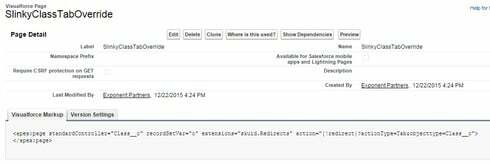
And the Skuid page properties:
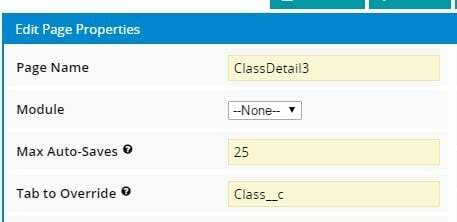
Why isn’t the tab highlighting? Hopefully I’m just being dumb and missing something obvious, but what?


6 replies

Forum|alt.badge.img+11

Did you try this per the troubleshooting section?

  • In your VF page markup, try changing {!redirect}? to {!redirect}& or vice versa.

Do you need recordSetVar?


Forum|alt.badge.img+8

Hi Peter,

I’m guessing your org has a managed namespace. If so, you need to include your namespace in the override property.

mynamespace__Class__c should probably work.

Also, it works if you just use the label of the tab as well. Let me know if either of those methods don’t work.


Forum|alt.badge.img+9
  • Author
  • July 10, 2024

By “managed namespace” do you mean a Salesforce custom domain (xxx.my.salesforce.com)? sandbox? Sites URL? Portal? Community? We actually have all of the above - I’m testing currently in a community of a full sandbox of an org that has a “my” domain. I haven’t gotten any of the combinations of anything mentioned above to work.


Forum|alt.badge.img+11

Peter, I believe he means a namespace.  ala Setup > Build > Create > Packages 


Forum|alt.badge.img+6
  • Nintex Employee
  • July 10, 2024

The easiest option is to just use the label (probably “Class” in your case)


Forum|alt.badge.img+9
  • Author
  • July 10, 2024

We haven’t created any packages, so there isn’t a “managed namespace” that I know of. Using the tab/object label doesn’t work.
