

Nintex Community Menu Bar
Solved

Model.ModelName.data.0.FieldName not being resolved in SKUID V2

  • July 12, 2024
  • 4 replies
  • 80 views
  • Translate All

Forum|alt.badge.img+2

I am trying to get a field value using javascript but data.0 is giving error.

Please suggest if the 0 is causing Uncaught SyntaxError: Unexpected number.

cmodel = skuid.runtime.getPage('RSS_Support_Mainpage__v2').model.getModel('DialPad')
//Ye {_parentPageId: 'sk-2n8w-14', dataSourceName: 'salesforce', dataSource: E, processOnClient: true, id: 'DialPad', …}
cmodel.data.length
//1
cmodel.data.0.Description
//VM6472:1 Uncaught SyntaxError: Unexpected number

Best answer by lukaspovilonis

I’m glad the 2nd way worked. Regarding the 1st way, try removing . before [0].

Instead of cmodel.data.[0], do the following, cmodel.data[0]

All good.

View original

4 replies

Forum|alt.badge.img+8

Hello Dinesh,

Since this is in Javascript you need to do cmodel.data[0].Description.

Or another approach:

let firstRow = cmodel.getFirstRow();
firstRow.Description;
Translate

Forum|alt.badge.img+2
lukaspovilonis:

cmodel.data[0].Description

Thanks lukaspovilonis.

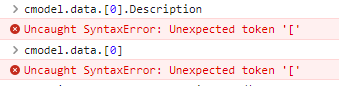
The first approach to get the row context in array using isn’t working.
image

However, the second approach worked to get the first row and fetch value.

Thanks again for your time and help.

Translate

Forum|alt.badge.img+8

I’m glad the 2nd way worked. Regarding the 1st way, try removing . before [0].

Instead of cmodel.data.[0], do the following, cmodel.data[0]

All good.

Translate

Forum|alt.badge.img+2

It worked, thanks for your time and help!

Translate