Nintex Community Menu Bar
Question

Model Condition Field in other model Multi-picklist field??

  • July 10, 2024
  • 6 replies
  • 31 views

Forum|alt.badge.img+7

Added a Multi-Picklist field to the SF User object for “Country__c” which the user works/handles.

  • I made a RunningUser model like suggested in other conversations, that pulls the current user and the Country__c field fine.

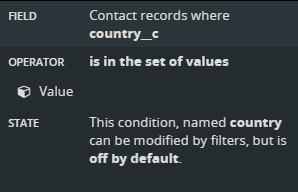
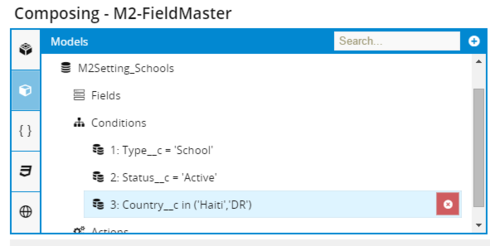
  • Trying to add a condition to another model to restrict records to the countries selected in the users Country__c field, as below.

Comparing a Single item picklist to a multi-picklist.

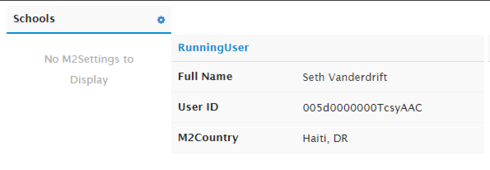
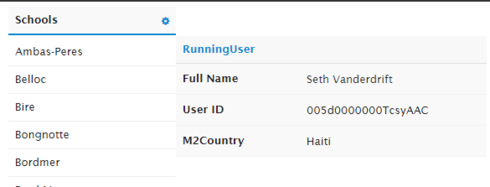
Works fine if the RunningUser Country__c has one value selected. If I select multiple, the condition always fails. (All objects get filtered out)
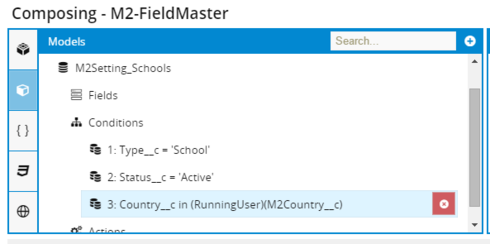

With multiple countries selected, the model and queue is empty:
With just one, the model loads and the queue displays:
As a test, I made the model condition on a hard-coded set of values and that works fine with single or multiple:
What am I missing?

Thanks
Seth

6 replies

Forum|alt.badge.img+18

I think the problem is that multipicklist fields get passed as a single semicolon separated string (“Haiti;DR”) and the ‘field from another model’ condition isn’t parsing them correctly.

Not sure what to do about that, but diagnosis is the first step to healing!


Forum|alt.badge.img+7

Thanks. 

 At present it looks like I need a way to reverse the query to be :
(RunningUser)(M2Country__c) contains Country__c


Forum|alt.badge.img+18

Perhaps a “result of a subquery” condition would work here?


Forum|alt.badge.img+7

Looked in to subquerys, but couldn’t see a simle way (any way actually) to use them.

Seems like the long-term Skuid power user way would be the option to manually enter the the condition arbitrary text.

So I punted and added formula fields based on this:
https://success.salesforce.com/answers?id=90630000000gv5cAAA  (After reading this and http://cloud4good.com/announcements/evils-multi-select-picklists-salesforce/ , I going to consider multi-picklist fields more carefully.

Our multi pick only has 2 values, so it’s annoying but I made two forumla fields, one for each country which returns the country name if it’s in the multipick list.

I have the text formula fields with this formula:
IF( INCLUDES( M2Country__c , “Haiti”) , “Haiti”, null)

Seth


Forum|alt.badge.img+5

Seth,

I figured it out how to do this.

What you need on the model where you want to filter by country, you add a condition for the country-picklist field which contains multiple values (leave them empty) and filterable default off and not loading data on page load.
Also make sure to have a condition on the model where you get only the records belonging to the appropriate school.

You then add an in-line snippet (in your case a snippet on-click of the queue item) as follows (you will have to alter the snippet slightly: replace model_one.data[0] with your context row of the clicked queue item):

var model\_one = skuid.model.getModel('school\_model'); var model\_two = skuid.model.getModel('user\_model'); model\_two.setCondition(model\_two.getConditionByName("country"), model\_one.data[0].country\_\_c.split(";")); model\_two.activateCondition(model\_two.getConditionByName("country")); model\_two.updateData(); 

You need to split up the country string (its a semicolon separated string using the javascript .split(“delimiter”) method) and add it to the condition value (there is no need to assemble the string again).

I hope this helps you

Regards


Forum|alt.badge.img+10
  • Scholar
  • July 10, 2024

This is excellent. Thank you!