Nintex Community Menu Bar
Question

Hide tab based on count

  • July 10, 2024
  • 7 replies
  • 25 views

Forum|alt.badge.img+14

If I have 2 tabs with the same count is there a method to hide one of the tabs.
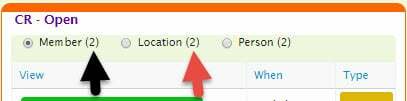
If Member has a count of two which equals the Location count of two, then I want to hide the Location tab. How do I render this?

This topic has been closed for replies.

7 replies

Forum|alt.badge.img+9

Set the render conditions of the location tab to be the following:

Source Type: Model Property
Source Model: Member (or whatever is driving your Member count of 2)
Model Property: # of rows in Model
Operator: =
Content: Single specified value:
Value: {{$Model.Location.data.length}}


Forum|alt.badge.img+18

Craig… I don’t think conditions will process merge syntax.


Forum|alt.badge.img+17
  • Nintex Employee
  • July 10, 2024

Yup that’s right. Condition values do not process merge syntax.  Sorry.  I don’t think there is an easy way to do what Bill is asking.  Some Javascript needed…


Forum|alt.badge.img+18

I believe that you could create a model with model conditions requiring the counts to be the same. Then if that model has rows, you don’t need to render the tab.


Forum|alt.badge.img+9

Ah of course, didn’t think about merge syntax in the conditions. My understanding is tabs are not constantly re-rendered, so if you did have a model like Matt suggests, you would have to have a snippet to re-render the tab after the “data rows model” is updated. Is that correct?


Forum|alt.badge.img+18

Craig,

I believe you would just want a model action on your “data rows model” to run a one-line javascript snippet:

skuid.$C('MyTabsetId').render();


Forum|alt.badge.img+9

Yep, that’s what I was talking about!