

Nintex Community Menu Bar
Question

Date Picker month/year menu white on white

  • July 11, 2024
  • 15 replies
  • 99 views
  • Translate All

Forum|alt.badge.img+4

Hi

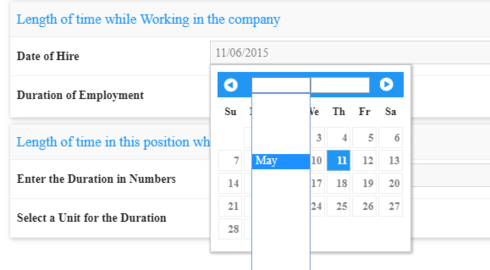
For some reason, for the date picker’s month/year menu, the month and year are showing as white on white, thus essentially invisible. Is there a way to fix this?

15 replies

Forum|alt.badge.img+20

What version of Skuid are you running?

Translate

Forum|alt.badge.img+4
  • Author
  • Nintex Partner
  • July 11, 2024

Hi Pat, thank you for your help.  Sandbox is 11.2.24, prod is 11.1.7.  Both exhibits the same behaviour.

Translate

Forum|alt.badge.img+20

Have you tried updating your themes?

Translate

Forum|alt.badge.img+4
  • Author
  • Nintex Partner
  • July 11, 2024

Hi Pat

I tried updating the theme.  It now shows the theme as last modified today, and I still have white on white text.

Translate

Forum|alt.badge.img+20

Do you have any custom CSS?

Translate

Forum|alt.badge.img+4
  • Author
  • Nintex Partner
  • July 11, 2024

Just these for that page:

.field-error-messages {    
   color: red;
    padding: 2px;
}
.my-required-field textarea, .my-required-field input  {
    border: 1px solid #D00;
    border-right: 4px solid #D00;
}

But I dont think that field is using these.

Translate

Forum|alt.badge.img+4
  • Author
  • Nintex Partner
  • July 11, 2024

Also, when I preview the Skuid page, it renders correctly (black text on white background), but it is still white text on white background even after I have saved the page, genereated support files, and refreshed browser.  When I force a new theme, the preview changes to a new theme, but the actual page doesn’t update to a new theme either.

Translate

Forum|alt.badge.img+4
  • Author
  • Nintex Partner
  • July 11, 2024

I did another test.  I forced a new theme for the page.  Saved it, generated support file.  The preview looks fine.  The SF page using the skuid component does not update to the new theme at all, so I still have white text on white background for the month/year menu.

Translate

Forum|alt.badge.img+20

Hmm … sounds like there is some css in the SF page that is overriding Skuid’s styling. Have you inspected the element(s)?

Translate

Forum|alt.badge.img+4
  • Author
  • Nintex Partner
  • July 11, 2024

Hi Pat, I finally had time to circle back on this issue. I tried to inspect element for CSS on the page.

/l/%7B%22mode%22%3A%22PROD%22%2C%22app%22%3A%22one%3Aone%22%2C%22loaded%22%3A%7B%22APPLICATION%40markup%3A%2F%2Fone%3Aone%22%3A%22E9lQZfqOkTMip9Qw1AbLug%22%7D%2C%22styleContext%22%3A%7B%22c%22%3A%22webkit%22%2C%22x%22%3A%5B%22isDesktop%22%5D%2C%22tokens%22%3A%5B%22markup%3A%2F%2Fforce%3AsldsTokens%22%2C%22markup%3A%2F%2Fforce%3Abase%22%2C%22markup%3A%2F%2Fforce%3AoneSalesforceSkin%22%2C%22markup%3A%2F%2Fforce%3AlevelOneDensity%22%2C%22markup%3A%2F%2Fforce%3AthemeTokens%22%2C%22markup%3A%2F%2Fforce%3AformFactorLarge%22%5D%2C%22tuid%22%3A%2209HNnkqXFGgH8xQyci6McA%22%2C%22cuid%22%3A1073780934%7D%2C%22pathPrefix%22%3A%22%22%7D/app.css" as="style"/>

href="/l/%7B%22mode%22%3A%22PROD%22%2C%22app%22%3A%22one%3Aone%22%2C%22loaded%22%3A%7B%22APPLICATION%40markup%3A%2F%2Fone%3Aone%22%3A%22E9lQZfqOkTMip9Qw1AbLug%22%7D%2C%22styleContext%22%3A%7B%22c%22%3A%22webkit%22%2C%22x%22%3A%5B%22isDesktop%22%5D%2C%22tokens%22%3A%5B%22markup%3A%2F%2Fforce%3AsldsTokens%22%2C%22markup%3A%2F%2Fforce%3Abase%22%2C%22markup%3A%2F%2Fforce%3AoneSalesforceSkin%22%2C%22markup%3A%2F%2Fforce%3AlevelOneDensity%22%2C%22markup%3A%2F%2Fforce%3AthemeTokens%22%2C%22markup%3A%2F%2Fforce%3AformFactorLarge%22%5D%2C%22tuid%22%3A%2209HNnkqXFGgH8xQyci6McA%22%2C%22cuid%22%3A1073780934%7D%2C%22pathPrefix%22%3A%22%22%7D/app.css

getPrefixCSS:function (){return PREFIX.css;}

Those are the three css reference I could find. Do you have any suggestions?

Translate

Forum|alt.badge.img+4
  • Author
  • Nintex Partner
  • July 11, 2024

Also, I noticed for themes the update theme button is not exposed.  Is the render suppose to be conditional?

Translate

Forum|alt.badge.img+4
  • Author
  • Nintex Partner
  • July 11, 2024

Hi, any suggestions?

Translate

Forum|alt.badge.img+1
  • July 11, 2024

Pat, very same issue here. Looks fine in Classic preview but not in LEX.
Skuid ver 12.2.10.

Any thoughts?

Translate

Forum|alt.badge.img+8

I added the following CSS to my page and it changed the Month/Year headers to black in Lightning.  I did not have the problem shown in Johnny’s original screen shot where picklist menu items were white as well, so there is probably an additional jQuery control that you need to add here to control those values.

.ui-datepicker .ui-datepicker-month,
.ui-datepicker .ui-datepicker-year {
    color:black;
}

See the “theming” section of this article for the CSS class names: https://api.jqueryui.com/datepicker/

Translate

Forum|alt.badge.img+1
  • July 11, 2024

Cool, thanks @Elissa.

Translate



