Nintex Community Menu Bar
Question

Create detail override on custom object

  • July 10, 2024
  • 10 replies
  • 52 views

Forum|alt.badge.img+1

Where can I find instructions on how to implement an override for a custom object?

10 replies

Forum|alt.badge.img+20

Forum|alt.badge.img+1

I have followed those instructions, but the visual force page created does not show up under “buttons links and actions”

Thanks


Forum|alt.badge.img+20

hmmm … can you paste the visualforce code here along with which object this is for.


Forum|alt.badge.img+1

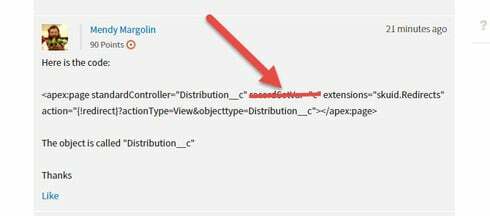
Here is the code:

<apex:page standardController=“Distribution__c” recordSetVar=“c” extensions=“skuid.Redirects” action=“{!redirect}?actionType=View&objecttype=Distribution__c”></apex:page>

The object is called “Distribution__c”

Thanks


Forum|alt.badge.img+20


Forum|alt.badge.img+1

I have removed that line. I now see the links reflecting a redirect. that said, I am still taken to the regular page, Would you have any suggestions?

Thanks!


Forum|alt.badge.img+20

Forum|alt.badge.img+1

I believe I have done this as directed as well.

Would you have any other suggestions?

Thanks!


Forum|alt.badge.img+20
join.me

join.me | Free Screen Sharing, Online Meetings & Web Conferencing

Free screen sharing, online meetings and team collaboration are all fast and easy at join.me - no registration required. Show work who’s boss.


Forum|alt.badge.img+17
  • Nintex Employee
  • July 10, 2024

Note: Sometimes overrides on custom objects from within managed packages are difficult / impossible.  You generally have to make new VF tabs for the tab view to work.  Sometimes you have to break down and totally ignore the overrides for detail pages and use URL redirects to specific skuid pages,  or put some html in a template so that the name links to a skuid page instead of using the override infrastructure. 

Sorry…