Nintex Community Menu Bar
Question

Compare DateTime fields

  • Jul 10, 2024 11:58 AM UTC
  • 4 replies
  • 44 views
  • Translate All

Forum|alt.badge.img+14

I am comparing 2 datetime fields in a UI field and not sure why I am not getting the results expected.

IF( {{UI_Only_Field__r.Delete_Date_Time__c}} > {{Completed_Date_Time__c}} ,“True”,“False”)

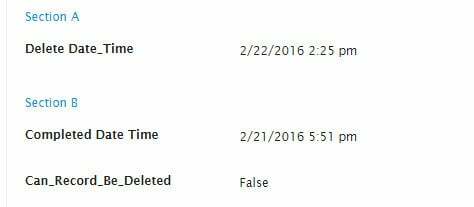
These are the results:

This topic has been closed for replies.

4 replies

Forum|alt.badge.img+11
  • Nintex Employee
  • Jul 10, 2024 12:28 PM UTC

Bill~

I think your syntax is the problem for the UI only formula. Try IF( {{Delete_Date_Time}} > {{Completed_Date_Time}} ,“True”,“False”).

Thanks!
Karen

Translate

Forum|alt.badge.img+14
  • Author
  • Jul 10, 2024 12:28 PM UTC

Why would I not need the __c part of the field name?

Translate

Forum|alt.badge.img+10

Bill,

You setup the Model UI fields as part of the Skuid page.  They only exist when you view the page.  Since Salesforce doesn’t know they exist, it doesn’t enforce any naming convention.  Whatever you enter in the Field Id is what you need to use when you reference the field in merge syntax.

Thanks,

Bill

Translate

Forum|alt.badge.img+11
  • Nintex Employee
  • Jul 10, 2024 12:28 PM UTC

Bill~
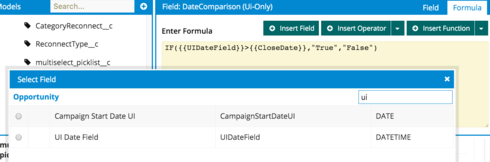
An easy way to ensure that you are using the correct syntax is to use “Insert Field” and then select the field you want inserted in your UI only formula field, as seen below.
5436808f6e73e95437dcc67aef1a306c87a07d3f.png
Thanks!
Karen

Translate