Nintex Community Menu Bar
Question

Changing the color of text from field in edit mode VIA CSS

  • July 10, 2024
  • 8 replies
  • 28 views

Forum|alt.badge.img+13

HI,

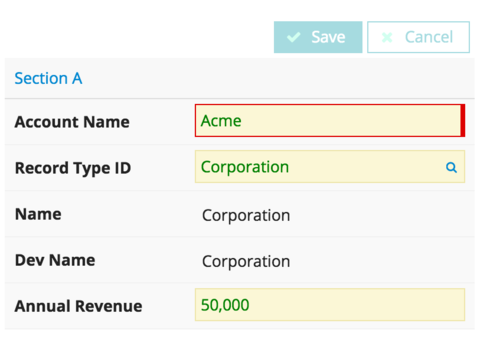
I’m trying to change the color of the text from only a couple specific fields , which are mostly in Edit mode by default…
I created a CSS with guideline found in community… and am not able to make it work

Here what i thought should have work:

.nx-fieldtext {
color:#ff0000;
}

And ofc added the name in th css class on field I need to change color on.

But it did not work

I’ve even followed the examples here: http://help.skuidify.com/m/25162/l/102515-including-custom-css-in-a-skuid-page using the inspect element.

I’m a noob when it comes to that, but it seems pretty straightforward
this is the element styles when i click on specified field trying to apply this css
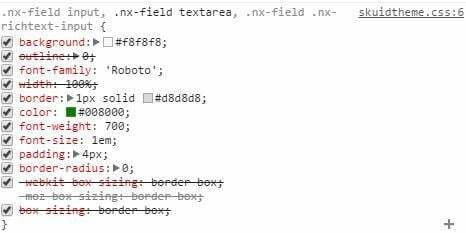
If i change the color on it directly (the green color is default from theme) or use the following , as seen on console, directly in css class:
.nx-field input, .nx-field textarea, .nx-field .nx-richtext-input {
color:#ff0000
}

The color is applied to All my large text fields

Can anyone point me in the right direction pls?

Thx

This topic has been closed for replies.

8 replies

Forum|alt.badge.img+17
  • Nintex Employee
  • July 10, 2024

Dave,   We are all noobs around here…  Don’t worry. 

Not sure I totally understand,  what you are trying to do.  But if you want to target the text showin in the edit mode version of the field - you’ll want to build your css around the “input” tag.

So here is something I did:  I added the css class “greenText” to a field editor and then added this css rule.

.greenText input {    color: green;  }


And the field editor looked like this: 

642557e68a9f14694b9e89175f685f4a416389b8.png


Forum|alt.badge.img+13
  • Author
  • Scholar
  • July 10, 2024

Thank you Rob, yes as u said, I’m trying to change the color of text from field in edit mode

I just copied your exact code, put it in a css class (inline) -Just changed the color to red

I put in the field the CSS class name: greenText (tried as well to do it on field Editor instead of specific field)


But still did not work, the text is not red 😦

The field is still shown in the default color I chose on Theme (green)


Forum|alt.badge.img+10

You could try this instead - might be worth a shot:

.greenText input {color: green !important;}<br>

Forum|alt.badge.img+13
  • Author
  • Scholar
  • July 10, 2024

Ty Louis, but unfortunately that did not work either 😦


Forum|alt.badge.img+10
  • July 10, 2024

If you set your Theme to default will it work then?


Forum|alt.badge.img+13
  • Author
  • Scholar
  • July 10, 2024

Hey Tami,

I did try that as well but did not work either.

If i use the code below,The color works, but on all All large text type of fields

.greenText .nx-field input, .nx-field textarea {
 color:#ff0000
}

But still cannot get this to be applied on specific field


Forum|alt.badge.img+8

Try this to limit it to just fields with the greenText css class.

.greenText .nx-field input, .greenText .nx-field textarea {
 color:#ff0000
}

the comma in your rule represents the start of a new selector.


Forum|alt.badge.img+13
  • Author
  • Scholar
  • July 10, 2024

Ty Ben, that worked perfectly 🙂